Most AI at work still starts the same way: a person opens a chat and types a prompt. No prompt, no work.
With Copilot Studio, that is changing. On October 15, Microsoft announced new Copilot Studio capabilities for delegating shared business processes to agents. Now rolling out through the Frontier program, they let agents built in Copilot Studio take care of tasks when they need to be done, without anyone prompting them. An email arrives, or it’s Tuesday morning and the weekly review is due, and the agent gets to work. It gathers the data, chases the missing explanations, remembers what was left open last time, and prepares the decision for people.
This is process automation with Copilot Studio agents. Rule-based flows already handle the predictable steps. Agents now take on the work between those steps, the parts that need judgment, follow-up and context. And they do it on their own, as part of the process rather than as a chat someone remembers to open.
What Copilot Studio brings in Frontier:
- Triggers → the agent starts the work. An email or a schedule starts the agent’s cycle, with no prompt needed. Soon agents can also use their own browser-enabled cloud computer.
- Agent accounts → the agent works as itself. It has its own credentials and scoped permissions in Microsoft 365. People can reach it in Teams and Outlook, @mention it in Office comments, and assign it tasks by email. Its actions are attributed to the agent, not to a person.
- Business process memory → each cycle builds on the last. Context and preferences carry forward, so nobody has to explain the process again.
- Agent refinements (coming) → the automation improves. The agent’s activity produces suggestions for turning stable steps into workflows, capturing reusable skills and choosing a better-suited model.
- Agent 365 → the agent is governed like any other identity. Agent accounts are provisioned and governed through Microsoft Agent 365, so admins get user-grade visibility and control.
Pro-code has made this possible for a while. Development teams have built agents that start on events, run under their own identities and keep state. With Copilot Studio, these become platform building blocks with admin controls, lifecycle management and attribution. Business units and makers will be able to automate shared processes with agents, not just developers.
This is how Copilot Studio helps organizations become AI-native: routine tasks get done because they need to be done, not because someone remembered to prompt for them. Agents prepare, follow up and remember. People decide.
It’s the next step in the story: first AI moved from answers to actions, then teams got a memory curated by AI, and now agents start the work themselves. Let’s take a closer look.
Triggers – the agent starts the work
This is the core of the announcement. Triggers in the GitHub Copilot harness let agents built on the harness stay “always on.” When configured, an external signal (like an email) or a set schedule starts the agent’s cycle, with no prompt needed.
That changes the role of AI in a process. Instead of waiting for someone to remember to ask, the agent runs its part of the work when the process needs it:
- On a schedule: every Tuesday before the budget review, at month-end close, before the weekly steering meeting.
- On an event: a proposal arrives by email, a supplier sends an update, a request lands in a shared mailbox.
Add the upcoming option for agents to use their own browser-enabled cloud computer, and processes that cross many systems become realistic candidates for redesign.
Automation that starts by itself needs clear limits, though. The more the agent does without a prompt, the more important it is to decide up front what it may do on its own and where it hands over to a person.
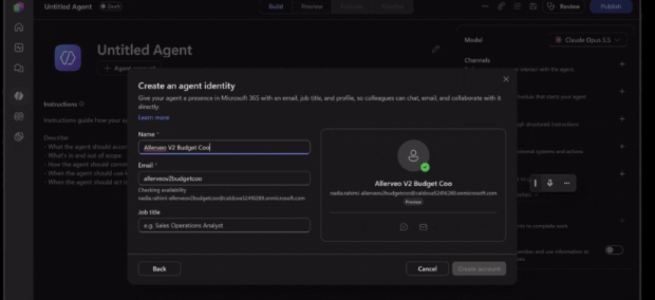
Agent accounts – the agent gets its own identity
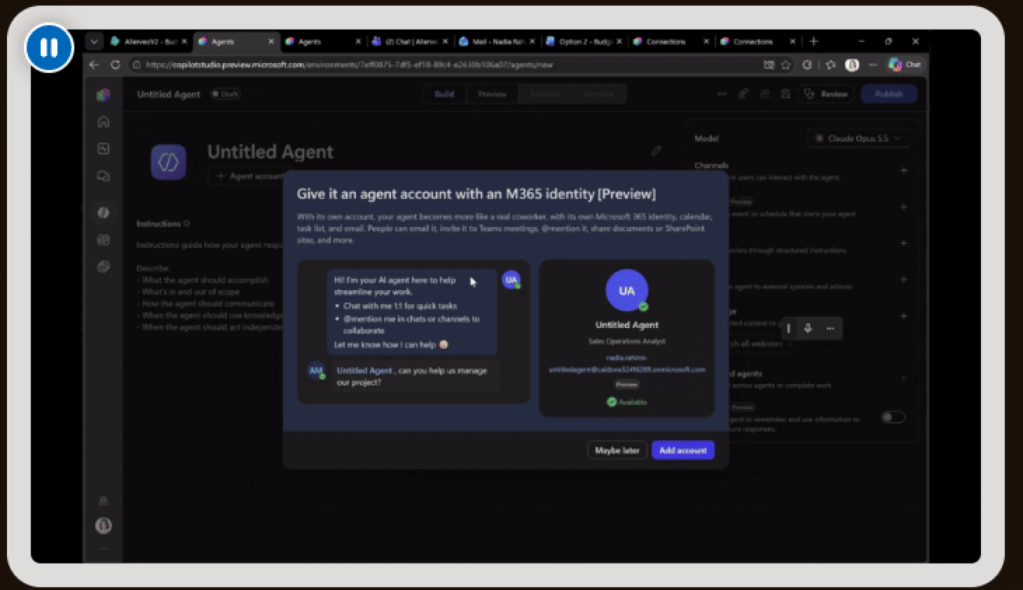
An agent that starts work by itself also needs to work as itself. With an agent account, the agent works in Microsoft 365 with its own credentials, much like a person would.
In practice:
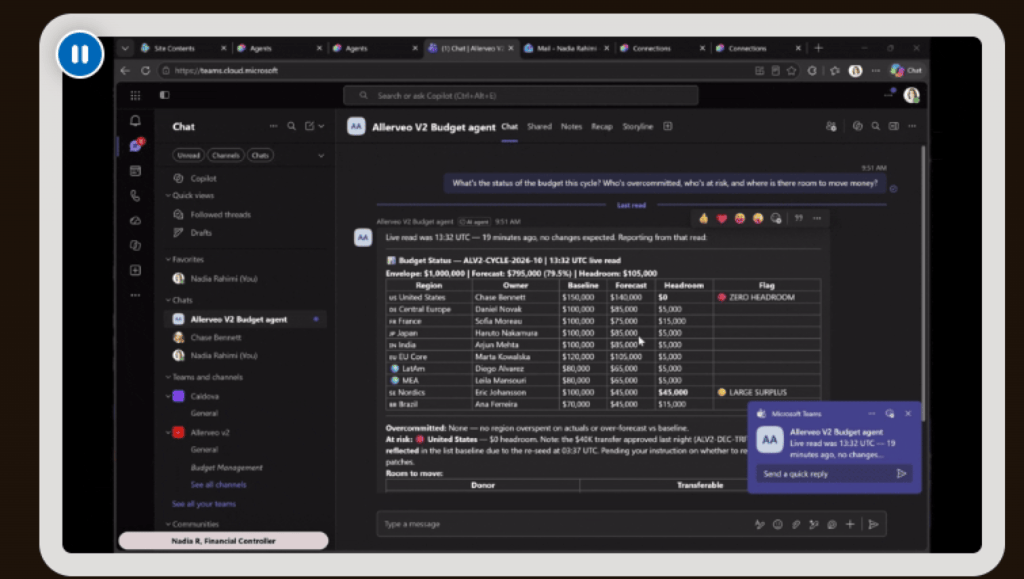
- People can talk to the agent in Teams and Outlook to ask questions, assign work or give updates, without opening a separate agent chat for every task.
- The agent can be @mentioned in comments in Word, Excel and PowerPoint, just like any other process participant.
- Team members can delegate a task by Teams message or email and keep working. The agent carries on with the task in between.
- The agent works with other agents, tools and services using its own approved credentials and scoped permissions, not any individual user’s or maker’s credentials.
Why does this matter? In the previous post about the SharePoint knowledge base, Autopilot uploaded a meeting transcript “As you” after the user approved it. With agent accounts, the agent acts as itself.
That speaks directly to one of the points in From Answers to Actions with Work IQ: you need to be able to tell “the person did it” from “an agent did it.” Microsoft says work can now be attributed to the agent, while the process owner keeps control of its scope. That improves observability and traceability.
Admins can scope access, apply extra controls and manage the agent’s lifecycle. Microsoft says further access policies, quality and cost management, and lifecycle controls for these agents are planned for the coming months.
Business process memory – what one person teaches, everyone benefits from
Recurring processes have their quirks. “This cost center always reports late.” “Legal wants to see contracts over a certain value.” Today that knowledge sits in someone’s head, and it has to be explained again every time.
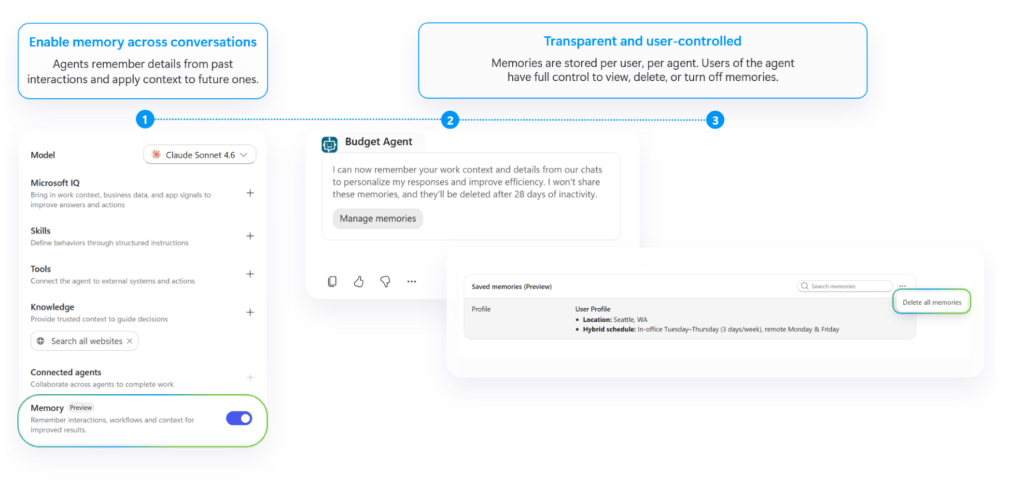
Business process memory lets the agent carry users’ preferences and process context into each new cycle. When one person points out a quirk to the agent, it becomes shared knowledge that everyone else benefits from. People need to repeat less every time they hand work to the agent.
Makers stay in control. Through the agent’s instructions, they set how the retained context is used and which business records and policies are authoritative.
This pairs nicely with the SharePoint knowledge base:
- The knowledge base is the team’s memory: what we know.
- Business process memory is the process’s memory: how this work runs here.
Both address the same old problem: the person who knows leaves, and part of the memory leaves with them.
Agent refinements – coming next
Over the coming months, Microsoft plans to roll out agent refinements. These use the agent’s own activity to suggest improvements to the maker, who can review, test and apply them:
- turn stable, repeated steps into workflows
- capture reusable approaches as skills
- point out recurring ambiguity in the instructions
- suggest a better-suited model for the task
That is a smart loop: the agent helps its maker improve both quality and cost.
What it looks like in practice
Microsoft’s example is a budget management agent built by a finance lead:
- Every Tuesday the agent prepares for the weekly review. Using its own credentials, it gathers planning records, compares forecasts with the explanations submitted, and asks budget owners about unexplained changes.
- The finance team adds context by @mentioning the agent in Teams or replying in Outlook.
- The agent writes a concise summary of the figures, explanations and gaps, and escalates decisions to finance.
- People decide whether to revise the forecast, ask for more information or approve the plan.
- In the next cycles the agent carries forward the review requirements and open questions.
The team spends less time piecing together what happened and keeps full authority over allocations and spending.
Early customers are already using these capabilities. At Ooredoo Qatar, an executive business-case review agent works across Outlook, Teams and Word. It reviews incoming proposals against company policy and precedent and prepares decision-ready briefs for executives.
Agent 365 – where the agent gets its identity and governance
If an agent is going to work like a colleague, it also needs to be managed like one. That is the role of Microsoft Agent 365, the control plane for agents. It has been generally available for the Commercial segment since May 1, 2026, and it is built around three things: observe, govern and secure the agents in an organization.
For agent accounts, Agent 365 is not an optional add-on in the background. Agent 365 provisions and governs the agent accounts, giving admins the same kind of visibility and control they have over user accounts.
What the agent gets
When a Copilot Studio agent with an account is published, it is provisioned with:
- its own mailbox, so it can send and receive email and be added to distribution lists
- a presence in Teams and in the organization’s directory, so people can find and @mention it like a colleague
- its own Microsoft Entra account and Entra Agent ID, so admins can govern and audit it like any other identity
A nice detail: the agent’s email address uses the maker’s alias as a prefix, and the agent reports to the maker. Just like a new hire, the agent has a manager. In this preview, the prefix and the reporting relationship can’t be changed, and the email address is fixed once the agent is published, so plan the agent’s identity before publishing.
What admins get
Copilot Studio agents plug into Agent 365 automatically, with no manual registration or SDK work:
- Registry: agents appear in the agent registry in the Microsoft 365 admin center with their name, publisher, connectors and environment details.
- Observability: agent and tool invocations flow automatically to the Microsoft 365 admin center, Microsoft Defender and Microsoft Purview.
- Governance: lifecycle management, access control and compliance across Microsoft 365 admin center, Microsoft Entra and Microsoft Purview, including Conditional Access policies that target the agent’s identity.
This is also where the pro-code point from the beginning shows. Pro-code agents need their identity set up manually. Copilot Studio creates the agent identity automatically and connects it to Agent 365 governance.
Good to know before designing a process
This is a preview, and the current limitations are worth reading before choosing the first process:
- Protected documents are off-limits. Agents with an account can’t read documents protected with labels such as Confidential or Internal Only. Compare that to the previous post, where Autopilot, acting as the user, kept the “Confidential \ Internal Only” label on the transcript it uploaded. An agent with its own account works differently from an agent acting as you.
- Memory is shared, with no privacy boundary between users. Anything shared with the agent can be summarized and used in responses to other users, even users who don’t have access to the original file or chat. There is no opt-out in this preview. This is the most important design point. The agent’s People card and first conversation tell users about it, but the process owner should make it clear up front what is OK to share with the agent.
- Internal only. The agent doesn’t respond to anyone outside the tenant.
- New documents, not co-authoring. The agent can generate new documents but can’t yet edit existing ones through co-authoring or make targeted edits from a comment.
- Email audience is limited to conversations with up to 250 people.
- EEA note: agent accounts are available in the European Economic Area, but the agent appears in Teams only if the tenant also licenses Teams separately.
What this means
The agent is becoming a colleague, not just a tool. It has an identity, a manager, a place in Teams and Outlook, memory and a schedule. That makes it easier to use, and it also makes it something that needs to be managed like a colleague.
A few questions to sort out before the first production process:
- Who owns the agent? A process owner, not just the maker who built it, even though the agent reports to the maker in the directory.
- What does the agent’s account have access to, and who reviews that access when the process changes?
- What may be shared with the agent? Shared memory is shared knowledge, and it can also hold shared mistakes or information that shouldn’t spread across the team.
- Where does the agent escalate, and to whom? The budget example only works because the decisions stay with finance.
- What happens when the agent is retired? Lifecycle now matters for agents as much as for people, and so does freeing up its license.
The three questions from the Work IQ post still apply: Is it allowed? Is it allowed for an agent? Does a human need to approve this specific action? The difference now is that the agent itself is the identity being asked.
Availability
These features are rolling out now through the Frontier program, with more capabilities coming soon. Agent refinements and additional admin controls are planned for the coming months. Agent accounts require Frontier enrollment, a maker license with Agent 365 (Microsoft 365 E5 + Agent 365 add-on, or Microsoft 365 E7), and a Microsoft 365 Frontier for AI Teammates license per agent, with usage billed in Copilot Credits.
Start with one process
Microsoft’s advice matches mine: start with one shared business process. Pick one that recurs, has clear decision points, and currently relies on a few people remembering how it works. In this preview, also pick one where the content isn’t protected and the team is comfortable sharing it with the agent.
The previous posts covered how AI moves from answering to acting, and how teams gain a memory curated by AI. This step gives the work itself an owner that doesn’t forget, doesn’t go on holiday, and starts on time, without waiting for a prompt. People stay in the driver’s seat.
Which shared process in your organization would you hand to an agent first?
Previously in this series: From Answers to Actions with Work IQ and SharePoint Knowledge Base – Team Memory, Curated by AI.
Sources and further reading
- Microsoft Copilot Blog – Delegate shared business processes to agents that are more persistent and proactive with Microsoft Copilot Studio
- Microsoft Learn – Give your agent an account (Frontier)
- Microsoft Learn – Overview of Microsoft Agent 365
- Microsoft Learn – Build agents with Copilot Studio and Agent 365


