
Picture a Monday morning.
A sales director opens Copilot and asks: “Which of our opportunities need attention this week?” A few seconds later she has a clear list. There are three deals with stalled conversations, two with open support cases and one where the customer’s champion just changed jobs. That’s useful and fast, and nothing in the business has changed. She simply knows more than she did a minute ago.
Then she types a second request:
“Move the deals that had a positive meeting last week to the next sales stage, update the close dates and let the account teams know.”
This request is different. Now the AI isn’t helping her know something. It is about to change something: the pipeline forecast the CFO reads on Friday, the records five account managers rely on and the messages colleagues will act on.
It uses the same data and the same person, but it carries very different consequences.
That second kind of request is exactly where Microsoft is taking Copilot and agents right now. I think it is one of the most important shifts for business and IT leaders to understand this year.
The question is changing
For the past few years, nearly every enterprise AI conversation I have been part of has circled around one question:
What is AI allowed to see?
We worked on oversharing, permissions, sensitivity labels and which SharePoint sites Copilot can reason over. That work still matters.
Now a second question is arriving, and it is a bigger one:
What is AI allowed to change?
Right behind it comes a third:
When can an agent make that change on its own, and when does a human need to say yes?
If your organization has a good answer to the first question and no answer to the other two, you are about to have a gap.
Work IQ is becoming an enterprise action layer
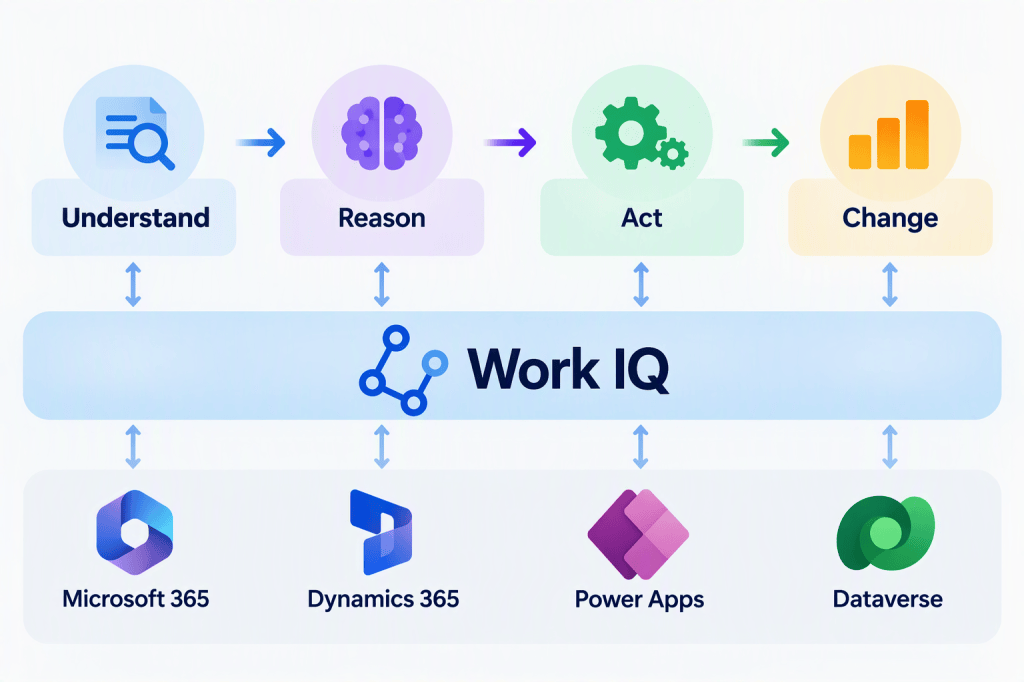
Work IQ is the intelligence behind Copilot and Microsoft’s agents. It gives AI the context of your organization: your emails, meetings, chats and files, who works with whom, and increasingly your business data from Dynamics 365 and Power Apps. For a long time, I saw it mainly as the layer that helps AI understand work, by finding the right information and grounding the answer in your reality.
That picture is now changing. Microsoft itself describes Work IQ as something that lets agents reason over work and take action, and the product is following those words. Agents are getting the ability to edit Office documents, save files into Microsoft 365, create and update business records, and act in connected third-party services. All of that happens within the user’s own permissions, behind admin controls and, in many cases, with the user confirming before anything is saved.
When I put these pieces side by side, I see Work IQ becoming kind of an enterprise action layer: a common, governed place where AI goes not just to understand your business, but to change it.
Think about it as four steps:
Understand → Reason → Act → Change the state of the business
The last step is the one that matters. When AI gives a wrong answer, you notice, frown and ask again. When AI makes a wrong change, the change stays. Other people see it, reports pick it up, and tomorrow’s Copilot answers are built on it.
A wrong answer is a bad moment. A wrong change is a new reality.
The reason I’m writing about this now, rather than feature by feature, is that the individual announcements are easy to underestimate. On its own, each one looks like a handy convenience. But they are arriving in the same quarter, through the same layer and with the same kinds of controls. That isn’t a list of features. It’s a platform direction, and platform directions are what organizations need to plan for, not individual settings.
What this means
“What can AI change?” belongs next to “what can AI see?” Most AI strategies and governance models today are built around access to information. They now need an equal answer for actions: which changes AI may make, where and how much. This isn’t only an IT decision. Business owners of processes and data have to be part of it.
Know what can now be changed through AI, and what is switched on. Services that used to be “read-only for AI” are getting write capabilities, some switched off by default and some on. Someone needs to know which ones, and who decides when to enable them.
Be able to tell “the person did it” from “an agent did it”. When something important changes, you will want to know who asked for it, which agent did it and whether a human approved it. Plan for that before the first incident, not after.
This is where the real value is. Agents that do the follow-up, update the record and file the document save far more time than agents that only answer questions. This shift isn’t something to block. It’s something to steer.
Start with one concrete process and agree its risk level up front. Pick a real process, decide where the agent can act freely and where a human says yes, and pilot it. Clear agreements early are what get you to safe, real results faster.
The rest of this post looks at what is actually shipping, why reading and changing need different rules, and how to decide where humans stay in the loop.
Four signals pointing the same way
Here is what is happening:
- Agents will create and edit Office documents using organizational context. A proposal or project plan can be updated by an agent, not just drafted for you. (Planned: preview November 2026, general availability January 2027.)
- Agents will save files into Microsoft 365, for example into SharePoint libraries. What AI generates stops being a chat answer and becomes company information that others find and reuse. (Planned for October 2026.)
- Agents can work with business records in Power Apps and Dynamics 365: listing, reading, creating, updating and deleting customer cases, opportunities or any record in a model-driven app, using plain language. (In public preview now, with general availability planned for November 2026.)
- Copilot can make changes in non-Microsoft services through connectors, for example creating or updating items in third-party systems, with the user confirming each change by default. (Rolling out during October 2026.)
These are documents, files, business records and other companies’ systems, all moving in the same direction from “tell me” to “do it for me”.
A business system you can talk to
The business-records change is, in my opinion, the clearest example of the whole shift.
Microsoft’s Business Applications in Work IQ brings data and processes from Dynamics 365 Sales, Dynamics 365 Customer Service and Power Apps into Copilot and agents. A user can say “show me open cases for Contoso”. They can also say “create a follow-up case with these details” or “update the status of this record”, without opening the app.
What I like here is that Microsoft has built in some sensible guardrails:
- The person reviews before anything is saved. For creating and updating records, Copilot shows the proposed values, and the user can correct them before confirming. Deleting a record also needs explicit confirmation, and the record is shown first so you can check it’s the right one.
- Existing rules still apply. The app’s required fields, read-only fields and business rules are enforced, and people can only change what they already have rights to change.
- When the rules can’t be enforced, the AI doesn’t write. If a form depends on custom script logic that can’t be run in this conversational mode, the change has to be made in the app itself.
- Admins and app owners decide what takes part. Turning this on is a deliberate choice per environment, app and AI experience, and doing so doesn’t give anyone extra data rights.
For service owners, that last point is important. Your business logic is part of your safety model, so it pays to know where it lives.
Same data, very different decision
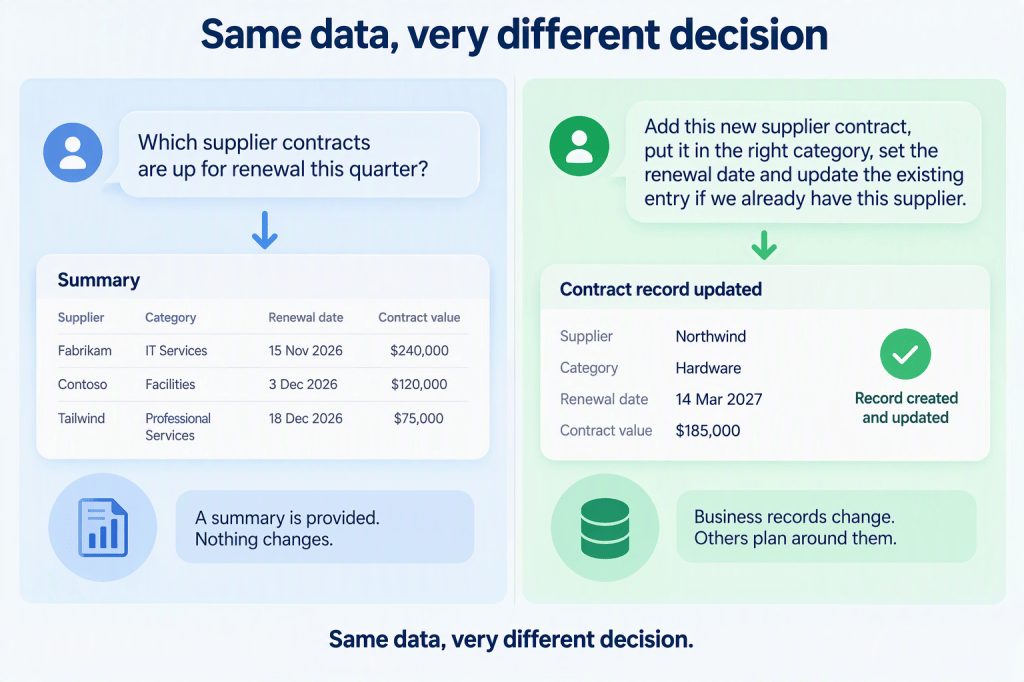
Here is a simple illustration you can use with your own teams. Imagine your organization keeps its supplier contracts in a business app: supplier, category, contract value, renewal date and owner.
Asking: “Which supplier contracts are up for renewal this quarter?” The agent reads the records and summarizes them. If it gets something wrong, you ask again.
Changing: “Add this new supplier contract, put it in the right category, set the renewal date and update the existing entry if we already have this supplier.” Now the agent decides whether the supplier is a duplicate, picks a category and writes a renewal date that procurement and finance will plan around.
The organizational data is the same in both cases, but the governance implications are very different.
The action doesn’t stop at company borders
This is where it gets really interesting for business innovators.
Microsoft’s Sales Development Agent helps sellers research prospects, run outreach and qualify leads, and hands qualified opportunities over to a human seller. It can now connect to Salesforce. There it can work with leads, log sales activities and record changes such as qualifying or disqualifying a lead.
A note on status: the integration itself is listed as rolling out, but the Sales Development Agent is still in public preview, and early-access enablement is required until mid-November 2026. Check your own tenant before planning around it.
Let’s be precise. This doesn’t mean Microsoft’s AI can suddenly change every application you own. It is one agent, connected to one CRM, in a specific supported way.
The direction is clear, though. A single piece of work can span Teams, Outlook, Dynamics 365 and Salesforce in one go. The agent works across the whole process, not inside one application.
Does that make your business applications less important? Not at all. Your systems of record still hold the data, the rules and the audit trail. But if a process can be carried out across four systems by one agent, governing each application separately is no longer enough. Your governance has to follow the process, not just the app.
Permission to know is not permission to change
Reading information and changing it carry very different kinds of risk. Some everyday examples:
| Asking | Changing |
|---|---|
| “Which opportunities need attention?” | “Move these opportunities to the next stage.” |
| “What meetings do I have tomorrow?” | “Reschedule my customer meeting and notify everyone.” |
| “Summarize the project status.” | “Update the project plan with these new dates.” |
| “Which leads haven’t replied?” | “Disqualify the leads that haven’t replied.” |
The left column can reveal information. The right column changes commitments, relationships and records, often before anyone notices.
Our access rights were designed for people, and people are slow. A sales manager who can edit 10,000 records has never been a problem, because she edits a few at a time and notices when something looks odd.
An agent acting for her isn’t slow. The access right is technically identical, but the business question is completely different:
Should an AI agent acting for this person be allowed to change 10,000 records?
The exact number doesn’t matter. What matters is the principle:
Permission to know is not permission to change.
Access rights tell us what is possible. They don’t tell us what is wise to delegate. Enterprise AI governance has to grow from managing what AI can know to managing both what AI can know and what AI can do.
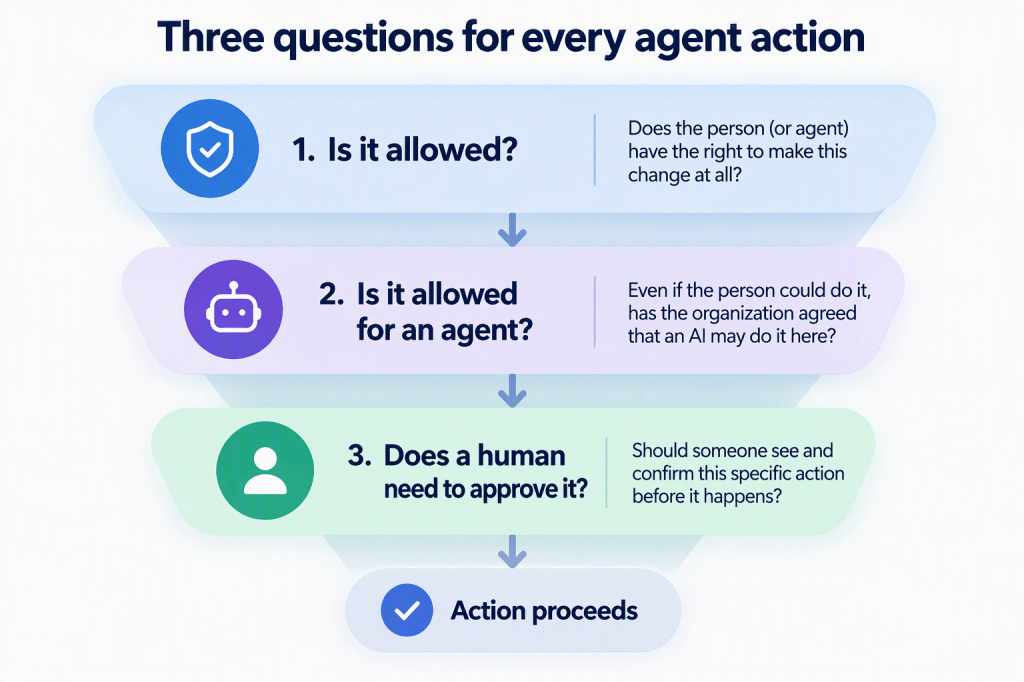
Three questions for every agent action
1. Is it allowed? Does the person, or the agent’s identity, have the right to make this change at all?
2. Is it allowed for an agent? Even if the person could do it, has the organization agreed that an AI may do it here?
3. Does a human need to approve this specific action? Should someone see and confirm this particular change before it happens?
Here’s where we are today:
- Question 1 is well covered. Work IQ acts within the user’s existing rights and can’t grant more access than the person already has. Business apps and connected third-party services apply their own security as well.
- Question 2 is there but still coarse. For the most flexible agent connection to Microsoft 365, the ability to change things is switched off by default, and an admin has to turn it on deliberately. It is a good default.
- Question 3 is clearly visible in interactive experiences. Record changes need confirmation. Changes in third-party services need confirmation by default, and Copilot shows what will be sent before it runs. Copilot’s longer-running tasks ask for approval before sensitive actions.
Human in the loop – not in every loop
Human-in-the-loop should not mean human-in-every-loop.
If every small action needs a confirmation click, people stop reading and click “Yes” (we all do it with cookie banners!). The value of the agent disappears, and the control becomes theater.
Unlimited autonomy isn’t an option either. One wrong update, repeated a few thousand times, isn’t a typo. It’s an incident.
So the real leadership decision is where autonomy ends. Here is a possible risk model:
| Risk | Example | How much autonomy? |
|---|---|---|
| Low | Creating a personal draft or working notes | Agent acts on its own |
| Low–medium | Updating a project document that has version history | Agent acts on its own; changes stay visible and can be undone |
| Medium–high | Changing a deal stage or a customer record, or saving to a shared team library | Human confirms, or a clear policy allows it |
| High | Contacting customers, changing commercially important data, anything that materially affects another person | Stronger approval – a named approver, or limited to specific agents |
| Very high | Deleting important records, bulk changes | Explicit confirmation, very limited autonomy, or not allowed at all |
Questions to take to your next leadership meeting
- Which business actions are we willing to delegate to AI agents?
- Which systems should stay read-only for agents, at least for now?
- Which actions can agents take on their own, because they are low-impact and reversible?
- Which actions need a human to confirm, and are we comfortable with “Always allow”?
- Which actions should agents never take?
- Can we always tell who or what made an important change?
- Can we undo the changes that matter, and do we know which ones can’t be undone?
- Were our access rights designed for humans, and are they still right when an agent acts at machine speed?
- Do our data protection rules cover what agents create, not only what they read?
- Which one process will we pilot first, and how will we measure it?
From understanding work to changing it
Work IQ started as the layer that helped AI understand work: who works with whom, which content matters, and what your business data means.
Now it is becoming part of how AI changes work: documents updated, files saved, records created and closed, sometimes in systems that aren’t Microsoft’s at all.
That’s the shift to prepare for. The good news is that the building blocks are arriving, and the defaults are sensible. The hard part is ours: deciding, process by process, where AI can act freely, where a human says yes, and where the answer is simply “not yet”.
The next generation of AI governance won’t only decide what agents can know. It will decide what they can do, what they can change, and where people stay in control.
Permission to know isn’t permission to change. Let’s design for both.
Where would you draw the line between autonomy and approval in your organization?
Reference – Roadmap and Message Center details
For readers who want to dig deeper. Status as of October 13, 2026. Roadmap dates are Microsoft’s estimates and can change. The Microsoft 365 Roadmap is now called the AI at Work Roadmap (MC1461528).
| Capability | Roadmap | Message Center | Status | Key details |
|---|---|---|---|---|
| Agents create and edit Office documents | 570871 | – (none published yet) | In development: preview Nov 2026, GA Jan 2027 | Uses organizational context. Admin controls not yet published. |
| Agents upload content to Microsoft 365 | 570850 | – (none published yet) | In development: preview and GA Oct 2026 | “Supported destinations” not yet listed. |
| Business records in Power Apps model-driven apps | 571888 | MC1479277 | Public preview; GA planned Nov 2026 | Confirmation for create, update and delete. Business rules enforced. Admin controls in the Power Platform admin center and the Microsoft 365 admin center. |
| Sales Development Agent with Salesforce | 574105 | MC1492151 | Integration rolling out; the agent itself is in public preview (Frontier enablement until Nov 16, 2026) | Uses Microsoft’s Salesforce MCP server. Agent has its own mailbox. Billed in Copilot Credits from Nov 16. |
| Third-party connectors can create, update and delete | – | MC1476316 | Rolling out Oct 2026 | Confirmation by default with Allow once / Always allow. Admins can review and disable write tools. Researcher stays read-only. |
| Work IQ agent connection (MCP) policy | – | – (Microsoft Learn) | Available | Changes blocked by default. Policy is tenant-wide in the initial release. |
| Copilot long-running tasks | – | MC1479277 | Frontier | “Sensitive actions require user approval.” |
| Data loss prevention for Copilot Cowork | – | MC1477182 | GA mid–late Oct 2026 | Existing Copilot DLP policies apply automatically. Prompt DLP covers prompt text only, not uploaded files. |
| Default library label applied to existing files | 559105 (Worldwide), 575283 (GCC/GCC High/DoD) | MC1477181 | Worldwide GA Oct 2026; government clouds GA planned Nov 2026 | Opt-in. One policy per tenant, up to 10 sites. |
| Browser use in Copilot Cowork | – | MC1474461 | GA Sep 2026 | Off by default. Can be scoped to groups. |
| Agent identities for Copilot Studio agents | – | MC1478488 | Migration ongoing | Entra audit logging and Conditional Access for agents. |
Further reading on Microsoft Learn


