Copilot is getting simpler. Not “more features” simpler – but one app simpler.
Microsoft is bringing the Microsoft 365 Copilot app and the personal Copilot experience together into a single app, with a simpler name, a new icon and a new web address: copilot.cloud.microsoft. The rollout starts mid-August 2026 (MC1454108), so this is happening right now, not “sometime later this year”. Copilot is embedded onto Microsoft 365 more and more, enabling AI across experiences. Just think how SharePoint is a platform providing content management in Microsoft 365, Copilot is becoming an AI platform providing AI in the same way.
- One app for work and personal
- New name and new icon
- The URL changes to copilot.cloud.microsoft
- What does NOT change
- What admins should actually do
- And there is more happening in Copilot right now
- Reference table
- So what does this mean?
One app for work and personal
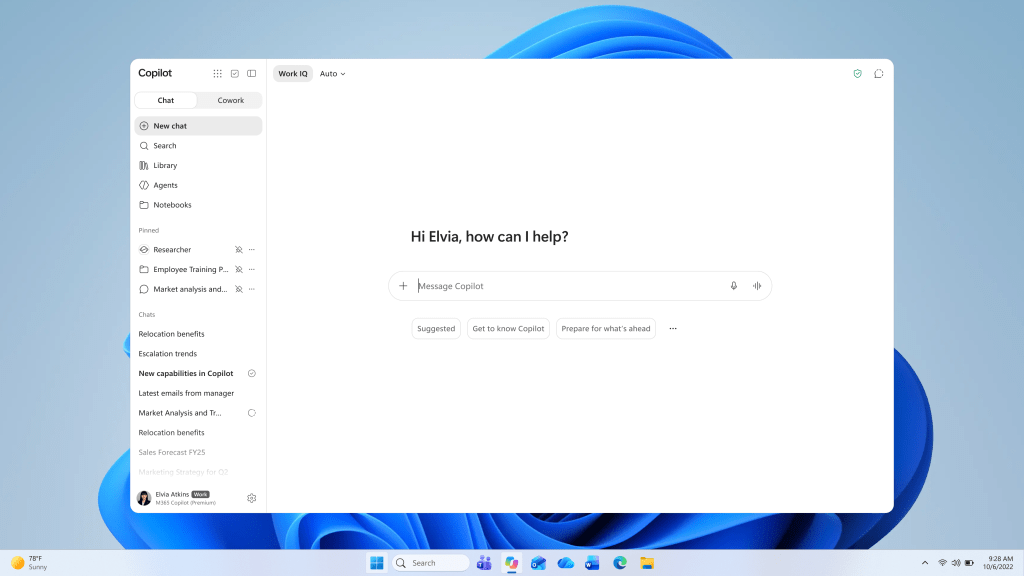
Like the other Microsoft 365 apps, Copilot moves to a single app experience across personal and work accounts. You will keep switching between your Microsoft Entra ID (work or school) account and your Microsoft account (personal) with the same account switcher in the navigation pane you use today.

What is new is that the app makes it much more obvious where you are:
- A different background color for each account type
- A “Work” label under your user profile in the navigation pane (web and desktop apps)
- The familiar green data protection shield stays in the work experience
The number one question I will get from customers about Copilot is still “but is this the safe one?” – and answering that with colors and a label beats answering it with a 20-slide deck. If your organization allows personal account sign-in, users will also be able to sign in with their Apple or Google credentials to reach their Microsoft account.
New name and new icon
The Microsoft 365 Copilot app becomes simply the Microsoft Copilot app, with a refreshed icon. Small thing on paper, big thing in practice: every screenshot in your adoption material, every “click the Copilot icon here” instruction in your training deck, and every intranet page is suddenly a little bit out of date. ( Note to myself: update my own slides before the next session!)

The URL changes to copilot.cloud.microsoft
The web app moves from m365.cloud.microsoft to copilot.cloud.microsoft, with automatic redirection. Timeline from the message center:
- Mid-August 2026 – worldwide rollout begins for mobile and web apps. Opt-in early access begins for Windows and Mac. The new URL is also available in Frontier for testing.
- Late August 2026 – standard rollout of the URL redirect begins.
- Mid-September 2026 – worldwide rollout for Windows and Mac apps.
- Late September 2026 – deferred rollout of the URL redirect for the web app.
The important part for the networking and security people: the new address stays under the *.cloud.microsoft domain, so it inherits the same security, compliance and enterprise allow-listing properties. If you followed the recommended network configuration for Microsoft 365 Copilot, you do not need to make additional network changes.
What does NOT change
This is the section I would put in your user communication, word for word:
- No changes to enterprise security, compliance, privacy or government controls.
- Data entered in the personal experience does not flow into the work experience – and data in the work experience does not flow into the personal one.
- The Application ID is not changing, so existing policies keep working.
- Admins can still limit Microsoft account (personal) access with Tenant Restrictions.
- The account switcher works exactly like today.
Despite it feeling like a big platform change, it really is not. It is a name, an icon, a URL and better visual cues.
What admins should actually do
A short, honest to-do list:
- Tell your users – updated name, icon and URL start showing up from mid-August 2026. This is the single thing that prevents helpdesk tickets.
- Update your internal material – training, adoption pages, help articles and anything referencing the old app name, icon or the m365.cloud.microsoft URL.
- Check your Recall filters. If you applied a group policy that filters the former Microsoft Copilot app out of Recall snapshots, that policy does not automatically carry over to the new Microsoft Copilot app. You need to set it up again for the new app. This is the one I would not skip.
- Consider the branded footer – when available later this month, adding a branded footer helps users recognize the work or school experience. It only shows in the Microsoft Entra ID experience (see MC1238432 for timing and setup).
- Test the desktop app early if you want – opt-in deployment to a test group will be possible before September GA. Opt-in early access is not available for special cloud environments yet.
And there is more happening in Copilot right now
This app update did not arrive alone. From the same message center batch, a few things worth having on your radar:
- Simplified access to Copilot Chat on mobile (MC1454386) – two legacy mobile-only controls stop restricting Copilot Chat on iOS and Android, so mobile access finally matches web and desktop. On by default, rolling out mid-August to late September 2026.
- Word document summarization is moving (MC1454113) – the Top of Doc summarization experience moves to other Copilot surfaces in Word, including a proactive “Summarize this document” suggestion. The capability stays, only the way you reach it changes. Rollout begins late August 2026.
- Agent Builder gets simpler (MC1454377) – new agents will have capabilities enabled by default, the knowledge configuration experience is updated, and “Uploaded Files” is renamed to Attachments. Existing agents are not impacted. Late August 2026.
- Copilot Tuning moves to Microsoft Copilot Studio (MC1454393) – a skill-based architecture, with tuning temporarily paused for selected Agent Builder templates and the Optimization template retired. Public Preview September 2026, GA December 2026.
- The =COPILOT function in Excel is retiring (MC1454373) on September 14, 2026. If you played with it in Insider or Frontier – and I of course tested it out – it is back to the Copilot side pane. A bit of a shame, honestly.
- Learning Coach Agent is retiring (MC1454391) in the first week of October 2026 – transition users to Learning Agent before that. Nicely timed with AI Skills Navigator content coming into Learning Agent (MC1454381), rolling out mid-to-late August 2026.
- Copilot Analytics Labs (MC1454388, MC1454387) – a new self-service hub under Resources with templates, sample code, prompts and research for measuring Copilot adoption and ROI, including an All-in-One Dashboard and a Cowork Value Estimator. If you are being asked “so what is the value?”, start here.
Reference table
| Change | MC ID | Timing |
|---|---|---|
| Microsoft Copilot app: single app, new name, icon, URL | MC1454108 | Mid-August 2026 → late September 2026 |
| Simplified Copilot Chat access on mobile | MC1454386 | Mid-August → late September 2026 |
| Word: Top of Doc summarization moving | MC1454113 | Late August 2026 |
| Agent Builder capabilities update | MC1454377 | Late August 2026 |
| Copilot Tuning → Copilot Studio | MC1454393 | Preview September 2026, GA December 2026 |
| =COPILOT function in Excel retiring | MC1454373 | September 14, 2026 |
| Learning Coach Agent retiring | MC1454391 | First week of October 2026 |
| AI Skills Navigator in Learning Agent | MC1454381 | Mid–late August 2026 |
| Copilot Analytics Labs | MC1454388 / MC1454387 | August 2026 |
So what does this mean?
One app. One name. One icon. One place to go. Copilot is essentially becoming more and more a platform, that enables AI in all around Microsoft 365.
For years we have been explaining to people which Copilot is which, and drawing little diagrams about where their data goes. That explaining does not disappear completely – but the app is now doing a big part of it for us, with a color and a label instead of a slide.
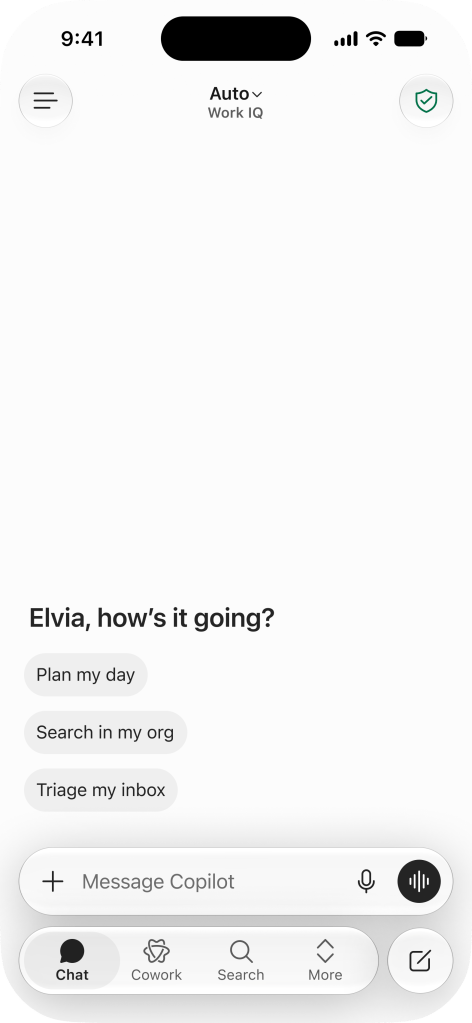
Images from Message Center message MC1454108.


