The financial question about Microsoft 365 used to be simple: how many people need a license?
That question isn’t going away, but it’s no longer enough. Copilot is moving from answering questions to doing work: planning steps, retrieving context, calling tools and running multi-step jobs. A new question sits next to the old one: how much AI work is the organization consuming, where does it happen, and what value does it create?
Answering that question is what AI FinOps is for. Microsoft now has real tooling for it: Copilot Credits, spending policies, a Cost Management dashboard in the Microsoft 365 admin center and a new Cost Management API in Microsoft Graph. This guide is in two parts. Part 1 is for business and IT leaders: why AI economics are changing, what it means for governance and responsibilities, and what to do now. Part 2 is for IT, AI platform and FinOps teams: the Cost Management dashboard, spending policies and the Microsoft 365 Copilot Cost Management API in detail. Read the first part, the second, or both. Let’s take a closer look.
AI changes the economics of digital work
Traditional SaaS economics were seat-based. You counted people, bought licenses and the cost was predictable. Usage could go up or down without changing the bill.
AI work doesn’t behave like that. One request might be a quick summary. Another might be a long job that reads hundreds of documents, uses several models and takes actions across systems. Microsoft’s Copilot Credits Guide says the same thing: as AI workloads become more advanced and agent-driven, the amount of work needed to complete a task varies significantly, and a usage-based model aligns cost to the work performed, complementing subscription-based services.
So the governance question changes:
- The SaaS question: How many people need a license?
- The AI question: How much AI work is the organization consuming, and what value is that consumption creating?
AI FinOps applies financial operations discipline to AI consumption. It isn’t a cost-cutting program. It builds the visibility, accountability and financial guardrails that let an organization use more AI where it pays off and less where it doesn’t.
Microsoft uses the same term. Its Copilot documentation describes “FinOps for AI” as AI cost management and optimization, and says admins can apply FinOps practices to manage the organization’s AI spending.
A practical way to frame AI FinOps is four dimensions:
- Visibility – Where is AI consumption happening?
- Accountability – Who or what is consuming AI capacity?
- Control – What financial guardrails should apply?
- Value – What business outcomes come from that consumption?
The first three are increasingly supported by Microsoft tooling. The fourth stays the organization’s job, and it’s the one that matters most.
Why agents make FinOps more important
A classic Copilot interaction is fairly simple: a prompt, some grounding, a response. Agents work differently. They reason, retrieve context, choose models, call tools, take actions and keep running.
Microsoft’s own explanation of what drives credit consumption shows this. For Copilot Cowork, credit usage scales with task complexity, and the Copilot Credits Guide breaks consumption into four cost buckets:
- Models – the AI models chosen for each task, depending on the quality, speed and cost the task demands.
- Runtime – managed cloud orchestration that keeps agents working across tasks, including long-running work.
- Context – understanding of people, roles and collaboration patterns, drawn from emails, files, meetings and past interactions.
- Tools – the actions the system takes, such as sending emails, scheduling meetings and updating documents.
The billing documentation says it plainly: usage isn’t a fixed amount per request, so more complex or multistep work generally consumes more credits.
Project Opal (Frontier) is a good current example of where this is heading. Microsoft describes Opal as a capability in Microsoft Copilot that gets task-based work done for you. You describe the task, and Opal works on your behalf using computer use on a secure Windows 365 Cloud PC, across your organization’s browser-based applications, sites and data. It works asynchronously in the background, and users can guide it or take control at any time. Microsoft’s example jobs include managing security group membership requests, collecting and validating audit evidence for compliance reviews, and compiling Excel data into a financial close deck.
This is AI doing work, not AI answering questions.
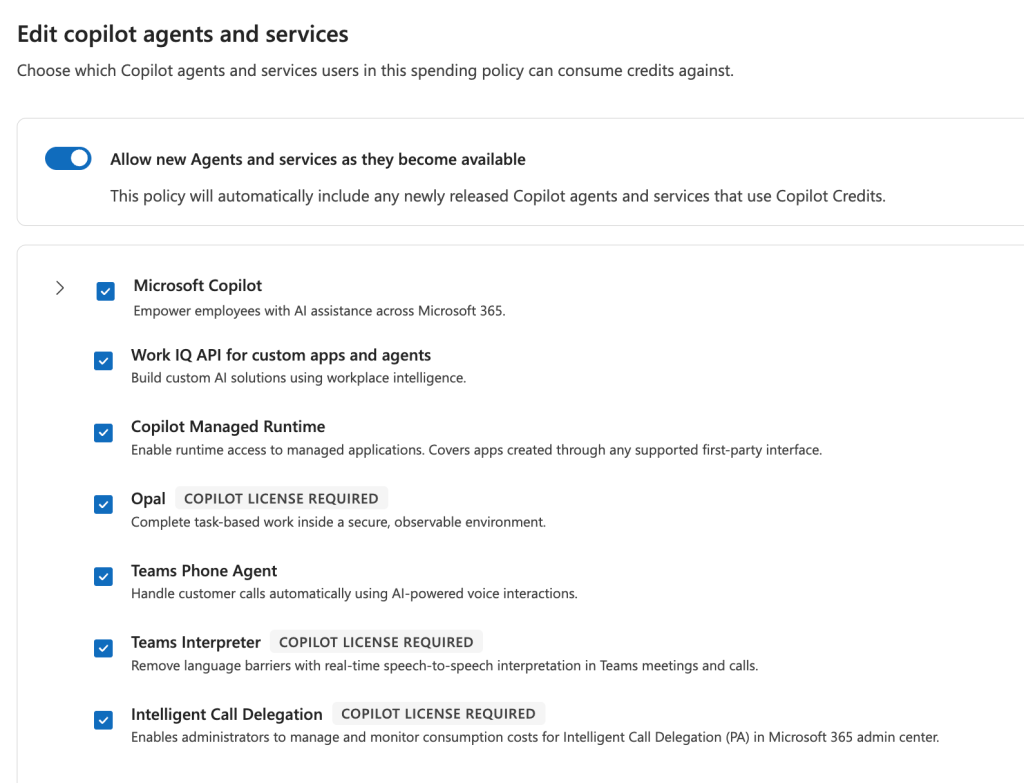
Opal is no longer just a preview of the direction. It’s already inside the financial guardrails. In the Microsoft 365 admin center, Opal now appears as its own service in the Copilot Cost Management spending policy editor. It’s listed as “Copilot license required” and described as completing task-based work inside a secure, observable environment. An agent that operates a browser on a Cloud PC is now governed the same way as Cowork or the Work IQ API: by policy scope, limits and alerts, paid for in Copilot Credits.
Two caveats. First, Opal is still a Frontier capability. It’s available only in the Microsoft Frontier program with a Microsoft Copilot subscription, and Frontier features might change as Microsoft improves them. Second, Microsoft’s published documentation hasn’t caught up yet. At the time of writing, Opal isn’t in the Learn list of services managed by usage-based billing, and the October 2026 Copilot Credits Guide doesn’t document how Opal consumes credits. The admin center is ahead of the docs.
The underlying requirements also stay in place: an Intune license, a Microsoft Entra ID P1 license and Microsoft Copilot licenses for individual users. Access is still turned on per user group under Copilot > Settings (“Opal (Frontier)”). Access governance and consumption governance now sit side by side for the same agent.
This is exactly the shift AI FinOps is about. An autonomous agent appeared in the same policy that governs the rest of Copilot’s agentic work, and it was already checked in a policy that automatically accepts new services.
Microsoft’s own wording describes the shift too. It groups AI work into Everyday AI, which you give to the whole workforce, and Advanced AI, which is complex, long-running agentic work you hand off, such as Cowork, Code, Autopilots or the latest frontier models.
As work moves from assistants to agents and digital workers, governing consumption becomes as important as governing access.
From licenses to licenses + consumption
Licensing isn’t being replaced. It’s being complemented.
According to Microsoft, the user subscription license (USL) covers everyday AI work and provides a fixed-price AI foundation for the workforce. Usage-based billing (UBB) is for advanced AI and frontier models beyond what the USL includes. It’s mainly used for agentic work that needs more time, compute or specialized frontier models, to help match cost to value.
Two details matter for planning. First, UBB experiences consume Copilot Credits and require a USL for access. The license stays the entry ticket. Second, Microsoft suggests a different funding owner: UBB may be better funded by business units that can manage it along with cost-benefit tradeoffs. That one sentence has big governance consequences, and we’ll come back to it.
Copilot Credits are the unit. Microsoft calls them a common currency for eligible Microsoft services with usage-based billing. They’re also shared: credits are pooled at the tenant level, and the organization’s total cost is the sum of credits consumed across all supported experiences.
There are several ways to fund those credits. Depending on the service, organizations can use fixed licensing, the Copilot Credit Pre-Purchase Plan (P3), pay-as-you-go billing, prepaid capacity packs, or supported combinations of these. For pricing, the Copilot Credits Guide (October 2026) lists the pay-as-you-go meter at $0.01 per Copilot Credit, with all pricing in USD and subject to change.
In short, the license gives every user the everyday AI foundation, and credits fund the heavier agentic work on top of it. Both now need managing, in different ways.
Three questions, three systems
| Layer | Question it answers | Status |
|---|---|---|
| Microsoft Copilot Cost Management (admin center + API) | How is AI capacity being consumed and governed? | Documented by Microsoft. Credit-denominated. |
| Azure Cost Management / billing | What are we paying? | Documented by Microsoft. Currency, invoices, amortization. |
| Business KPI systems | What value did the organization receive? | Organizational recommendation. |
The first two layers are confirmed by Microsoft documentation, and Part 2 goes into the details of both. The third is the one every organization has to build itself, and it’s where AI FinOps succeeds or fails.
Separation of responsibilities
AI FinOps is cross-functional by nature. Microsoft’s role model supports separating duties, and it’s worth using that deliberately.
What Microsoft documents:
- Global administrators and Billing administrators can add, select and change billing methods, and set billing methods in policies.
- AI administrators and License administrators can edit spending policies, manage limits and alerts, and billing methods, but they can’t create spending policies.
- AI Reader, Global Reader and other supported reader-based roles can view consumption dashboards and reports, without the right to change policies, limits, alerts, request policies or billing methods.
- For the API, Microsoft lists target personas: AI Administrator and License Administrator for policy management, FinOps/Global Reader and Billing Administrator for reads, and Support/Helpdesk administrator for per-user diagnostics.
- And as always, Global Administrator is a highly privileged role that should be limited to emergency scenarios.
Possible operating model:
- Finance owns funding: billing methods, P3 commitments, Azure subscriptions and reconciliation against the invoice (Billing Administrator).
- FinOps owns visibility and reporting: dashboards, trend analysis, anomaly review. Read-only roles and read-only API scopes.
- CIO / IT owns the platform: policy architecture, group design, the “new service intake” process and the integration layer.
- AI administrators operate the policies day to day: limits, alerts, services, model profiles. Policy write scopes, not billing.
- Support / helpdesk diagnoses individual users with the per-user balance scope only.
- Business owners own the value: they approve credit requests through custom request routing, fund their units’ consumption and are accountable for the outcome KPIs.
The principle is simple. The person who sets the limit shouldn’t be the only one who sees the spend, and the person who pays the bill should be able to see consumption without being able to change policies. Least privilege applies to money as much as to data.
An AI FinOps maturity model
A proposed framework Microsoft’s FinOps documentation builds on the FinOps Foundation’s framework, but the five stages below are a simple lens for AI consumption specifically.
| Stage | Statement | What it looks like |
|---|---|---|
| Enable | “We enabled Copilot and agents.” | Licenses assigned, default spending policy activated, usage-based services switched on. |
| Observe | “We know where AI is being consumed.” | Regular review of the Overview and Consumption tabs. Readers assigned. Consumption visible by service, policy and group. |
| Govern | “We have policies, limits, scopes and alerts.” | Group-scoped policies, per-user limits, alert recipients, a deliberate decision on new services, credit requests routed to business owners. |
| Optimize | “We understand which workloads deserve more or less capacity.” | Limits tuned on evidence, model profiles used intentionally, P3 sized on observed demand, separate funding for high-value workloads. |
| Value | “We connect AI consumption and cost to measurable business outcomes.” | Consumption → Cost → Business Outcome reporting. Every major agentic workload has an owner and a KPI. |
Many organizations sit somewhere between Enable and Observe today, some are in Govern. The jump to Govern should happen before agentic consumption scales, not after the first surprising invoice.
What CIOs should do now
- Activate the default spending policy with real limits. Set a policy-level limit, a per-user limit and alert recipients from day one. Do not just turn everything off ( disable ) but enable piloting and proof-of-concepting for pilot groups at least.
- Decide on “Allow new Agents and services” deliberately. Opal shows that new agentic services can land in your policies already enabled.
- Design your Entra groups as financial scopes. Spending policies target security groups, so align them with cost centers, pilots and business units.
- Separate duties. Give finance and FinOps reader roles, keep policy editing with AI administrators, keep billing methods with Billing administrators and stop using Global admin for day-to-day cost work.
- Map every governed service to a funding owner. Use per-policy billing methods (and separate Azure subscriptions or resource groups where useful) so Azure cost can be attributed back to the unit that consumed it.
- Prototype with the Cost Management API, but don’t put it in production yet. Build a support diagnostics tool and a balance-snapshot dashboard to learn the model while the API is in beta, and define the value KPI before scaling any agentic workload.
Part 2 – Copilot Cost Management in practice
From here on, the guide gets technical: what the admin center offers today, how spending policies work, and what the Cost Management API can and can’t do.
Microsoft Copilot Cost Management – what administrators can see and control
A small naming note first: the Copilot Credits Guide change log records that Microsoft 365 Copilot was rebranded as Microsoft Copilot (August 2026). The admin pages now say “Microsoft Copilot”, while the API keeps the “Microsoft 365 Copilot Cost Management API” name.
The center of governance is Copilot > Cost Management in the Microsoft 365 admin center. Microsoft describes it as a centralized place to govern and monitor AI experiences enabled by usage-based billing.
Which services are governed today
This list matters, because it defines what Cost Management actually covers. Microsoft Learn currently lists Microsoft 365 Copilot Cowork, Advanced work in SharePoint, Advanced work in OneDrive and Code (each requiring a Copilot license), plus the Work IQ API for custom apps and agents, Copilot Managed Runtime and Teams Phone Agent.
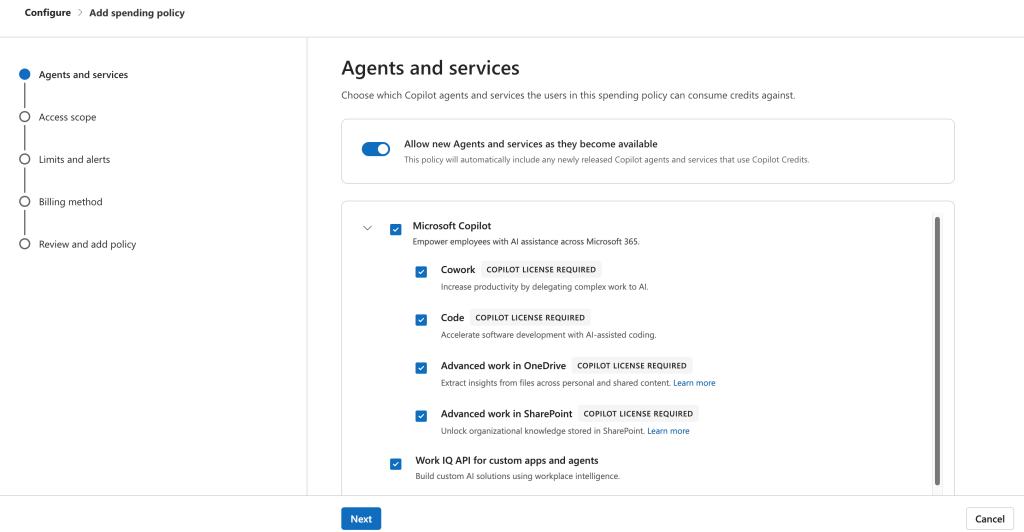
The spending policy editor in the admin center already shows one more: Opal. The editor groups Cowork, Code, Advanced work in OneDrive and Advanced work in SharePoint under Microsoft Copilot. Work IQ API, Copilot Managed Runtime, Opal and Teams Phone Agent appear as separate services. The lesson: the admin center is the source of truth for what a policy governs, and that list keeps growing. Review it regularly instead of relying on a documentation snapshot.
The API shows even more. In testing against a live tenant (October 2026), the all-users spending policy returned 32 service IDs, all enabled. The list included various service names, some of those who are already going to retire from Fronter. Microsoft hasn’t documented what each of these governs, or whether all of them consume credits today. But it’s a clear signal of how wide the Copilot Credits umbrella is becoming.
Just as important is what’s managed elsewhere. Copilot Chat pay-as-you-go, SharePoint agents and the Microsoft Copilot Retrieval API (Preview) use the separate Microsoft Copilot pay-as-you-go billing. According to the documentation, Copilot Studio uses Copilot Studio pay-as-you-go, and Power Platform and Copilot Studio usage details are managed in the Power Platform admin center.
In practice, AI consumption visibility is currently spread across more than one admin experience. Any AI FinOps practice has to account for that. Very likely all these will be consolidated to Copilot Cost Management in the future.
Visibility
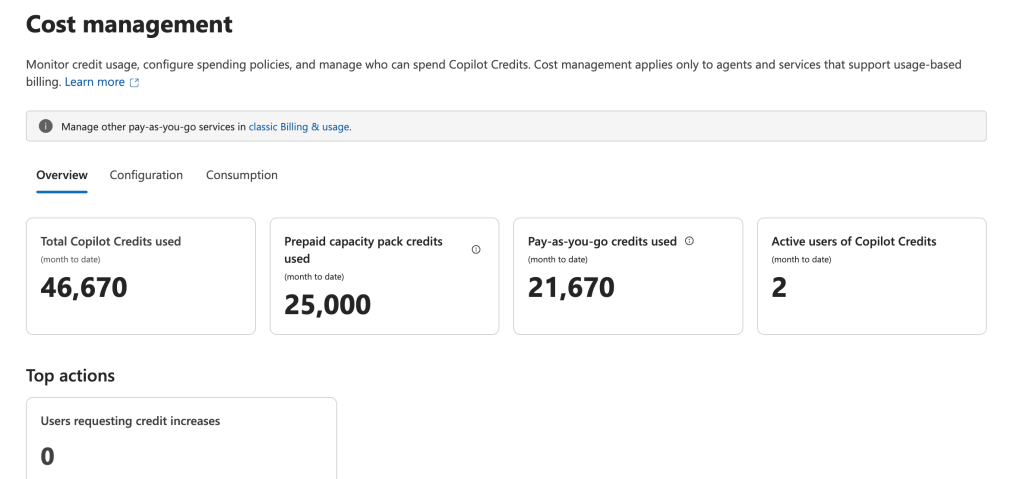
The dashboard has two main lenses. The Overview tab gives a central view of where credits are used, who consumes them and how usage trends change over time. It refreshes every four hours.
The Consumption tab goes deeper, with analysis by spending policy, user, group, agent or service. Two definitions are worth knowing before anyone builds a report on top of this. “Active users” means users who generated usage in the selected period, not everyone eligible under the policy. And the “current spending limit” shows the policy’s current configuration, even when you look at a historical period.
Control
From the same dashboard, administrators can configure spending policies, control which users and groups can access supported services, apply organization-level and user-level spending limits, automatically apply policies to future services and agents, configure policy alerts and user-level threshold notifications, manage billing methods, and set up custom routing for credit requests.
The credit requests feature is easy to overlook, but it’s useful for governance. Custom request policies can name alternate approvers or send requests to the right business owner or approval workflow, for example an internal IT portal or a ServiceNow workflow instead of approval in the admin center. This is where “the business owner decides” becomes an operating process instead of a slide.
Activation is deliberate
Usage-based experiences don’t switch on by themselves. Admins must set up a billing policy before users can use AI experiences that need usage-based billing. The first setup happens through Get Started in Cost Management, which opens a panel to activate the default spending policy for the organization.
Spending policies become financial guardrails for AI
Spending policies are the most important governance object in this model. Here’s what Microsoft documents, and then a governance recommendation.
What a spending policy contains (Microsoft functionality)
Scope. Policies can target users, groups or the whole tenant. One practical detail: specific users and resource accounts can currently only be targeted through security groups. Your Entra group design becomes your financial governance design.
Services and agents. Admins select which agents and services can consume credits against the billing method tied to the policy.
Limits. Policies can have an unlimited or a limited monthly budget. With a limited budget, users who hit the limit lose access to agents and services for the rest of the month, until credits reset on the first of the month. The policy always uses prepaid credits first (capacity packs or pre-purchase plans) before moving to pay-as-you-go. Per-user limits stop a single person from spending all available credits.
Spending limits aren’t allocations. This is a common misunderstanding. Spending policies are limit-based controls. They don’t reserve or allocate Copilot Credits to users or groups. A policy is a ceiling, not a bucket.
Threshold notifications. Admin alerts can be set as a credit amount or a percentage. Alert emails start when usage reaches the threshold and continue daily until the monthly period resets or the policy is changed. User-level notifications are separate and warn users as they approach their own limit, before their access is affected.
Billing methods. A policy can be tied to a specific funding source. Global and Billing administrators can override a policy’s billing method, which Microsoft says enables departmental billing with different billing methods per group, department or set of users. When several sources exist, Microsoft documents the order: prepaid capacity packs first, then the Copilot Credit Pre-Purchase Plan (P3), then pay-as-you-go.
Model profiles (documented, rolling out). According to Microsoft Learn, model profiles are reusable sets of model providers and models that control which models are available for supported experiences, currently only for Copilot Cowork. At the time of writing, this option is documented by Microsoft but not yet visible in the admin center in every tenant, so it is most likely still rolling out. Once it’s available, the documentation describes it as an extra step in the spending policy flow that appears when Cowork is selected, plus a Model profiles option on the Cost Management Configuration tab. A profile needs at least two models. You also choose whether Microsoft may substitute a comparable model during a model-specific outage. If you don’t allow it, users might see a service interruption when a selected model is unavailable.
Overlapping policies. If a user falls under several policies for the same service, the policy with the highest per-user limit wins, then the largest overall limit, then the most recently created one. The chosen policy applies in full, and settings from other policies aren’t combined. Users who reach their limit can request more credits but don’t fall back to other policies. Moving people between groups doesn’t reset anything either: consumption history carries over to the new policy.
Auto-apply new services – the governance question
Here’s the documented behavior: spending policies can automatically apply to future supported Microsoft Copilot services and agents. The “Auto-apply new services” setting is on by default, and administrators can turn it off for policies where new services and agents should be reviewed first. Microsoft also advises reviewing existing policies to decide whether automatic coverage is appropriate.
In the policy editor, the same setting is labeled “Allow new Agents and services as they become available”, with a note that the policy will automatically include newly released Copilot agents and services that use Copilot Credits.
Opal shows why this matters. In a policy with the toggle on, a new computer-using agent appears in the service list already selected. Nobody made a funding decision; the default made it.
This isn’t hypothetical. In testing against a live tenant (October 2026), Opal (opal) was enabled on the all-users spending policy, with the policy itself enabled, and Opal also showed up in users’ per-service balances. Nobody added it by hand; it arrived through the default.
Governance recommendation (not Microsoft guidance): Treat this setting as a deliberate decision, not a default to accept.
- Leave it on for broad, low-risk policies where the goal is fast access to new capabilities, as long as the policy has a sensible period limit, a per-user limit and alerts.
- Turn it off for policies tied to specific cost centers, regulated user groups or tight budgets. There, a new agentic service is a new kind of spending, and someone accountable should approve it first.
New AI services shouldn’t quietly inherit a budget their owner never agreed to fund. But they also shouldn’t wait three months in a review queue. A simple fix is a lightweight “new service intake” step: who owns it, which policy funds it, what outcome it’s expected to deliver.
The Microsoft 365 Copilot Cost Management API
Now for the technical part.
Beta status first
Every page of the API reference opens with the same warning: APIs under the /beta version are subject to change, and using them in production applications isn’t supported.
That’s the most important fact in this section. Build prototypes, proofs of concept and internal tooling to learn the model. Don’t build production finance processes that depend on it until Microsoft releases it as generally available. For the same reason, this guide covers what the API is for, not every property and error code. The reference documentation is the place for those details.
How the API was tested
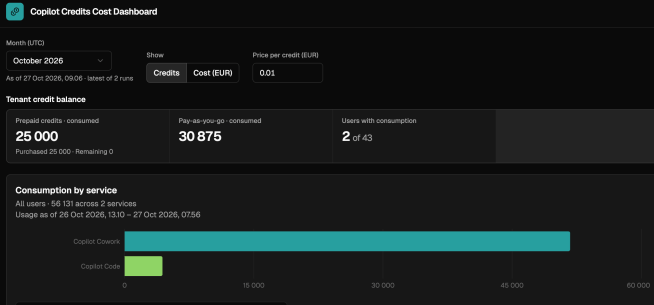
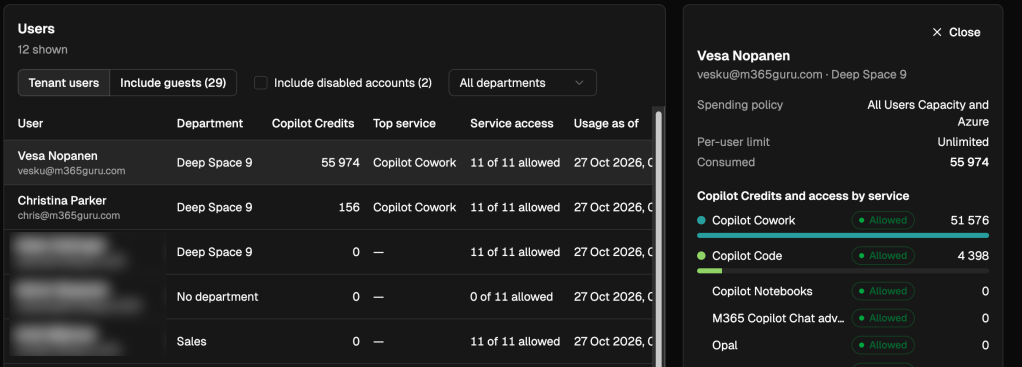
The API findings in this guide come from a small test application run against a live tenant in October 2026. The user interface was built with Copilot Code, and the data collection routine that fetches the cost management data from the tenant was built with GitHub Copilot. (Copilot Code is itself one of the services governed by Copilot Cost Management.)
The application is read-only. It reads the tenant credit balance, the spending policies and their services, and per-user balances. The Cost Management API was not used to create or update spending policies. Everything this guide says about write operations is based on Microsoft’s documentation only.
What it is
The Microsoft 365 Copilot Cost Management API lets administrators govern and observe tenant consumption of Copilot Credits through Microsoft Graph, rooted at /copilot/costManagement. Everything in it is expressed in credits.
What you can do with it
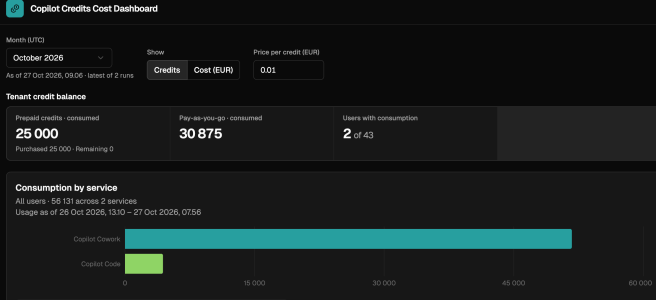
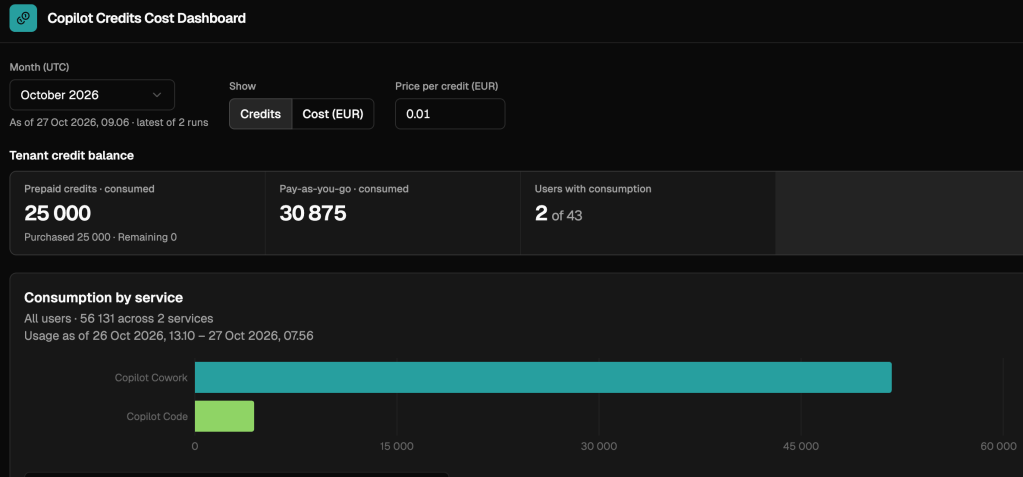
Read the tenant credit balance. A snapshot of credits per billing method. For prepaid credits it shows purchased, consumed and remaining credits. In testing against a live tenant (October 2026), the pay-as-you-go row showed only consumed credits, which makes sense because there’s no prepaid pool to draw down. The two rows together also showed the documented billing order in action: the prepaid pool was used up first, and consumption continued on pay-as-you-go.
Manage spending policies. Create, read, update and delete policies, scope them to all users or selected groups, and choose which services each policy governs. The same limits you set in the admin center are available here: a monthly limit for the policy and an optional per-user limit. The service list in the API is longer than the documentation suggests (32 services in the live tenant test), so read it from the API instead of hard-coding it.
Manage threshold alerts. Configure alert thresholds and recipients for a policy. Alerts only notify. They don’t raise limits or allow extra consumption.
Diagnose a single user. For a named user, the API shows which policy applies to each service, how much the user has consumed this month, whether they can currently consume the service, and why not if they can’t (not entitled, or the limit is exhausted). This is the “why can’t I use Cowork?” support tool.
Two things to know before you build on the per-user data. The “remaining” figure on a user’s row is the remaining amount under the policy, not that user’s personal allowance. In the live tenant test, it showed the same value on every user and service. And per-user rows don’t cover every governed service: they covered 11 of the 32 services in the test.
GET https://graph.microsoft.com/beta/copilot/costManagement/getTenantCreditBalanceGET https://graph.microsoft.com/beta/copilot/costManagement/spendingPoliciesGET https://graph.microsoft.com/beta/copilot/costManagement/userBalances/{userId}?$expand=serviceBalances
Changing policies through the API has its own rules (policy lifecycle states, concurrency checks, conflict rules between overlapping policies). Read the reference carefully before automating any write operation.
Permissions and roles
The API has its own CopilotCostManagement-* permission family, with separate read and write permissions for policies, policy audiences and per-user data. Pick the least privileged one for each job.
A major architecture constraint: most operations support only delegated permissions, so a signed-in admin is needed. Only the tenant credit balance read also supports app-only access. Directory roles still apply on top: creating a spending policy also requires the Billing Administrator or Global Administrator role.
What the Cost Management API does NOT provide
This is the most misunderstood part, so let’s be precise.
Microsoft states that the API is credit-denominated and deliberately excludes rated currency, invoices, prices and purchase forecasts. The billing overview says the same: the API reports usage in credits and doesn’t include pricing, invoices, currency costs or purchasing forecasts.
Two more limits stand out in the current beta:
- There’s no tenant-wide user list. You read balances one user at a time.
- It shows balances, not history. Policies and user balances are current month-to-date views, and the tenant balance is a snapshot. The reference doesn’t document a historical time series. (This is a reading of the documented operations. Re-check it as the API evolves.)
Where Azure Cost Management fits
Microsoft documents a clear split. The Microsoft 365 admin center gives IT admins detailed operational views of usage-based billing policies and consumption. Azure Cost Management and Azure invoices show the billing view for the Azure subscription connected to the billing method. The views are related, but they don’t show the same level of detail.
The admin center view is built for operational and governance questions: who is using credits, which policy applies and whether usage is approaching its limits. Everything in it is in Copilot Credits, not currency.
Azure, in turn, doesn’t show the user-level or spending-policy context of the admin center. Three Azure-side details matter for finance teams:
- Cowork, Copilot Studio and Work IQ consumption is billed through one common Copilot Credits service labeled Microsoft Copilot Studio. To attribute cost to a specific service, Microsoft suggests separating it by Azure subscription or resource group, or using service tags when they become available.
- Azure Cost Management doesn’t show consumption against prepaid capacity packs.
- For reconciliation, small differences between the dashboards and the bill are expected. Microsoft advises using the monthly billing record, not the usage dashboards.
This is the “consumption vs. cost” split from the three-question model in Part 1, seen from the technical side.
What IT can do with the API – Consumption → Cost → Business Outcome
Everything in this section is architecture ideas and recommendations, not documented Microsoft features. And because the API is beta, treat all of it as prototype and learning work for now.
The model to aim for is a simple chain:
Consumption → Cost → Business Outcome
1. An AI FinOps dashboard. Take regular snapshots of the tenant credit balance (the one operation that supports app-only access) and store them in Fabric or another data store. You get your own consumption trend and a runway view for prepaid credits. Pair it with the policy list to show configured limits next to actual burn.
2. A policy inventory and drift check. Export the spending policies, their services, audiences and alert recipients regularly, and compare them against an approved baseline. Is every policy enabled? Does every policy have alert recipients? Did someone widen an audience? Did a new service such as Opal appear in a policy? This is configuration governance for money.
3. Identifying users approaching limits. Because balances are read one user at a time, start from a list of users (for example a policy’s groups or a pilot cohort). Compare each user’s consumption with their per-user limit, since the “remaining” figure won’t tell you that. Then pick out users who can’t consume a service and why. For whole-tenant “who is close to the limit” views, the admin center’s Overview tab is still the better source today.
4. Support diagnostics. A small helpdesk tool, using the per-user read permission only, that answers “why can’t this user run Cowork?” with the policy, the limit, consumption and the reason. This one is valuable on day one.
5. Power BI and Fabric integration. Bring three datasets together: credit consumption (Cost Management API and admin center exports), currency cost (Azure Cost Management exports, ideally through the FinOps toolkit) and business KPIs (case volumes, cycle times, revenue metrics). The join keys are what you design: policy ↔ Azure subscription or resource group ↔ cost center ↔ business process.
6. Design billing for attribution from the start. Because Azure shows Copilot Credits under one service label, and policies can point at different billing methods and subscriptions, the cleanest chargeback model is often one funding subscription (or resource group) per accountable business unit, tied to that unit’s spending policy. Microsoft documents both building blocks. Combining them for chargeback is a recommendation.
Conclusion
Organizations are starting to run environments where humans, copilots and increasingly autonomous agents work together. Technical governance (identity, data protection, agent management) has been evolving for that world. Organizational governance (roles, accountability, change) is catching up. Financial governance has to evolve alongside both.
Microsoft has now put real building blocks in place: Copilot Credits as a common unit, spending policies as guardrails that already cover agents like Cowork and Opal, a Cost Management dashboard for visibility and an API, still beta, that makes consumption governance programmable. Azure Cost Management covers the money. The value layer is still the organization’s own work.
Using AI less isn’t the goal. Using it where it creates value, and knowing which is which, is.
The goal of AI FinOps isn’t to minimize AI consumption. It is to maximize the value created by every unit of AI consumption.
Sources
Microsoft Learn – Copilot usage-based billing and Cost Management
- Usage-based billing and cost management for Copilot Credits – https://learn.microsoft.com/en-us/microsoft-365/copilot/usage-based-billing-overview-copilot-credits
- Set up usage-based billing for Copilot Credits – https://learn.microsoft.com/en-us/microsoft-365/copilot/usage-based-billing-copilot-credits-setup
- Managing AI experiences enabled by usage-based billing – https://learn.microsoft.com/en-us/microsoft-365/copilot/usage-based-billing-manage-copilot-credits
- Monitor Copilot Credit spending – https://learn.microsoft.com/en-us/microsoft-365/copilot/usage-based-billing-copilot-credits-monitor-spending
- View Copilot Credit consumption in the Microsoft 365 admin center and on your Azure bill – https://learn.microsoft.com/en-us/microsoft-365/copilot/usage-based-billing-compare-dashboard-views
- Understanding the user subscription license (USL) and usage-based billing (UBB) – https://learn.microsoft.com/en-us/microsoft-365/copilot/user-subscription-license-usage-based-billing
- Microsoft Copilot pay-as-you-go service overview – https://learn.microsoft.com/en-us/microsoft-365/copilot/pay-as-you-go/pay-as-you-go-overview
Microsoft FinOps
- FinOps documentation – https://learn.microsoft.com/en-us/cloud-computing/finops/
- FinOps Framework overview – https://learn.microsoft.com/en-us/cloud-computing/finops/framework/finops-framework
Microsoft Learn – Cost Management API (beta)
- API overview – https://learn.microsoft.com/en-us/microsoft-365/copilot/extensibility/api/admin-settings/cost-management/overview
Project Opal (Frontier)
- Setting up and managing Project Opal (Frontier) – https://learn.microsoft.com/en-us/microsoft-365/copilot/opal-settings-manage
- Get started with Project Opal (Frontier) – https://support.microsoft.com/en-us/microsoft-365-copilot/get-started-with-project-opal-frontier


