
Microsoft’s September 25 announcement introduces Home, Code and Autopilot alongside a clearer commercial distinction between everyday Copilot use and usage-based agentic work.
There is plenty to get excited about. But what caught my attention is not only what Copilot can do next. It is what organizations will need to do differently.
My reading is that Microsoft is building an AI operating model—and an AI economy—inside Microsoft 365.
This is bigger than adopting another tool. It connects delegation, solution creation, autonomous work, governance and spending. And it raises a practical challenge: helping people create meaningful business value with the right AI capability, at the right cost, under the right governance model.
Let’s take a closer look.
Home and Cowork: from choosing tools to directing work
Home brings together Chat and Cowork, with Word, Excel and PowerPoint experiences integrated through Office in Copilot. Microsoft describes a future where people state what they want to accomplish and Copilot routes the work to Chat, Cowork or Code, rather than requiring them to select the mode themselves.
That is a significant direction: less focus on operating the interface, more focus on describing the outcome.
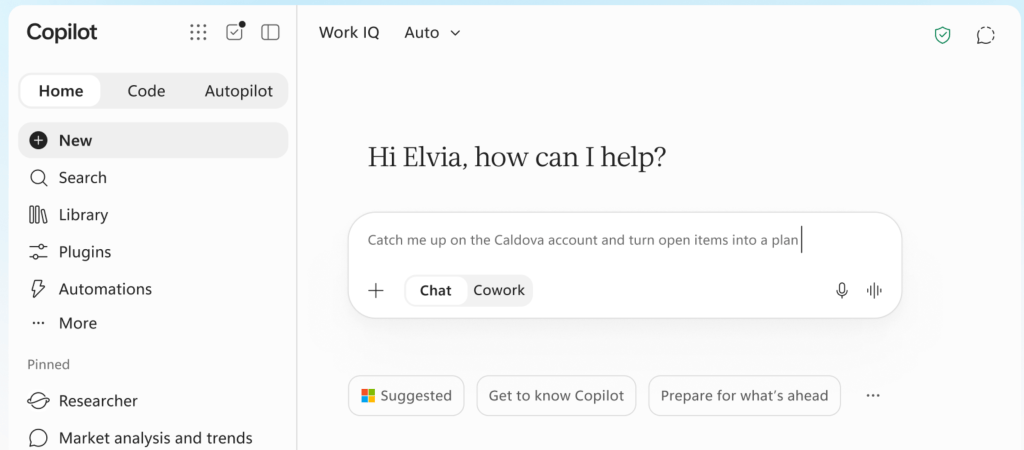
Cowork makes this shift particularly clear. Microsoft positions it around delegated, end-to-end work, including complex deliverables such as RFP responses and financial close packages.
This is not simply bigger chat.
When I delegate work, the important questions become what I want completed, which context matters, what boundaries apply and how I will judge the result. Better prompting helps, but a good prompt is not the same as a well-defined assignment.
That distinction should become part of how we teach people to work with AI.
This has already changed how I work
Cowork has already changed how I am able to work. Using Cowork and Copilot Chat on my mobile phone, I can draft, generate content and keep refining it when opening a laptop is not an option. Like preparing this blog post, planning the next work webinar, creating customer workshop materials, and the list goes on.
That might be on public transportation, sitting in a café or at home in the living room with my family. Bringing a laptop to the table with “I’ll just do some work while we’re having family night” does not really work. And yes, I should probably put the phone away as well. Touché. 🙂
The change is not just about the device. I can move work forward through conversation: describe what I need, review what comes back and steer the next iteration.
What excites me about Code and Autopilot is the possibility of extending that pattern—creating applications by chatting with Copilot, refining what I want an agent to do and reviewing its outcomes. That is the working pattern I want to build toward as these capabilities become available.
And perhaps the most useful outcome should be knowing when the work is handled—and putting the phone away.
Code: creating a solution is becoming part of everyday work
Microsoft describes Code as a way to create apps, dashboards, trackers, automations and workflows through natural language, extending solution-building beyond professional developers.
The important story is not that developers can build software. It is that business users, subject-matter experts and knowledge workers can increasingly turn their understanding of a problem into a working solution.
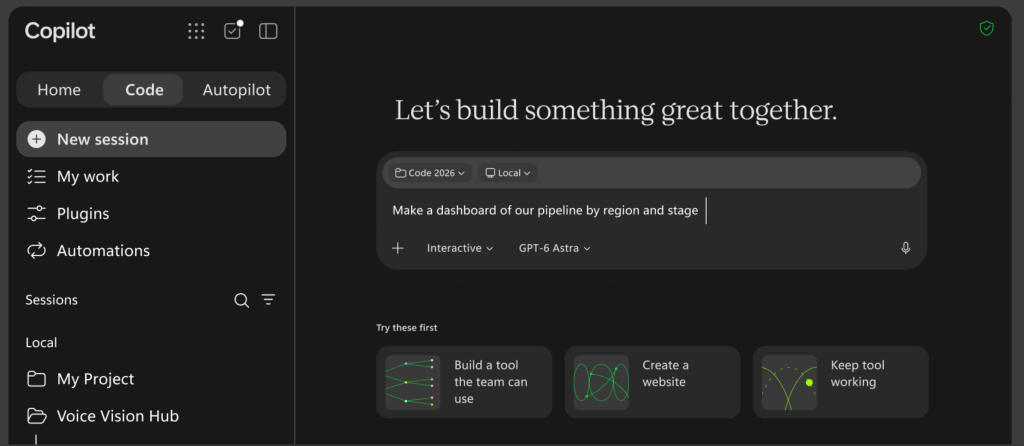
I see Code as extending that direction into the everyday Copilot experience. Compared with learning a visual builder or expression language, describing the desired outcome can lower the starting barrier further.
But easy to create must not become easy to abandon.
A useful team application still needs an owner, tested behavior, appropriate data permissions and a maintenance decision. A convincing first demonstration is not automatically a dependable business solution.
This is why Copilot Managed Runtime matters. Microsoft describes it as IT-governed hosting within the organization’s Microsoft 365 environment, supporting applications created through Cowork, Code and Copilot Studio; it is currently in preview.
Microsoft’s public documentation on Copilot Managed Runtime default governance settings describes controls for connectivity, sharing and runtime behavior alongside existing Power Platform governance.
For me, this is an enterprise-readiness discussion, not merely a hosting detail. Generating an application and operating it responsibly are different responsibilities.
My recommendation is to involve administrators, security teams and business owners early. Give experimentation a defined scope and a clear route from useful prototype to supported solution.
Autopilot: the work happens
Autopilot, previously known as Microsoft Scout, is Microsoft’s proactive, cloud-hosted agent for persistent work, including following up on threads, running recurring tasks and resuming projects beyond an individual interaction.
The important shift is that work can continue after the person stops interacting with it.
I find the digital-teammate framing useful, provided we do not confuse delegated execution with transferred accountability.
For persistent agentic work, I would want a business owner, a bounded objective, escalation rules, a review schedule and a clear way to stop execution.
This also connects directly to FinOps. When work continues beyond a conversation, organizations need to understand what they are funding and why.
Just because an agent keeps working does not mean the work is still needed or worth the cost.
An agent’s purpose should be reviewed alongside its quality, permissions and cost. Continuing to run is not, by itself, evidence that the work remains valuable.
The AI economy: subscription and consumption
In the Managing AI spend section of its announcement, Microsoft distinguishes between User Subscription License (USL) and Usage-Based Billing (UBB).
For everyday AI, the USL provides a fixed subscription cost covering Chat, Copilot experiences across Microsoft 365 applications, model selection and Auto model routing; Auto weighs accuracy, speed and cost when selecting a model.
Microsoft places Cowork, Code, Autopilot, long-running agentic capabilities and frontier models such as Astra and Fable under UBB. I would not frame this simply as “the interesting things cost extra.”
Someone pays for computation. If the customer is not charged separately for an operation, its cost still exists within the provider’s economics.
My view is that indefinitely expanding agentic work cannot sustainably be treated as computation without an economic consequence. Organizations should not base their strategy on that assumption. This is an economic argument, not a claim about Microsoft’s margins or unpublished pricing.
Equally, usage-based billing does not automatically mean poor value.
A demanding task can justify higher consumption if it produces a valuable, accepted result. A cheap task repeated unnecessarily can still waste money.
The useful business conversation connects the outcome, the required quality, the total cost of producing and reviewing it, and the value actually realized.
We should optimize for valuable work—not simply the lowest consumption or the most powerful model.
FinOps may be the most important announcement
The title of Microsoft’s companion announcement—New FinOps for AI capabilities: Control spend, measure value, and optimize for impact—captures the connection between financial control and business value.
I see this as a business capability, not a dashboard finance checks after IT has enabled everything.
The main Copilot announcement describes spending-policy management through APIs, credit requests routed into approval workflows and model-family controls for different user groups, including constraints on Auto’s choices.
It also describes cost-management expansion to Code and Copilot Managed Runtime, visibility into Cowork task outcomes, and users’ ability to see credit usage, remaining balances and usage history.
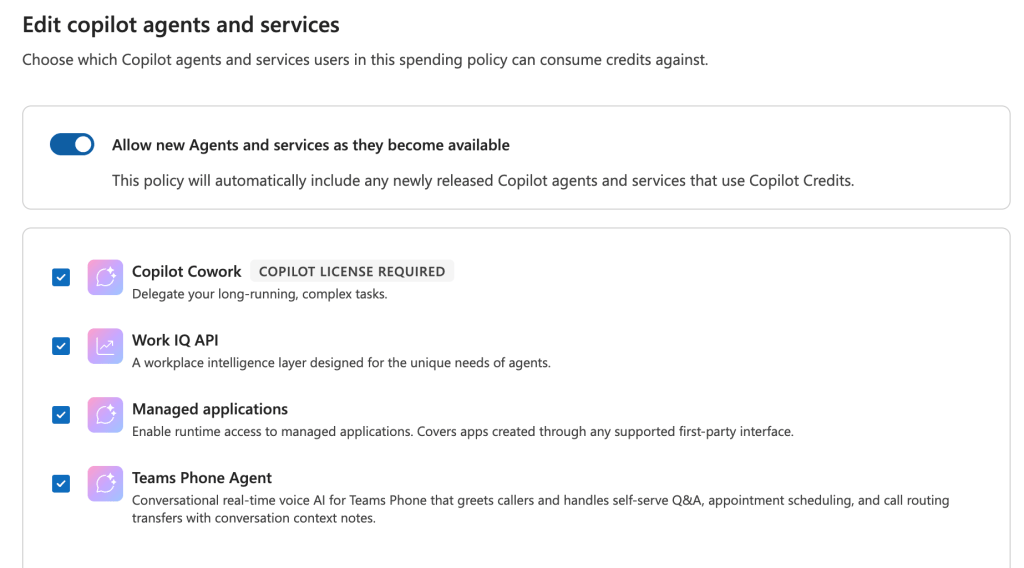
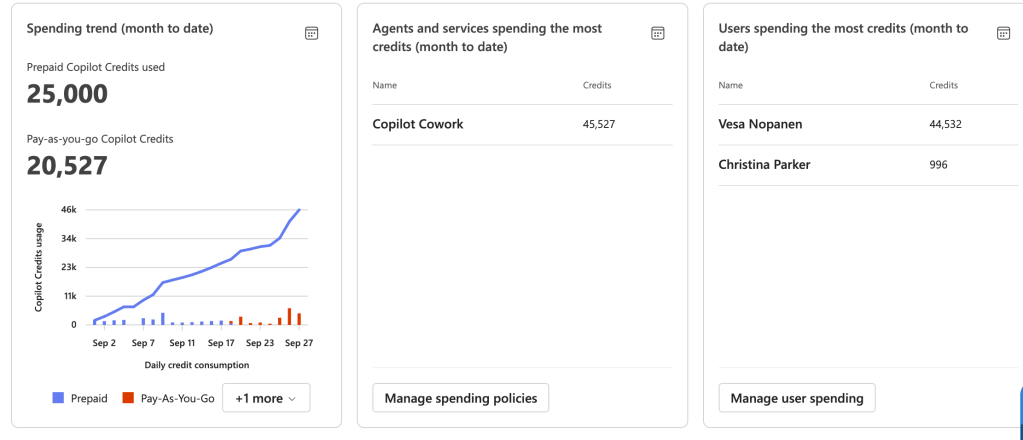
These are useful foundations. They are not, by themselves, proof of ROI.
A completed task is not necessarily useful work. Time saved does not automatically become financial savings. Someone still needs to establish a baseline, assess the result and decide what the organization gained.
For a pilot, I would examine accepted outputs, turnaround time, review effort, rework and consumption together. For an application, I would include maintenance and support. For autonomous work, I would also check whether the process still needs to run.
FinOps should help organizations spend confidently on valuable work—not merely spend less.
That becomes increasingly important when AI is creating applications, executing longer assignments and operating beyond individual interactions.
AI literacy needs to move beyond prompting
If an adoption program mainly teaches people to start using AI and write better prompts, I would now broaden it.
Prompting remains useful. It is simply not sufficient.
The next layer of AI literacy should include:
- Capability selection: matching the approach to the outcome.
- Delegation: defining objectives, boundaries and review points.
- AI judgment: assessing evidence, quality and uncertainty.
- Cost awareness: recognizing when additional consumption is justified.
- Governance awareness: understanding what may be accessed, created, shared or executed.
A quick answer may not require the most advanced model. A reusable business dashboard may justify evaluating Code. A recurring process with clear boundaries may justify evaluating Autopilot when it becomes available.
These are judgment exercises, not automatic product-selection rules.
Even when Copilot handles more routing, people still need to decide whether work should be delegated and whether the result is acceptable.
My practical recommendation is to select a few meaningful outcomes, give each an owner and baseline, agree on spending and review boundaries, and scale what demonstrates value. Connect IT, finance, business owners and adoption champions rather than treating each as a separate workstream.
And do not turn cost awareness into anxiety. Give people understandable limits, room to learn and a straightforward way to request more capacity.
Rollout: keep the preview distinctions clear
Microsoft’s published rollout expectations, as of writing this article on September 27, 2026, are:
- Home: Frontier rollout in the coming weeks.
- Code: Frontier rollout at the end of September, with broader availability in the coming weeks.
- Autopilot: expansion into private preview at the end of September.
- Copilot Managed Runtime: currently in preview.
- Plugin Registry: rolling out, with general availability across supported surfaces in the coming weeks.
- Dynamics 365 and Power Platform grounding: public-preview rollout over the month following the announcement.
Code is also planned to enter preview for Microsoft 365 Premium and Pro subscribers later in 2026. These are consumer subscriptions, not Microsoft 365 enterprise licenses, as reflected in Microsoft’s guidance on AI credits and limits for Microsoft 365 subscriptions.
My perspective: adoption is becoming operational
I am excited about this direction. But I would not use this moment simply to add more features to a Copilot training deck. I would use it to reconsider what successful AI adoption means.
Home, Code and Autopilot are important. FinOps may prove even more important because it connects that ambition to a sustainable way of operating.
The defining challenge of the next phase is not merely getting people to use AI. It is helping them delegate responsibly, create dependable solutions and recognize which work is worth doing.
The future of work is not a maximum AI consumption nor a heavily constrained one. It is meaningful business value, created with the right AI capability, at the right cost, under the right governance model.
That is the conversation I want us to have next.


