
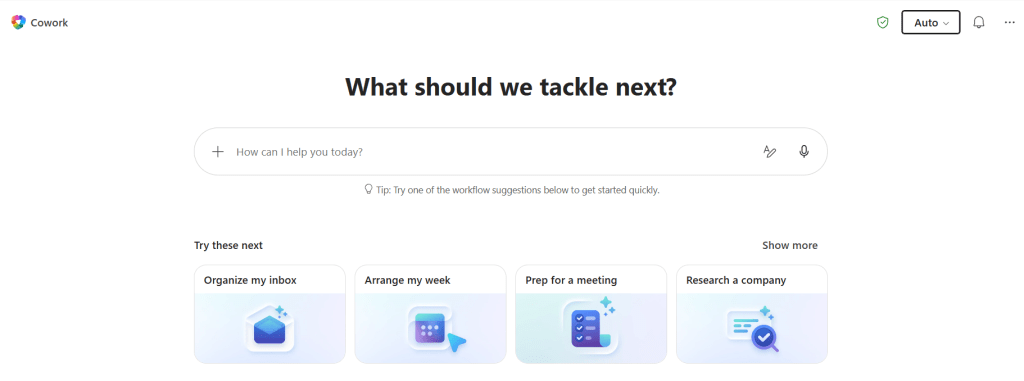
Copilot Cowork just hit general availability worldwide, and this is genuinely great news. After three months in Frontier, the agentic experience that runs your complex, long-running, multi-tool tasks end-to-end is now open to Microsoft 365 Copilot customers everywhere. I have been testing Cowork since it landed in Frontier, and watching it go from preview to GA this fast tells you everything about how much demand there is for AI that actually does the work — not just drafts a suggestion and hands it back to you.
Let’s take a closer look at what’s new — and the part everyone is asking me about: how the billing works.
- What makes Cowork different
- Usage based billing is live now — but Frontier orgs get a grace period
- How you pay – PayGo or P3
- Credits depend on the task – light, medium, heavy
- Cost management – control, visibility, efficiency
- The models – and where GPT-5.5 fits
- Other what’s new in Cowork
- Closing thoughts
- Resources
What makes Cowork different
The thing to understand is that Cowork is cloud-hosted, so your files are not stored locally, security is enforced inside your Microsoft 365 trust boundary, and — this is the part I really like — your tasks keep running even when your laptop is off. You can kick off a heavy task, close the lid, go to a meeting, and come back to finished work. That is a different way of working.
It is also grounded in Work IQ, so every task reflects the real context of the systems your business already runs on. And it is multi-model by design, which matters a lot for both quality and cost (more on that below).
Usage based billing is live now — but Frontier orgs get a grace period
Here is the important bit, so read this carefully: billing for Cowork usage starts today.
If your organization had at least one user actively using Cowork in Frontier (between March 30 and June 16), you get a grace period — you will not be billed until July 1, 2026 to ease the transition. So if you have been experimenting in Frontier like I have, you have a couple of weeks of runway. My tip: use that window to get your spending limits and budgets in place before usage ramps up.
How you pay – PayGo or P3
There are a twoways to pay, and you can pick what fits how predictable your usage is:
- Pay-as-you-go (PayGo) – maximum flexibility, priced at $0.01 per Copilot Credit. Great when usage is bursty or you are still finding your feet.
- P3 (Copilot Credit commitment) – commit to a usage volume up front in exchange for a discount. If you already know Cowork is going to be core to how your teams work, this is the one to look at.
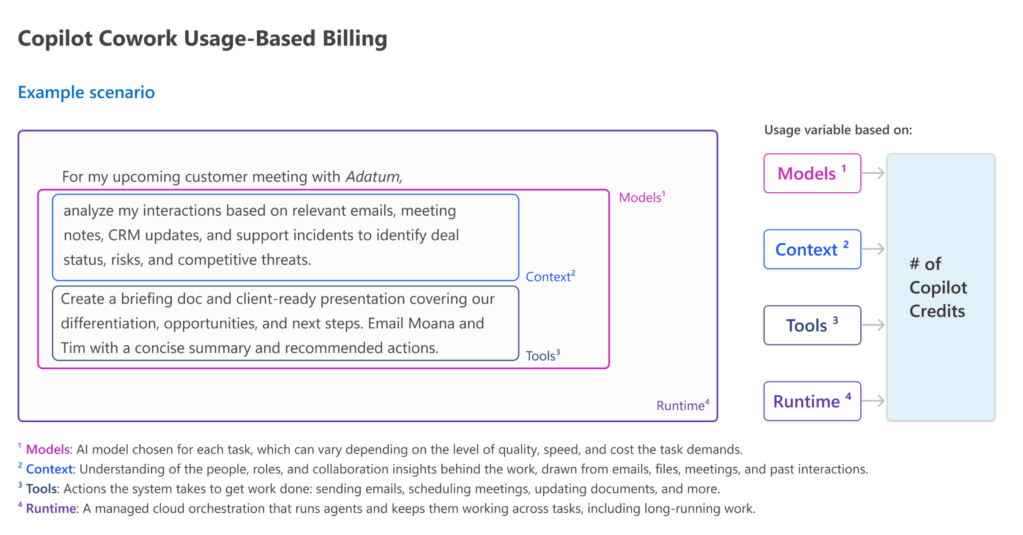
Everything is denominated in Copilot Credits, and the price of each task is calculated from four inputs: model use, context retrieval, tool calls, and runtime. Note that Cowork still requires the Microsoft 365 Copilot user license — Cowork is the usage-based layer on top of that.
Credits depend on the task – light, medium, heavy
This is the question I hear most: “How do I budget for something with variable pricing?” Microsoft grouped real Frontier usage into three task patterns, and this little chart makes it click instantly:
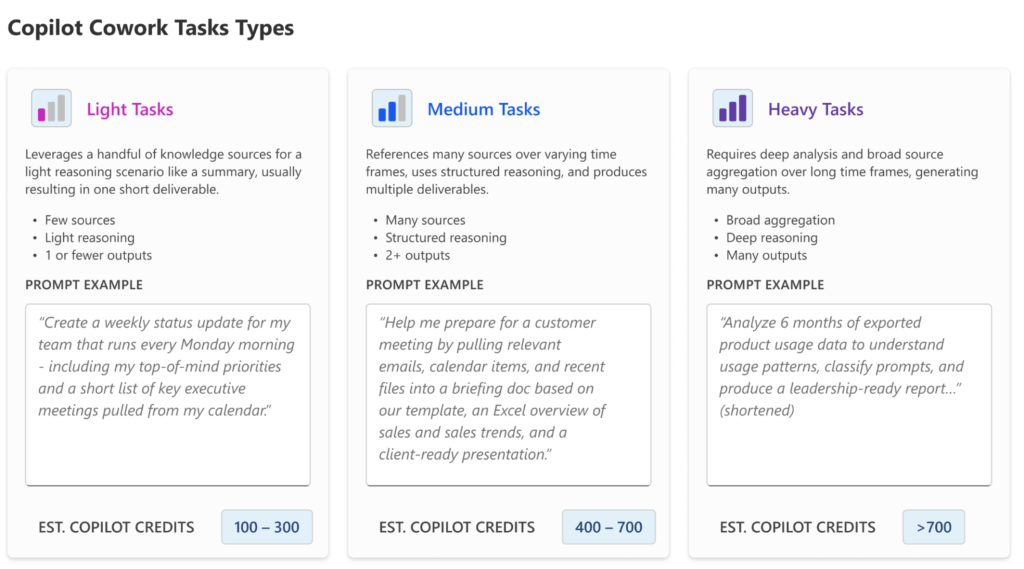
- Light tasks – a few sources, light reasoning, one-ish output. Think “create a weekly status update for my team from emails Monday morning.” Estimated 100–300 credits → about $1–$3 on PayGo.
- Medium tasks – many sources, structured reasoning, 2+ outputs. Like “prep me for a customer meeting by pulling emails, calendar, and files into a briefing doc and a client-ready presentation.” Estimated 400–700 credits → about $4–$7 on PayGo.
- Heavy tasks – broad aggregation, deep reasoning, many outputs. The “analyze six months of exported product usage data and produce a leadership-ready report” kind of job. Estimated 700+ credits → roughly $7 and up on PayGo.
At PayGo’s $0.01/credit that gives you a real mental model: a light task is the price of a coffee, a heavy multi-output analysis is the price of a nice lunch — for work that used to take a person an hour to a day. Microsoft published a downloadable spreadsheet so you can model your own costs by user persona and task mix, which is a genuinely thoughtful touch.
Cost management – control, visibility, efficiency
Because this is usage-based, cost management is one of the biggest new capability areas at GA, and it is built around three themes:
- Control – Cowork is off by default. Admins set spending limits at tenant, group, and user levels, create scoped billing policies, and configure usage alerts. Users can even request additional credits from inside Cowork when a task needs more.
- Visibility – usage reporting broken down by user, group, and feature, so there is clear accountability. Per-task pricing in credits that users see as they run a task is coming shortly after GA.
- Efficiency – your choice of PayGo or P3 to match how predictable your usage is, plus model choice in Frontier via the model picker so you can manage cost per task.
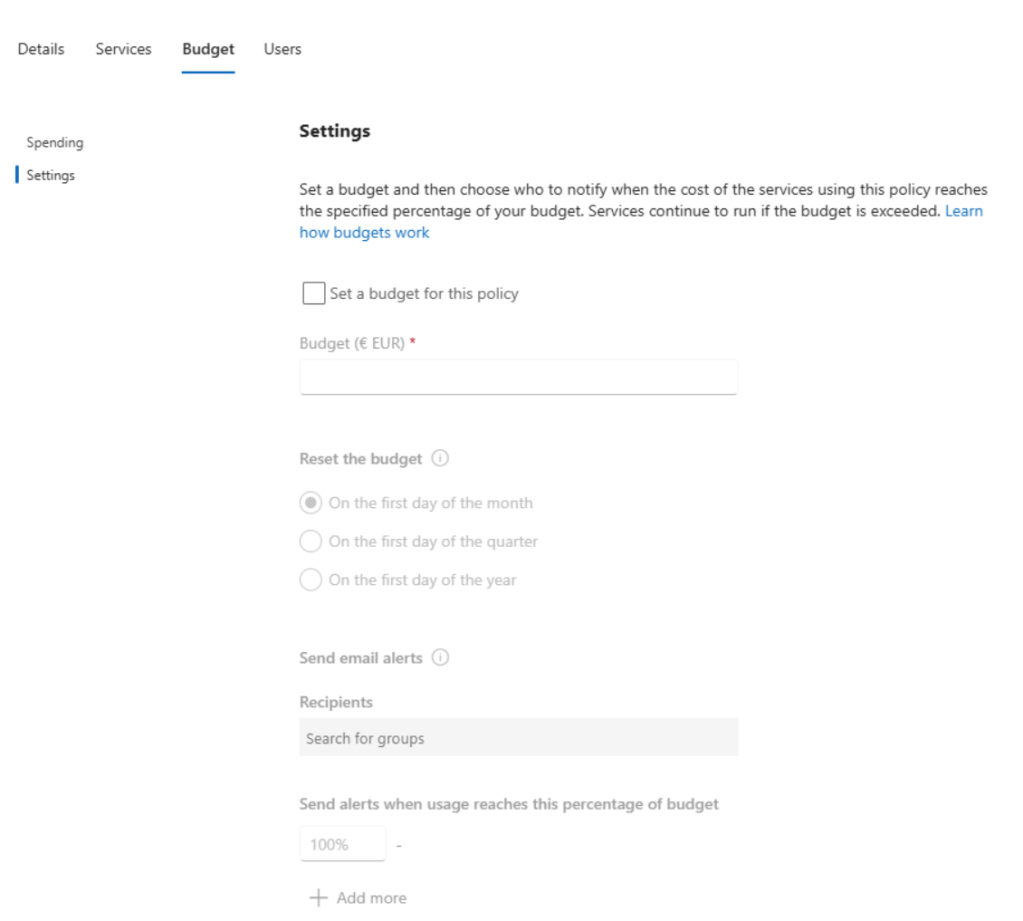
And here is the bit I really want admins to notice: you can set budgets for PayGo right in the admin center. Open the billing policy, go to the Budget tab, and Set a budget to monitor — and cap — the spend on the services linked to that policy. You get a running view of the period’s spending (mine shows June spending in €EUR), so PayGo never has to feel like an open tab you can’t see. This is exactly the kind of guardrail that lets you say yes to usage-based pricing with confidence: turn it on, set the budget, and stay in control.
The models – and where GPT-5.5 fits
At general availability, Cowork runs on Anthropic models — Opus 4.8 and Sonnet 4.6. You are not locked into one model, which is exactly how it should be: use the efficient model for everyday work, reach for a frontier model when the task demands it.
For Frontier users, GPT-5.5 is part of the model lineup. I do not see it on my demo account yet, so it should be lighting up very soon. And further out, Microsoft’s own fine-tuned Cowork 1 model is coming in the next few weeks, designed to handle everyday tasks at substantially lower cost — and to remove model bias. That is the one I am most curious to put through its paces.
Other what’s new in Cowork
Plenty more landed alongside GA:
- A Cowork toggle in the Microsoft 365 Copilot app – flip straight from chat into the full Cowork experience, so you go from conversation to action faster.
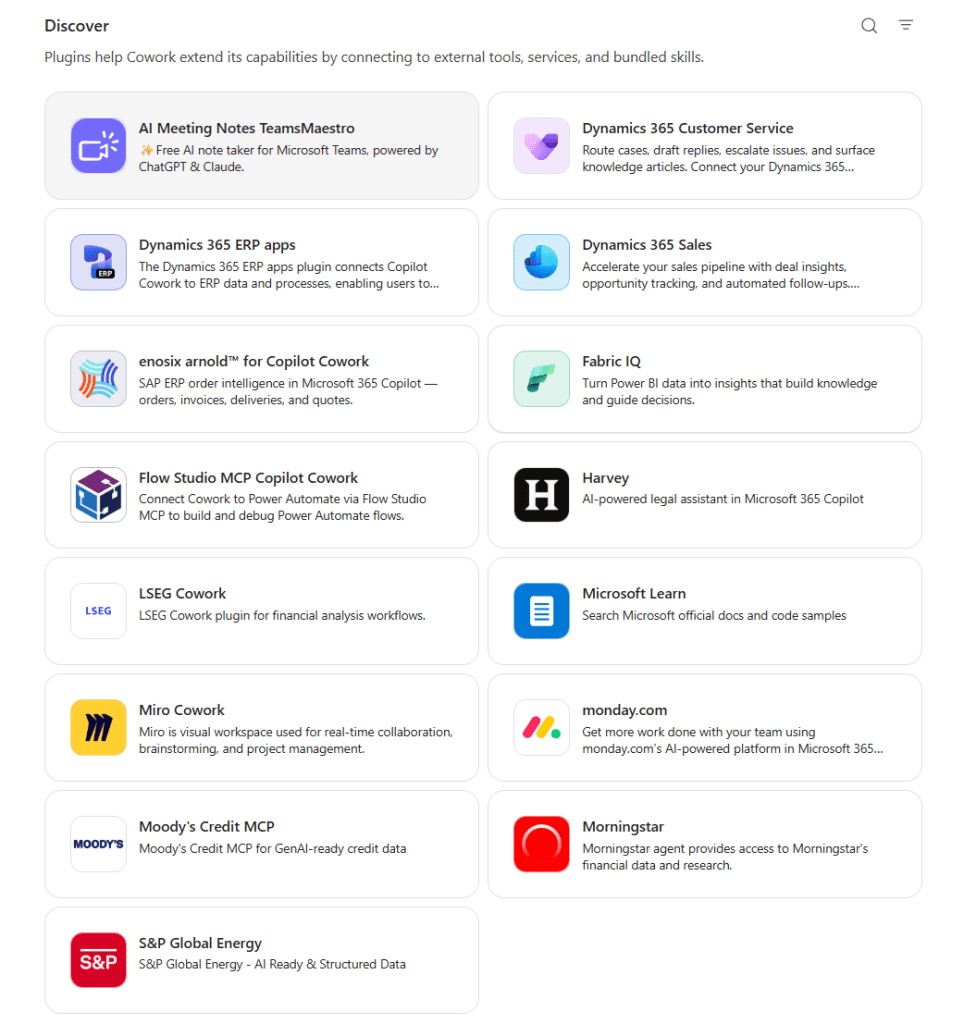
- Plugins – nine partner plugins available now (Enosix, Harvey, LSEG, Miro, monday.com, Moody’s, Morningstar, S&P Global Energy, and TeamsMaestro), with more coming soon (Adobe, Atlassian, Box, Canva, CB Insights, Databricks, MoneyForward, Templafy) plus the Dynamics 365 suite. Fabric and Dynamics 365 Sales, Customer Service, and ERP are GA too.
- Browser use via Edge (Frontier) – Cowork can browse the web through a local Edge browser, following your existing enterprise policies.
- New security & compliance – prompts, responses, and generated artifacts flow through your existing Microsoft 365 controls. Sensitivity labels are inherited and shown end-to-end, and the protected surface at GA includes audit log, DSPM, eDiscovery, and Communication Compliance. Insider Risk Management, DLP, and Data Lifecycle Management are coming soon.
That security story is a big deal for me — agentic AI is only enterprise-ready if it lives inside your trust boundary and respects your labels, and Cowork does.
Closing thoughts
Work that took a week now collapses into a morning. The billing is real now, so the smart move is to turn it on deliberately, set your limits, and start working. If you save an hour of work with that heavy task $7-$10..
I will keep testing (and keep watching for GPT-5.5 and Cowork 1 to show up!), and I would really like to hear how you are putting Cowork to work. Have you already tried it in Frontier? What was your first heavy task? Drop a comment and let’s compare notes.
Work is changing. And honestly? This is a fun time to be in it.

 Vesa Nopanen - Future Work today
awesome post!
cowork is quite awesome but I worry this pricing model means it’s now a no go for majority of SMEs
LikeLike
Thank you!
The pricing model isn’t a surprise – we are going towards usage based pricing on many tools.
This is not a show-stopper. Organizations can add budgets to org-team-person level, so they can manage costs.
Of course understanding how to use tools is important. When to use Copilot and when Cowork is essential.
Cowork can bring lots of benefits and value, as it can save hours of work for just $10-$15 prompt. This pricing model should not be feared, but understand it and the value and then govern costs.
LikeLike