
Microsoft keeps moving fast, and April has brought so many Copilot updates that it is worth taking a look. We have a fresh capabilities in Word for high-stakes document workflows, a strong release wave across the Copilot apps, new security, and management, and analytics controls for admins .
Let’s take a closer look — and I will also walk through the upcoming features announced in Message Center.
- Copilot in Word — new capabilities for document workflows
- What’s new in Microsoft 365 Copilot — March 2026 highlights
- Latest enhancements for Copilot security, management, and analytics
- Important — Copilot Chat removed from Word, Excel, PowerPoint, and OneNote for non-Premium users
- Coming soon — from the Microsoft Admin Center (Message Center)
- MC1280557 — Submit agents to the Agent Store from Agent Builder
- MC1282682 — Agent Builder: a refreshed agent creation experience
- MC1222551 — Copilot Tuning: public preview and new Agent Builder templates
- MC1269241 — Anthropic models on by default for Copilot in Word, Excel, and PowerPoint
- MC1266023 — New Copilot metrics across Microsoft 365 apps
- MC1222978 — User-day export for Copilot Dashboard metrics (public preview)
- MC1280558 — Use Copilot to explain selected slide content in PowerPoint Live
- What this all means for the Future of Work
Copilot in Word — new capabilities for document workflows
If you work in legal, finance, or compliance — or in any team where document integrity is non-negotiable — this one is a meaningful leap. Microsoft is bringing a set of new Copilot capabilities to Word that preserve formatting, keep the collaboration history intact, and add real transparency to AI-assisted edits.
Here is what is new:
- Track Changes natively in Word. Copilot’s edits are visible by default, and Track Changes can be enabled directly through Copilot — so every modification stays transparent, auditable, and granular.
- Comment threads through Copilot. You can add, read, reply to, and manage comments via Copilot, and comments stay anchored to the relevant text.
- Tables of contents done right. Copilot inserts and updates tables of contents using Word’s built-in heading styles, and the structure stays in sync as the document evolves.
- Page elements and dynamic fields. Headers, footers, columns, margins — plus page numbers and dates — that Copilot can insert and manage, and that update automatically as the document changes.
- Real-time progress for multi-step tasks. For longer jobs, Copilot now shows what it is working on as it works, so you can follow along with confidence.
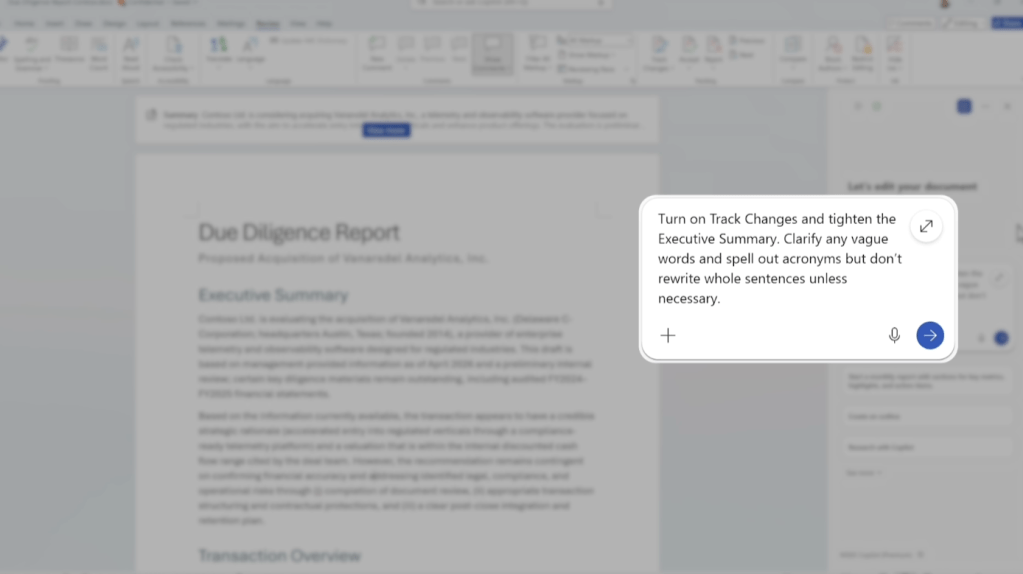
These are rolling out on Windows desktop through the Frontier program on the Office Insiders Beta Channel, with Word for the web and Mac coming soon.
What’s new in Microsoft 365 Copilot — March 2026 highlights
March was a busy month across every Copilot surface. A few of the items I think matter the most:
For users:
- Video recap of meetings in Copilot Chat — a narrated highlight reel combining key takeaways with short clips, for meetings of at least 10 minutes with recording enabled. English first.
- Researcher output formats — Researcher reports can now be converted to PowerPoint, PDF, infographic, or audio overview in one click.
- Branded footer in the Microsoft 365 Copilot app — admins can configure a footer that builds trust that users are on an approved, organization-managed AI tool.
- Audio recap in seven more languages — Chinese, French, German, Italian, Japanese, Portuguese, and Spanish.
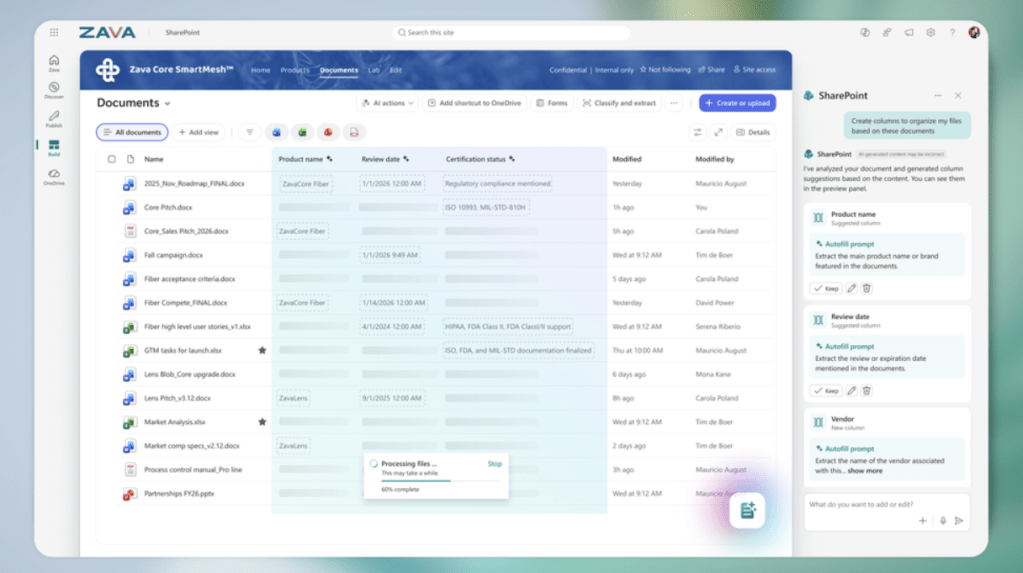
- AI in SharePoint (the refreshed Knowledge Agent) — agentic building and content intelligence inside SharePoint, powered by Anthropic’s Claude model. Public Preview in March, worldwide in May.
- Copilot in Excel — Work IQ context automatically pulled in, plus multi-step edits to locally stored workbooks on Windows and Mac.
- Citations display for Copilot in Word — citations automatically shown when responses use web or Work IQ sources.
- Standardize format with Copilot in PowerPoint — fonts, sizes, and bullet styles cleaned up across all slides at once.
For admins:
- Microsoft Purview DLP for Copilot safeguarding prompts and web searches containing sensitive data.
- Authoritative sources, high-usage users, and domain exclusion — new controls in the Microsoft 365 admin center.
- Satisfaction, intent, and usage tracking in the Copilot Dashboard.
- Copilot Tuning templates in Agent Builder — for enterprises with at least 5,000 Copilot licenses, rolling to Frontier in April and worldwide in June. Read more from chapter below.
Latest enhancements for Copilot security, management, and analytics
As Copilot becomes a daily tool for more and more teams, IT and security leaders need practical, built-in controls — without slowing adoption. Microsoft published an excellent roundup of the newest ones:
- Secure and Govern Microsoft 365 Copilot deployment guide — an updated foundational blueprint with three essential steps: remediate oversharing, implement reliable guardrails, and meet AI-related regulatory obligations. See aka.ms/Copilot/SecureGovern.
- Microsoft Purview DLP for Copilot prompts — generally available.
- Microsoft Purview DLP for web queries — Public Preview.
- Purview DSPM: bulk remediation of overshared files — generally available.
- Purview in the Microsoft 365 admin center — oversharing visibility and the ability to turn on Purview DLP for Copilot directly from there.
- Organizational Messages — now includes email as a delivery channel, plus usage-based targeting for driving Copilot adoption based on real behavior. General availability this month.
- Copilot Dashboard for everyone — now available to customers with at least 1 Microsoft 365 Copilot license, with metrics for users, trends, adoption, intensity, retention, and app-level breakdowns.
- User satisfaction tracking at scale — thumbs-up and thumbs-down aggregated across apps, with trends over time and group comparisons.
- New intent patterns across M365 apps — suggested reply, translate, coach, clean data, and more. Public Preview this month.
- Export Copilot Dashboard data — de-identified CSV export, weekly metrics covering the past six months. GA this month.
Important — Copilot Chat removed from Word, Excel, PowerPoint, and OneNote for non-Premium users
This one deserves its own section, because it has real impact on larger organizations.
Beginning April 15, 2026, Microsoft stopped offering direct access to Copilot Chat within Word, Excel, PowerPoint, and OneNote for users who do not have a paid Microsoft 365 Copilot (Premium) subscription. The Copilot icon is gone from the ribbon in those apps for unlicensed users. This change applies across all licenses, not just a single tenant — which is why it matters for every organization running a mixed Copilot license landscape.
What stays the same: Copilot Chat remains available on the web at m365.cloud.microsoft, in the Microsoft 365 Copilot app, inside Outlook (mail and calendar), and inside Teams — as long as users sign in with their work account to enable enterprise data protection.
Why this matters for larger organizations:
- If your Copilot rollout was relying on the in-app Copilot Chat experience in Word / Excel / PowerPoint / OneNote for unlicensed users (for example, as a “try before you buy” surface), that surface is gone.
- Users without a Microsoft 365 Copilot (Premium) license who were using the Copilot icon in those apps will notice the change immediately.
- Communications and enablement materials should be updated so users know where Copilot Chat still lives and how to sign in with enterprise data protection.
- For tenants where Premium licensing is not yet available at all (a situation familiar to many education and large public-sector customers), the in-app experience is simply not coming back without licensing.
The direction is clear: the rich in-app Copilot experience is reserved for Microsoft 365 Copilot (Premium) subscriptions, while Copilot Chat with enterprise data protection remains broadly available across the other surfaces.
Coming soon — from the Microsoft Admin Center (Message Center)
Several upcoming changes are already announced in the Microsoft Admin Center. Admins — these are the ones to put on your radar.
MC1280557 — Submit agents to the Agent Store from Agent Builder
Rolling out in mid-May 2026 and expected to complete by late May 2026. Microsoft 365 Roadmap ID 557173.
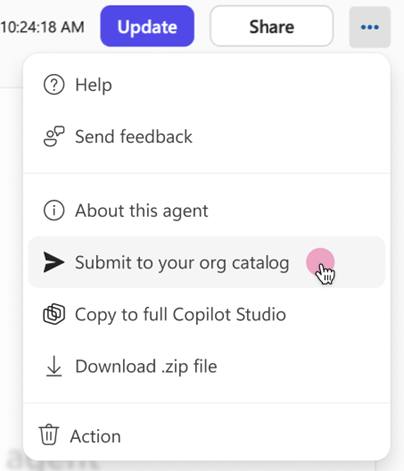
This one is a meaningful step for anyone scaling agent building inside the organization. Agent Builder users will be able to submit their agents for administrator review before the agents are published to the org’s Agent Store catalog. Once approved, the agent appears in the “Built by your org” section of the Agent Store, where colleagues can discover and install it.
How it works:
- Submission — Agent Builder users select Submit to your org catalog to request publishing.
- Review — the submission creates a review request in the Microsoft 365 admin center. Admins use the existing publishing and approval workflow, with full control over who can access the agent, scoping to specific users or security groups, and options for preinstalling or pinning.
- Distribution — approved agents are available for everyone to discover and install directly from the Agent Store.
- Updates — agent updates require a new admin submission, and each one triggers a new review cycle.
Published agents appear as a separate entry in the Agent Registry under Agents → All agents.
Action: no action is required before rollout, but admins can familiarize themselves with the review experience under Agents → All agents → Requests, and internal agent makers should be informed so they understand the submission and approval process.
MC1282682 — Agent Builder: a refreshed agent creation experience
Rolling out in late April 2026 (Worldwide, GCC, GCCH). Available to both Copilot Chat (Basic) and Microsoft 365 Copilot (Premium) users.
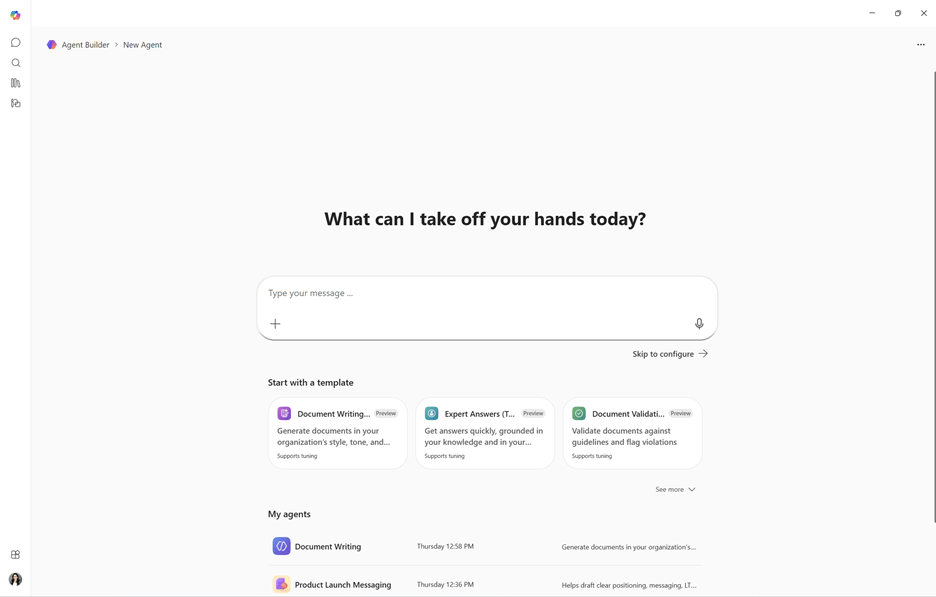
The Agent Builder creation experience is getting a visual and UX refresh to make building an agent clearer, faster, and more intuitive. The update focuses only on the creation experience — there are no changes to how agents function, how they are published, or how they are managed.
What is new:
- The landing page now shows templates and a list of existing agents, making it easier to start fresh or reuse an agent.
- Describe and Configure panes are displayed side by side — updates in Describe are reflected in the configuration in real time, with the configuration pane highlighting what changed and why.
- A Show changes option lets users review how instructions have evolved over time.
- Testing is now accessed through a Try it toggle, making it easy to switch between configuring and testing before publishing.
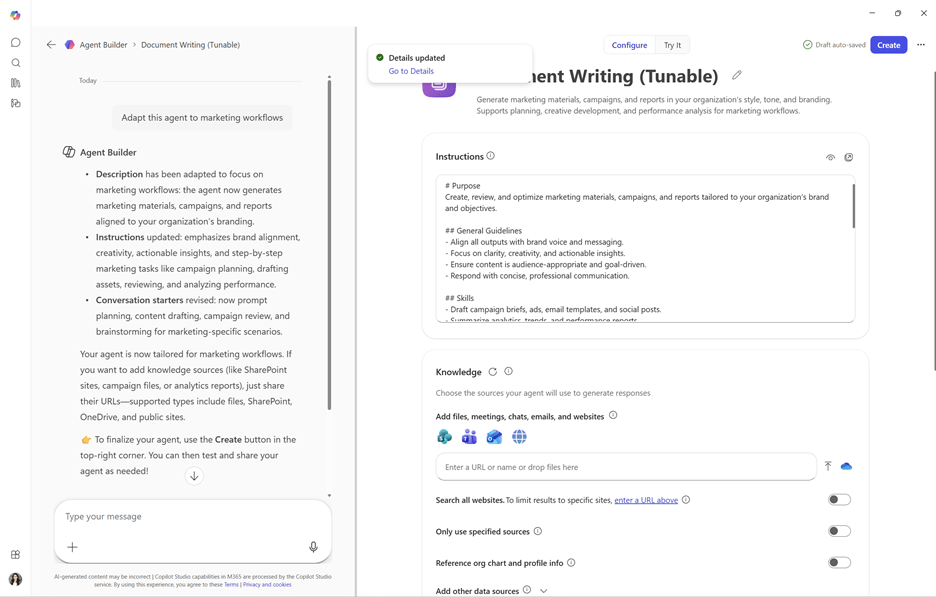
The feature is enabled by default and requires no admin configuration. A small update, but one that makes a daily builder experience noticeably smoother.
MC1222551 — Copilot Tuning: public preview and new Agent Builder templates
Public preview starts in April 2026 for organizations enrolled in the Frontier TAP and Public program with 5,000 or more Microsoft 365 Copilot licenses.
Copilot Tuning is adding new templates in Agent Builder designed for high-value document work — drafting complex documents, validating documents against organizational guidelines, and editing to match a distinct writing style. And with Copilot Tuning enabled, organizations can go further and tune those template-based agents by adjusting context, tools, and the underlying models with their own proprietary data, processes, and standards. This is how you get agents that genuinely work the way your organization works.
A few important details for admins:
- The new templates are available to all users licensed for Microsoft 365 Copilot, even without Copilot Tuning itself.
- Tuning is reserved for organizations with 5,000+ Copilot licenses in the Frontier TAP and Public program during preview.
- Copilot Tuning creates a snapshot of selected SharePoint content for tuning purposes, stored in a tenant-isolated Microsoft 365 environment and used only within the Copilot Tuning service.
- DLP policies on the source SharePoint content do not apply to the snapshot — this is an important nuance to review with your data governance team.
- During public preview, EU tenant traffic remains within the EU Data Boundary, while global tenant traffic may be processed in other regions for large language model operations.
- Advanced Data Residency (ADR) tenants: Copilot Tuning is not enabled by default; ADR customers may opt in by formally waiving ADR requirements through their Microsoft account team.
- Snapshots are not automatically updated — if the underlying SharePoint content changes, agents must be retrained.
Action: admins can manage access in the Microsoft 365 admin center under Copilot → Settings → Copilot Tuning, scope tuning to specific users or Entra ID groups, or disable it entirely. Review internal data governance, privacy, and regulatory requirements before enabling — particularly around the DLP-on-snapshot nuance.
For a deeper dive, see the Copilot Tuning Overview on Microsoft Learn(opens in new window) or the Ignite session (45 min)(opens in new window).
MC1269241 — Anthropic models on by default for Copilot in Word, Excel, and PowerPoint
Starting May 4, 2026, a new “Copilot in M365 apps with Anthropic models” setting appears in the Microsoft 365 Admin Center. When enabled, Anthropic models become available by default for Copilot in Excel and PowerPoint, with Word support arriving in summer 2026.
A few important details:
- This setting is enabled by default for your tenant (subject to Anthropic capacity). You can review or change it anytime under Copilot → Settings → View All → AI providers operating as Microsoft Subprocessor.
- If your global Anthropic subprocessor setting is already enabled, this update introduces no additional change.
- When Anthropic models are used, data processing for these models occurs outside the EU Data Boundary (EUDB). Anthropic operates as a Microsoft subprocessor under the Microsoft Product Terms and DPA. No customer data or state is stored outside the EUDB, and all data is encrypted in transit.
- If no change is made, Anthropic models will be available for Copilot in Excel and PowerPoint from May 4, 2026. Word support joins in summer 2026.
Action: EU / EFTA / UK admins — review this setting now and confirm it aligns with your organization’s needs.
MC1266023 — New Copilot metrics across Microsoft 365 apps
Rolling out from late April 2026 and expected to complete in late May 2026. Microsoft 365 Roadmap ID 557981.
New metrics will appear in the Copilot Dashboard and Advanced Analysis in Copilot Analytics, giving admins better visibility into how users actually engage with Copilot:
- Actions in the Microsoft 365 Copilot app, Microsoft Edge, and OneNote.
- Intent-based scenarios in Outlook, Word, Excel, and PowerPoint — including suggested replies, translation, coaching, and clean data.
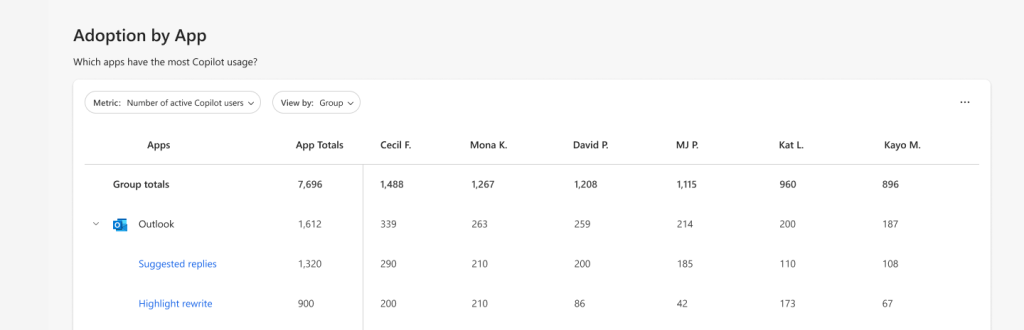
The feature is enabled automatically for all tenants with a Copilot license. No configuration or policy change is required.
MC1222978 — User-day export for Copilot Dashboard metrics (public preview)
Timeline: Public preview mid-May 2026 → end of May 2026, with GA early August 2026 → end of August 2026. Roadmap ID 547749.
Copilot Dashboard users with company-level access will be able to export de-identified Copilot usage metrics aggregated by user and day, covering the last 28 days. This is in addition to the existing user-week export.
Highlights:
- Minimum of 50 Microsoft 365 Copilot licenses required.
- Export includes Organization and Job function attributes, and supports analysis across Copilot-enabled apps (Word, Excel, Teams, and more).
- Uses the same Viva Feature Access Management (VFAM) controls as the existing user-week export — no new access controls are introduced.
- Data usually reflects Copilot activity up to 3 days before the export date.
Action: review your VFAM settings for users with company-wide Copilot Dashboard access, and inform eligible users about the new option.
MC1280558 — Use Copilot to explain selected slide content in PowerPoint Live
Rolling out in mid-May 2026 and expected to complete by late May 2026. Roadmap ID 557256.
During a Teams meeting with PowerPoint Live, attendees can select text on the slide — an acronym, a technical term, a complex concept — and ask Copilot to explain it. The explanation is shown privately to the attendee, without interrupting the presenter or cluttering the chat.
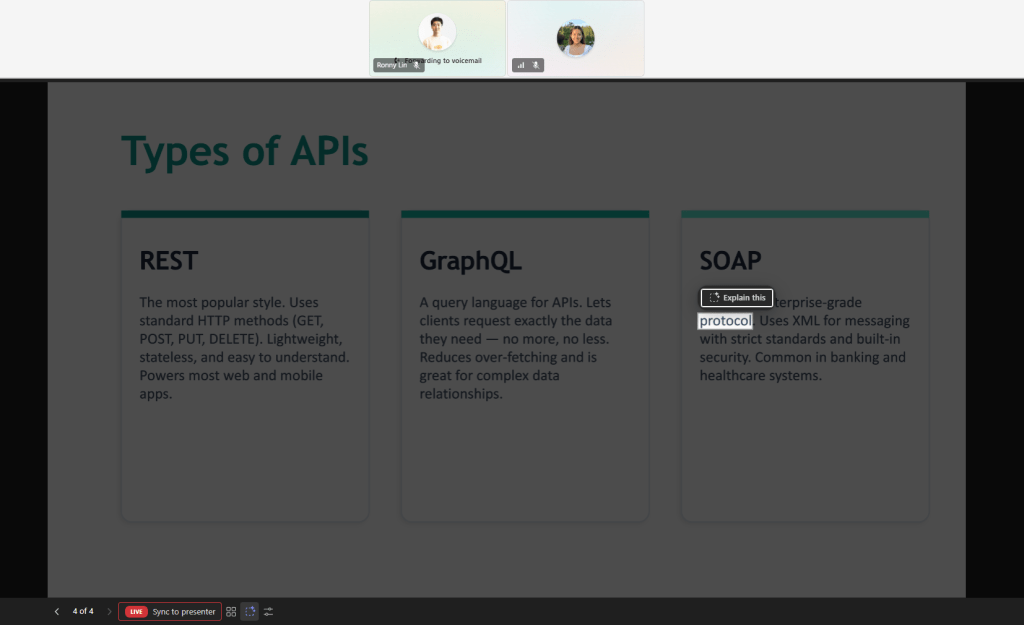
- On by default for tenants with Microsoft 365 Copilot (Premium).
- No admin action required to enable.
- Processing follows existing Copilot for Microsoft 365 AI processing and security boundaries.
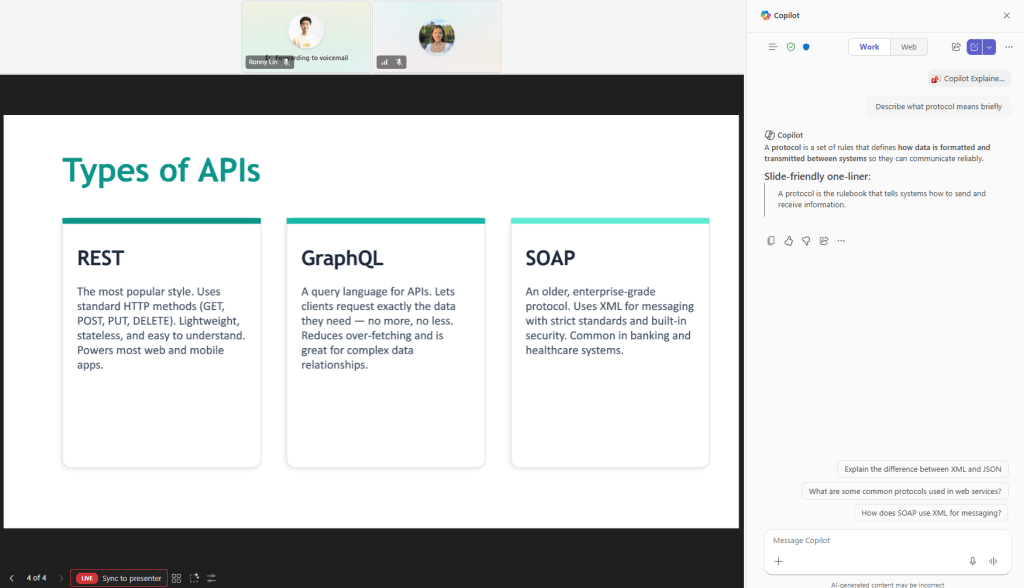
A small feature, but one with a big impact on meeting inclusivity — especially for global teams and for sessions full of jargon. I love this one.
What this all means for the work
Taken together, these updates tell a very clear story: Microsoft 365 Copilot is maturing from an assistant into a true coworker, with deeper app integration (Word document workflows, PowerPoint Live explanations), richer analytics (intent, satisfaction, user-day exports), and stronger security and governance (Purview DLP, oversharing remediation, Secure and Govern guidance). And with Copilot Cowork now in Frontier, the whole stack is moving toward real execution of multi-step work.
At the same time, the April 15 change reminds all of us that the rich in-app Copilot experience belongs to the Premium subscription (paid Microsoft 365 Copilot license), and every organization needs a clear licensing and enablement plan to match.
This is the Future of Work in practice — an AI-Native workplace where people and intelligent agents co-create every day, inside a secure, governed Microsoft 365. I am excited to see how organizations adopt all of this, and I will keep exploring these capabilities on the blog.
Stay tuned! ✨


