Microsoft is lining up a new wave of Copilot and Teams capabilities—features that are in preview, targeted release, or scheduled rollout over the coming weeks and months. Here’s what’s on the way, when to expect it, and why it matters.
Across Copilot and Teams, Microsoft is pushing from “AI assistant” toward “AI execution”—with more model options, more in-flow actions, smarter agents, richer meeting recaps, stronger controls for external participants, and better support for multilingual collaboration. Some of these experiences are already in limited rings, but many organizations will see them arrive as rollouts progress.
Here’s information of a selected what’s coming. Keep in mind that Copilot and Teams, yes Teams too, are evolving all the time and there are a lot more updates coming to both
- Claude Sonnet and Opus 4.7 Join the Copilot Model Lineup
- Draft and Send Outlook Emails Without Leaving the Copilot Chat
- Declarative Agents Upgraded to GPT-5.2
- Teams Will Identify External Bots Joining Your Meetings
- Teams Meetings Video Recaps
- Teams Is Adding Turn-by-Turn Interpretation
- Channel Agents Are Getting a Level-Up
- Copilot is Just Getting Started
Claude Sonnet and Opus 4.7 Join the Copilot Model Lineup
Microsoft is expanding model selection in Microsoft 365 Copilot by adding Anthropic Claude Sonnet alongside OpenAI’s GPT models. If you have a Copilot license, you’ll be able to choose Claude Sonnet from the model selector in Copilot Chat as this rolls out. I can already see it in my demo tenant.
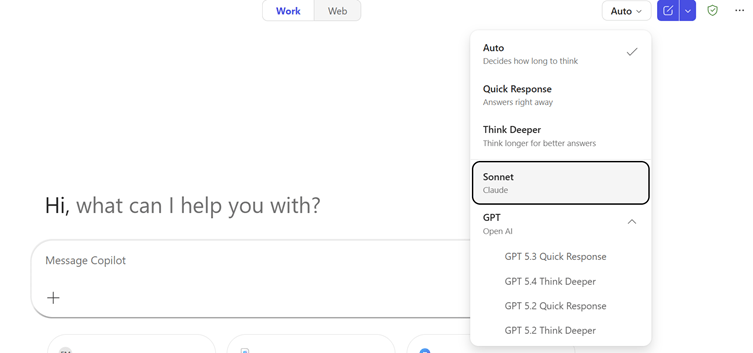
Microsoft has indicated this is starting in Frontier and then expanding across web, desktop, macOS, and mobile..
If you don’t see this yet and want to test out Claude already, you can use it in the Researcher Agent (if Anthropic models are allowed in your environment).
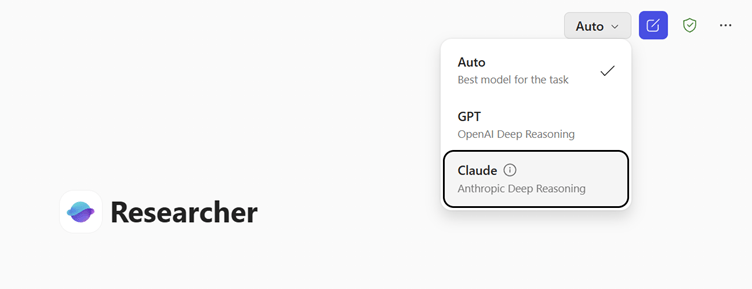
Claude Opus 4.7 in Microsoft 365 Copilot
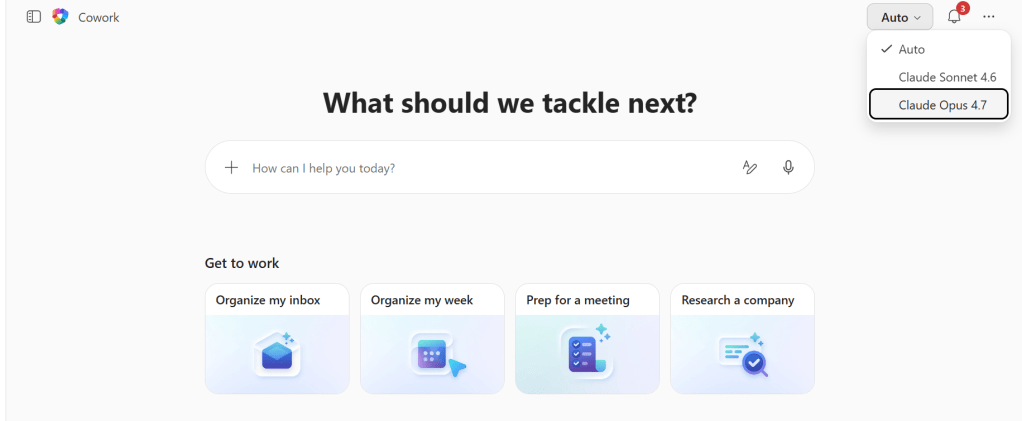
But this is getting even better with Claude Opus 4.7! Microsoft is expanding model choice with Anthropic’s Claude Opus 4.7 is available in Microsoft 365 Copilot — specifically in Copilot Cowork (Frontier) and in Copilot Studio early release cycle environments — and it is also rolling out to Copilot in Excel.
Opus 4.7 is designed to be faster and more precise than the earlier Opus generation. It follows instructions more closely, checks its own outputs before responding, and reads images at higher resolution — so Copilot can interpret visual content with more detail and use Work IQ context to take action more precisely. It is also better at picking the right tool for the task, which matters a lot when you are running multi-step, agentic work.
You will find Opus 4.7 in the model selector in Copilot Cowork and Copilot Studio, and in the near future in Copilot in Excel. This is exactly the kind of cutting-edge, enterprise-grade model choice that makes Microsoft 365 Copilot — and Copilot Cowork especially — so powerful for real work.
Why this matters:
This isn’t just about having options—it’s about matching the right model to the right task. Claude Sonnet is known for strong performance in document analysis, nuanced reasoning, and content generation. Giving users the ability to pick their model based on the work they’re doing is a clear signal that Microsoft sees Copilot as a multi-model platform, not a single-model product.
There are governance implications too. Anthropic operates as a Microsoft subprocessor, and the models are excluded from EU Data Boundary commitments. In regions where Anthropic is set to “off by default,” admins will need to opt in. This is a good reminder that AI governance is now part of everyday IT administration.
Draft and Send Outlook Emails Without Leaving the Copilot Chat
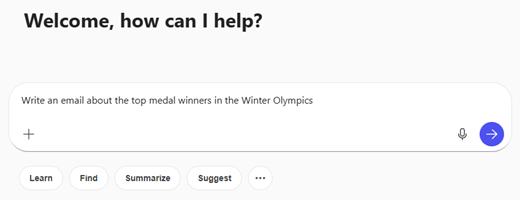
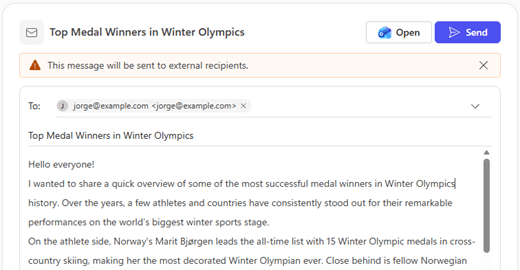
One of the most practical capabilities on the roadmap: Copilot Chat will be able to draft, edit, and send Outlook emails without leaving the chat interface as this feature rolls out.
In tenants where it’s enabled, when Copilot detects email-writing intent it can open an embedded Outlook compose experience inside Copilot Chat. You can review and edit the content, modify recipients, and send—or open the draft in Outlook to continue there.
Microsoft has described this as a desktop-first (“big screen”) rollout with completion targets in early April. Availability depends on rollout ring, tenant configuration, and prerequisites (Microsoft 365 Copilot license and an Exchange Online mailbox).
Why this matters:
This is one of the clearest examples yet of Copilot shifting from assistant to execution surface. Instead of generating a draft that you copy and paste into Outlook, Copilot can now complete the entire workflow. Less context switching. More doing.
It’s also a sign of where this is going: Copilot as the place where work happens, not just where you ask questions about work.
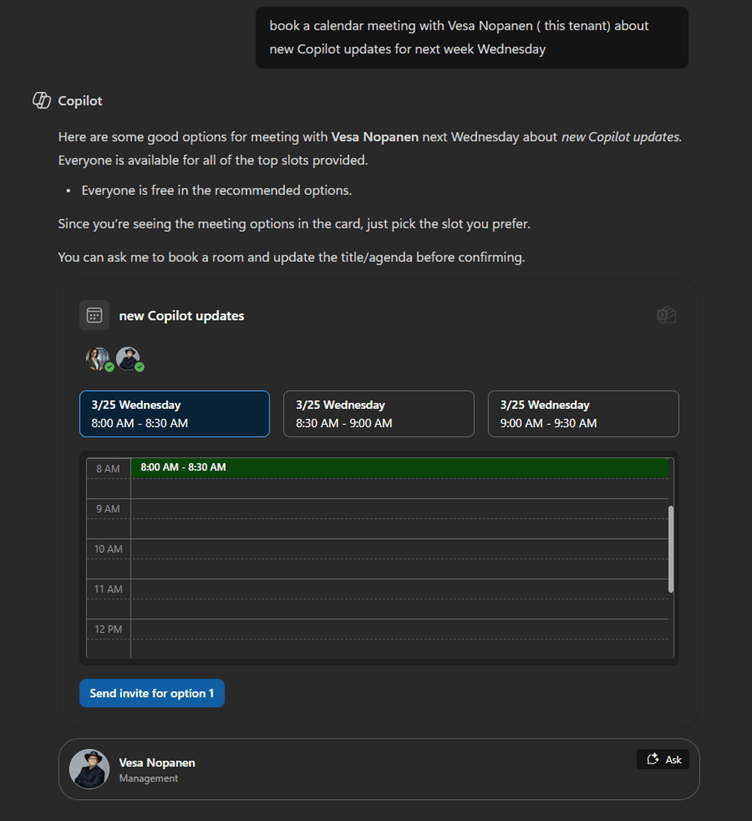
Did you know you can already use Copilot Chat to book meetings?
Declarative Agents Upgraded to GPT-5.2
Microsoft 365 Copilot Declarative Agents have been upgraded to the GPT-5.2 model, which brings improvements in reasoning, multi-step workflows, tool calling, structured output generation, and document analysis.
Users may notice improvements in quality, accuracy, and formatting—along with slight behavioural differences due to the model change.
Why this matters:
If you’ve built Declarative Agents, this is a good time to test your top prompts and workflows before the change reaches all users. The upgrade is automatic, and there are no new admin controls, but Microsoft recommends validating key scenarios and using the thumbs-up/thumbs-down feedback with the tag #GPT52 to help improve detection of any issues.
More broadly, this update reinforces that agents are a core part of Microsoft’s Copilot strategy—and the platform is evolving quickly to support more complex, reliable agent behaviors.
Teams Will Identify External Bots Joining Your Meetings
Microsoft Teams is introducing a new capability to detect external meeting assistant bots as they attempt to join meetings hosted by your organization.
The feature specifically targets bots used for transcription, summarization, and other meeting assistance services. When detected, these bots will be clearly labelled in the meeting lobby experience.
The rollout begins in mid-May for Targeted Release and completes in mid-June for general availability (including GCC tenants).
Why this matters:
This is about visibility and control. Microsoft notes that some external bots can access meetings without the knowledge or consent of the organizer or hosting tenant, creating data security, privacy, and compliance risks.
This update gives organizers greater awareness and gives admins clear controls over how detected bots are handled. It’s a timely response to the growing ecosystem of third-party meeting bots—and a reminder that AI governance extends to who (and what) participates in your meetings.
There may still be bots that go undetected, so Microsoft is encouraging users to report them directly from the meeting to help improve detection over time.
Teams Meetings Video Recaps
Intelligent meeting recap in Teams is adding video-based recaps—narrated video highlights that showcase key takeaways and important moments from recorded meetings.
This feature is expected to reach general availability in April 2026.
Why this matters:
Text-based recaps are helpful, but video recaps are more consumable and more engaging, especially for people who couldn’t attend the meeting. This is a natural evolution of Teams’ intelligent recap capabilities toward multimodal summary experiences.
It’s also another example of how AI is making meetings more accessible after the fact—reducing the pressure to attend every meeting live and making it easier to stay aligned across time zones and schedules.
Teams Is Adding Turn-by-Turn Interpretation
Microsoft is planning a Consecutive Interpretation mode for the existing Interpreter agent in Teams.
Unlike simultaneous interpretation, this mode uses turn-by-turn interpretation: participants speak one at a time, and each speaker’s words are interpreted before the next speaker begins. It’s designed for structured, interactive multilingual meetings like working sessions, negotiations, and cross-functional collaboration.
The feature rolled out to Targeted Release in early March and will reach general availability between late April and early May.
Why this matters:
This is one of the most distinctive “future of AI meetings” stories in this set. It shows that Microsoft is thinking beyond captions and transcription and moving toward real-time, structured multilingual collaboration.
For global teams, this reduces overlap, improves interpretation accuracy, and helps everyone stay aligned—even when they don’t share a common language. It’s a practical example of AI enabling collaboration that would otherwise be slow, expensive, or impossible.
Channel Agents Are Getting a Level-Up
Microsoft is rolling out several updates to Channel Agent in Teams to make it more collaborative and more practical.
The updates include:
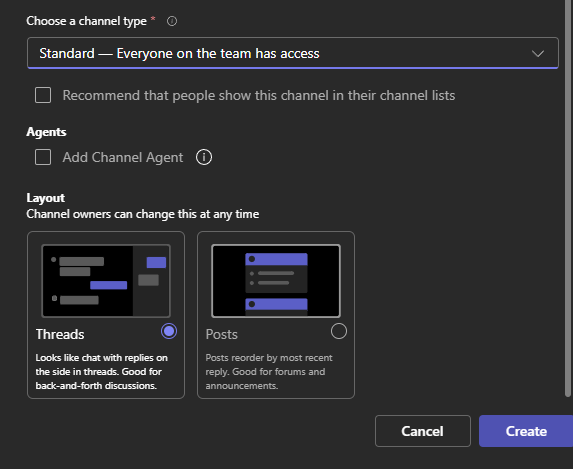
- Customized welcome messages based on channel context
- The ability to disable automatic Channel Agent creation during team or channel setup
- Improved scheduling suggestions using updated calendar logic
- The ability to add members to a channel with prompts like “@agent add John Doe to this channel”
- The ability for Channel Agents to post messages directly to a channel
This feature has been rolling out to Targeted Release since early March and should be complete on every tenant around this time. A Microsoft 365 Copilot license is required.
Why this matters:
This is a strong example of agents becoming operational and collaborative, not just informational. Channel Agents are moving into the flow of teamwork—helping with scheduling, adding people, and posting updates without needing a human to do it manually.
It’s another signal that agents are becoming teammates, not just tools.
Copilot is Just Getting Started
If you step back and look at what’s in the rollout pipeline, a clear pattern emerges:
Copilot is becoming more powerful, more actionable, and more configurable. You can now choose your model, execute work directly in Copilot Chat, and rely on smarter, more capable agents.
Teams is becoming more intelligent, more secure, and more multilingual. You get richer recaps, better visibility into who’s joining your meetings, and real-time interpretation that makes global collaboration feel effortless.
And across both products, Microsoft is making it clear that AI isn’t just about answering questions—it’s about doing work, enabling collaboration, and making decisions. This article was just about coming updates and improvements to Copilot and AI in Teams – however I suggest you read my earlier article about Digital Workers to see where we are heading.
If you’re managing Copilot or Teams in your organization, soon is a good time to:
- Review your governance settings, especially around model choice and external meeting bots
- Test your Declarative Agents to make sure they’re performing well on GPT-5.2
- Start thinking about how features like Copilot email drafting and Channel Agents change the way your teams work
The future of work is being built in real time. And it’s moving faster than most of us expected.


