
I keep an eye on Message Center updates that will actually change how people work day-to-day (and also what admins will need to handle behind the scenes). Here are a plenty new things coming in the next weeks and months but let me pick a few to this article: first Copilot end user features, then Teams Events / Live Events + Meet app, and finally admin-focused & licensing changes.
- TL;DR (for those in a hurry)
- 1) Copilot end user features
- 2) Teams Events, Live Events retirement, and the Meet app
- 3) Admin-focused changes (governance + PowerShell + approvals)
- Licensing changes to Teams, Places and Teams Premium
TL;DR (for those in a hurry)
Here are the key changes and the “so what” in one minute.
- Copilot (end users)
- “Hey Copilot” voice trigger goes GA end of Feb 2026 — it’s off by default, user must enable it, and there’s no tenant/group admin switch. (MC1189003)
- Copilot Chat improvements in Outlook + Agent Mode in Word/Excel/PowerPoint are for users without a Microsoft 365 Copilot license (no change for licensed users). Rollout Jan → late Mar 2026. (MC1187671)
- MCP agents can show interactive UI widgets in Copilot Chat (buttons, selectors etc.) in Public Preview late Feb → early Mar 2026. (MC1227627)
- Teams events / Meet app
- Teams Live Events retirement is locked: scheduling already becomes limited (can’t schedule past Jun 30, 2026), and full retirement is Jun 30, 2026; existing events keep working until Feb 28, 2027. (MC1226495)
- Viva Engage Live Events (powered by Teams Live Events) stops new scheduling Apr 15, 2026; already scheduled ones supported until Feb 28, 2027. (MC1227085)
- Meet app gets a unified “Events” experience (webinars + town halls + custom events): Targeted Release Feb 2026, GA Apr 2026. (MC1227087)
- Admin / governance
- New agent request & approval flow for Microsoft agents lands early → end of Mar 2026. Expect more user requests (good signal, but needs process). (MC1134738)
- New PowerShell cmdlet to change meeting organizer arrives mid‑May → late Jun 2026 (Worldwide/GCC). Big win for offboarding and long recurring series. (MC1227623)
- Licensing
- Starting 1st of April 2026
- Microsoft Places end‑user coordination features now included with licenses that provide Outlook/Teams calendar access (Microsoft 365 E3/E5/Business plans, Outlook 365 E1–E5, Exchange Online, and eligible Teams licenses).
- Teams Shared Space license renamed and expanded with new space‑management and analytics capabilities for admins.
- Advanced events features previously in Teams Premium now included in Teams Enterprise (large events, enhanced host controls, registration, attendee tools, simu‑live, immersive events).
1) Copilot end user features
“Hey Copilot” voice activation in the Copilot app for Windows (GA this month)
Message Center: MC1189003 (Roadmap ID 497848)

What Microsoft is adding
Microsoft is making “Hey Copilot” generally available for the Microsoft 365 Copilot app on Windows. This is a hands-free trigger phrase that starts a voice conversation. The big detail: it’s OFF by default, and users must enable it themselves in settings ( … menu that is next to your profile picture on bottom left corner of the M365 Copilot App).
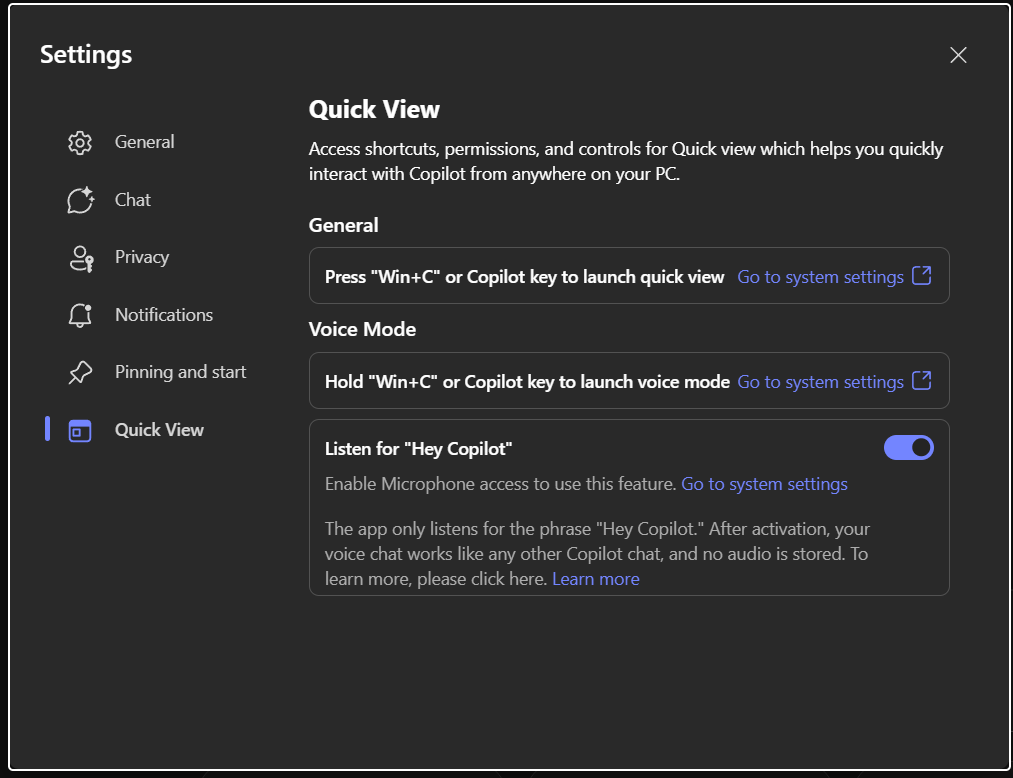
Voice is one of the most “natural” interaction modes for Copilot, but it is also the one that raises most questions: is it always listening? Is audio stored? Can admins disable it?
From the Message Center details: it works locally for the wake word, and it is stated that no conversation audio is stored — but text transcripts are handled like other Copilot chats.

Rollout schedule
- General Availability (Worldwide): begins end of February 2026 (so… this month).
- Preview (Frontier) already started end of November 2025.
Important operational notes
- No admin control to disable at tenant/group level (so you should prepare comms, not a policy).
- English trigger phrase only (“Hey Copilot”), but once activated, chat can be in other supported languages.
- Doesn’t activate if device is locked or another app is using audio.
My “what to do”
- Tell users: it’s optional, you must turn it on, and it stops listening when you dismiss.
- Remind people about microphone permissions and that this is for Copilot licensed users.
Copilot Chat upgrades inside Outlook + Agent Mode in Word/Excel/PowerPoint (for Copilot Chat users WITHOUT a Microsoft 365 Copilot license)
Message Center: MC1187671
Important first: this update is specifically for eligible Copilot Chat users who do NOT have a Microsoft 365 Copilot license. Microsoft even says: “There is no change for users with a Microsoft 365 Copilot license.” So if your organization mostly talks about “Copilot licensed users”, this one can be easy to misunderstand.
What Microsoft is adding
Microsoft is expanding Copilot Chat in Outlook so it can reason over more than a single email thread — it can include the entire inbox, calendar, meetings, and other enterprise data for that user (based on the message text).
At the same time, Microsoft is rolling out Agent Mode inside Word/Excel/PowerPoint and also Word/Excel/PowerPoint Agents that users can call from Copilot Chat (Tools menu or “@”).
✨This is adding quite a lot value to those who are using apps with Microsoft or Office 365 license but don’t have M365 Copilot license.
Rollout schedule (estimated)
- Rollout is expected to complete late March 2026.
- Outlook expanded reasoning started rolling out (Jan 20 update) and should complete “in the following weeks”.
- Agent Mode in Excel and Word started rolling out (Feb 5 update), expected to complete “in the following weeks”.
MCP-based agents get rich interactive UI widgets inside Copilot Chat
Message Center: MC1227627
What Microsoft is adding
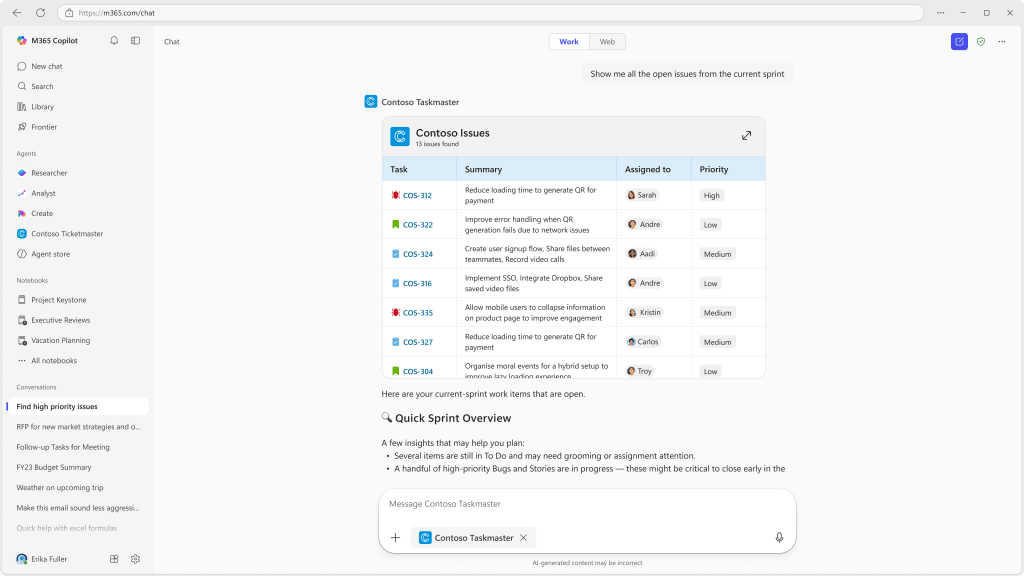
Microsoft is enhancing Model Context Protocol (MCP) based agents so they can show rich interactive UI widgets inside Copilot Chat — think buttons, selectors, parameter pickers, and other guided UI elements embedded directly in chat.
Why I care
This is one of those changes that looks “small” but changes user experience a lot. Most agents today are text-in/text-out. Widgets can make agents feel more like real apps: less prompt gymnastics, more structured choices, fewer errors.
Rollout schedule (estimated)
- Public Preview: starts late February 2026, completes early March 2026
What changes for users
- Users will see widgets when interacting with agents that implement them.
- It should make agent interactions more predictable and faster.
What changes for admins
- Admins still manage agents in Microsoft 365 Admin Center; existing controls remain.
- Access can still be scoped via Entra ID groups.
2) Teams Events, Live Events retirement, and the Meet app
Teams Live Events retirement (and Graph API retirement)
Message Center: MC1226495
Microsoft is retiring Teams Live Events and the Microsoft Graph APIs used to create them on June 30, 2026. Events scheduled before that date keep working until February 28, 2027.
It is no longer possible schedule Live Events past June 30, 2026.
Rollout / timeline (estimated)
- Jun 30, 2026: Live Events + Graph APIs retire
- Feb 28, 2027: last day for already scheduled events to function
What to do now
- Inventory where Live Events are used: Teams, Engage, Dynamics 365, custom Graph automation.
- Start moving large broadcast scenarios to Teams town halls.
- Update internal docs and training.
Engage is retiring “live events powered by Teams Live Events”
Message Center: MC1227085
What Microsoft is doing
Microsoft is removing the option to schedule Engage live events powered by Teams Live Events starting April 15, 2026. Already scheduled ones will still run until February 28, 2027.
Timeline
- April 15, 2026: can’t schedule new Engage live events using Teams Live Events
- Feb 28, 2027: support ends for already scheduled ones
What to do
- Start using Engage events powered by Teams town halls instead.
- Check internal comms templates and event guidance pages.
Redesigned Meet app: a unified Events experience (webinars + town halls + custom events)
Message Center: MC1227087 (Roadmap ID 547834)
What Microsoft is adding
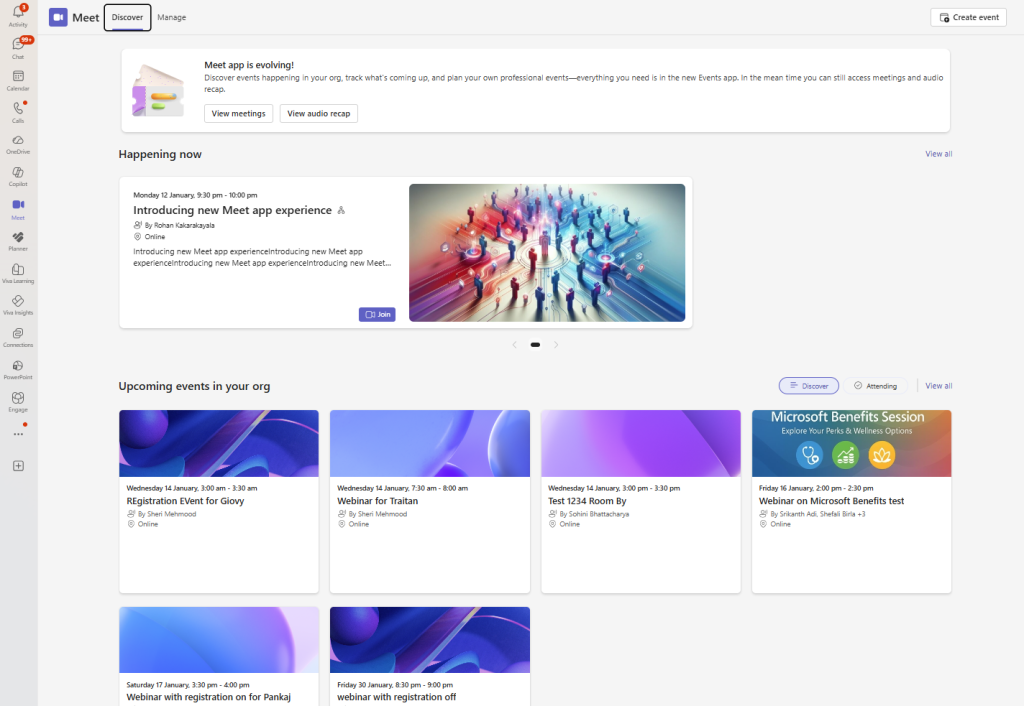
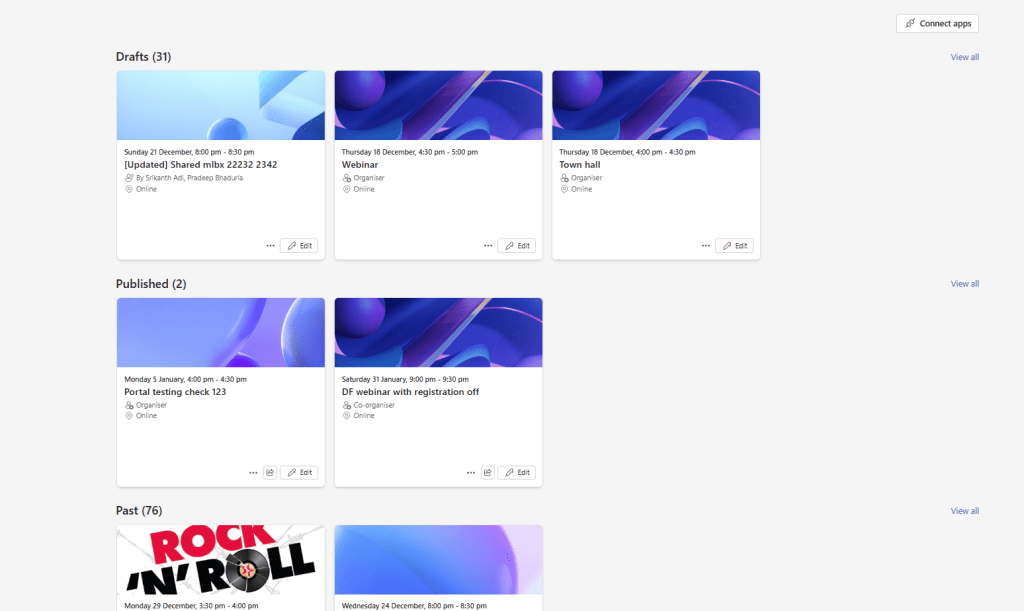
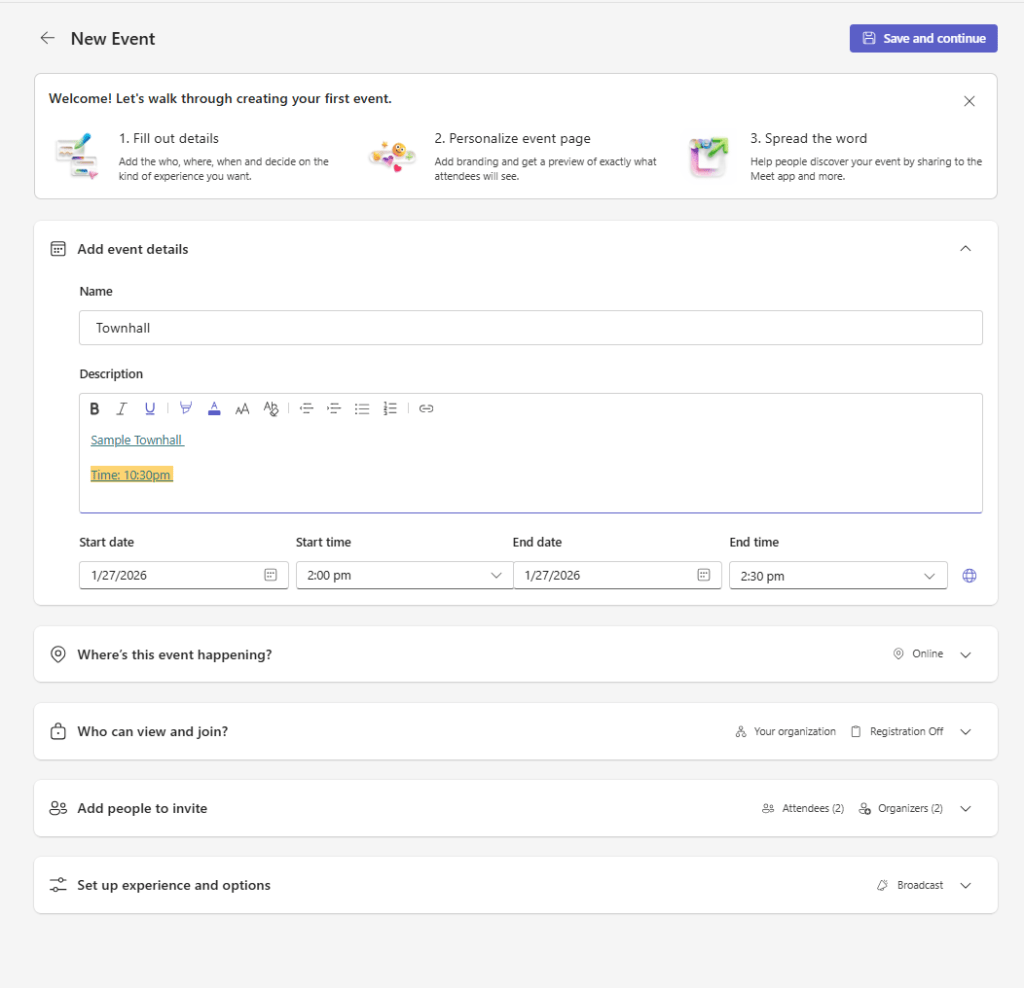
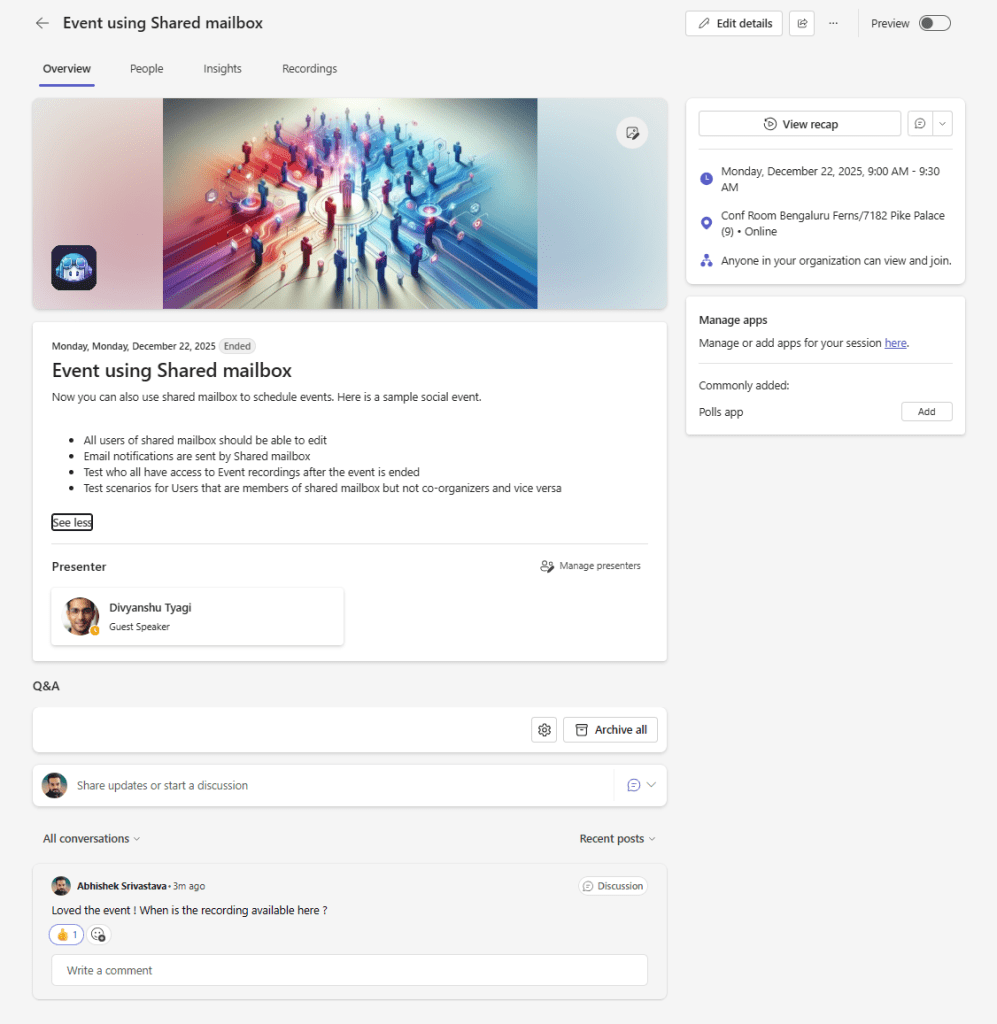
Microsoft is introducing a redesigned Meet app in Teams with a unified Events hub. The goal: one place to create, discover, and manage webinars, town halls, and custom events.
Rollout schedule (estimated)
- Targeted Release: early Feb 2026 → mid-Feb 2026
- General Availability: early Apr 2026 → late Apr 2026
What changes for users
- A central Events hub (create/edit/track)
- Simplified scheduling using templates
- Event landing pages with Q&A and Polls
- Scheduling with shared and delegate mailboxes
What to do
- If you have Targeted Release users, prep them for UI change and capture feedback early.
- Update internal instructions: where to click, what event type to use, what policy applies.
3) Admin-focused changes (governance + PowerShell + approvals)
New request & approval experience for Microsoft agents in M365 admin center
Message Center: MC1134738 (Roadmap ID 494809)
What Microsoft is adding
Microsoft is rolling out a new workflow where users can request access to Microsoft-built agents directly from the Agent Store — even if the agent is currently unavailable due to org configuration. Admins manage approvals centrally from Copilot > Agents & connectors.
Rollout schedule (estimated)
- Begins early March 2026
- Completes end of March 2026
Key details
- Applies only to Microsoft agents (not all third-party agents).
- On by default, no setup required.
- Admins can approve/reject at individual user level.
Change meeting organizer via new PowerShell cmdlet in Exchange Online
Message Center: MC1227623 (Roadmap ID 554937)
What Microsoft is adding
Microsoft is adding a PowerShell cmdlet that lets admins change the organizer of an existing meeting or meeting series in Exchange Online. This is great for long running series when someone changes role, goes on leave, or is offboarded.
Rollout schedule (estimated)
- Worldwide/GCC: mid-May 2026 → late June 2026
- GCC High/DoD: mid-May 2026 → late July 2026
Important behavior
- Internal attendees: meeting gets updated silently, no re-RSVP needed.
- External attendees: they receive two messages (end old series + invite new series), and may need to accept again.
Why I care
This solves a real pain point. I’ve seen many tenants with “orphaned” recurring meetings that nobody dares to touch. This makes it manageable.
What to do
- Update your offboarding / role-change process: “transfer ownership of recurring meetings” becomes a real step.
- Watch for public docs on the cmdlet name and parameters when Microsoft publishes them.
Licensing changes to Teams, Places and Teams Premium
Starting April 1st 2026:
- End-user workplace coordination features from Microsoft Places available for licenses that include access to the calendar in Outlook and Teams (including Microsoft 365 E3, E5, Business Basic, Business Standard, and Business Premium; Outlook 365 E1, E3, and E5; Exchange Online; various Teams licenses; additional Microsoft 365 and Office 365 licenses)
- Introduction of the renamed Teams Shared Space license with additional capabilities for space management and analytics for admins
- Advanced events features that once required a Teams Premium license will be included in Teams Enterprise licenses. This includes advanced events capabilities for hosting large-scale, professionally produced events, expanded host controls, registration and attendee management tools, simu-live events, and immersive events functionality.
- Advanced Teams town hall and webinar features available for all Teams Enterprise users for instances up to 3,000 attendees (10,000 attendee view-only experience)
- Introduction of attendee pack add-on licenses for town hall events starting from 5,000 up to 100,000 attendees
- Immersive events are included with a Teams Enterprise license at no extra cost.
- Microsoft Enterprise Content Delivery Network (eCDN) is now included with a Teams Enterprise license
Teams Premium and benefits it adds on advanced communications, security, and intelligence capabilities will continue to be available. Organizers with an active Teams Premium license purchased before the April 1, 2026 may continue to host events with up to 100,000 attendees until their current Teams Premium term ends. After April 1, 2026, once a customer’s Teams Premium term expires, events above 3,000 attendees will require an Attendee Capacity Pack sized to the desired attendee capacity.
Teams Premium will continue to have
- Security and meeting controls
- Intelligent calling features
- Personalized meeting experiences
- Advanced Bookings and virtual appointment capabilities
- Intelligent meeting features
Read more about these licensing updates from https://techcommunity.microsoft.com/blog/microsoftteamsblog/licensing-updates-extend-access-to-advanced-capabilities-in-microsoft-teams-and-/4488312

 Vesa Nopanen - Future Work today