
Work is changing. Imagine a workday where AI seamlessly integrates into every task, transforming the way we operate. This is not a distant future; it’s happening now with Microsoft 365 Copilot. Recently, I’ve been to Microsoft 365 Community Conference and listened to keynotes and sessions about what’s next such as Microsoft’s new M365 Copilot app, and it feels like walking into an AI-powered worklife. The old-fashioned routine of bouncing between apps is giving way to something different: an “AI-first” environment where the AI itself is the work surface – the canvas, instead of being a tool. Let’s explore what it means to work in an AI-first era, and in the age of AI Agents. We are co-creators with AI.
We’ve heard “everyone” proclaim the dawn of a new AI era, but what does that mean for us? And for how we work? We are transitioning from the traditional method of launching separate apps for each task to a more integrated approach where AI agents orchestrate work across various applications and other AI agents. I heard it described it well: “We’re entering the agentic era, where Copilot and AI agents become the front door to work, not apps.”. Your intent becomes more important than the app or what interface you use. If I need a project update or a draft presentation in the (near) future, I don’t manually gather files and open PowerPoint; I tell the AI (Copilot) what I need, and it will figure it out using information from inside and outside of the organization. For example, if I need a project update, I simply ask Copilot, ‘Give me the latest project update,’ and it compiles the necessary information from emails, documents, and other sources.
This is a fundamental shift in the mindset. Thinking first about how AI could help me with this task.
At Microsoft 365 Community Conference it was mentioned that the new Copilot app will be generally available at Microsoft Build , which is happening next week! Attending Build online is free, so I recommend registering to it.
Copilot is becoming more as a “canvas” or “work surface” – from brainstorming new ideas to analyzing data – and all that happens in conversation with an AI.
Copilot has truly become the UI for AI — and for me, it’s the scaffolding for my workday.
Satya Nadella recently
- The new Microsoft 365 Copilot App: Your New Front Door to Work
- Copilot Notebooks
- Copilot Pages
- From Knowledge Worker to “Agent Boss”
- Teams of the Future
- Conclusion: Already Working with the AI
- Read more & Source references:
The new Microsoft 365 Copilot App: Your New Front Door to Work
So, what the new App is – or will be? It is the evolution of the prior Office/Microsoft 365 home portal that has been reimagined as an intelligent front door to your work that connects Copilot Chat, Search, Create, Pages, Notebooks and apps. Currently the new Microsoft 365 Copilot app is in the limited private preview, and I have had an honor to be included in it. I can’t share any details under NDA, only what’s publicly available. But as I am writing this article, you know I am thrilled about the new AI First approach.
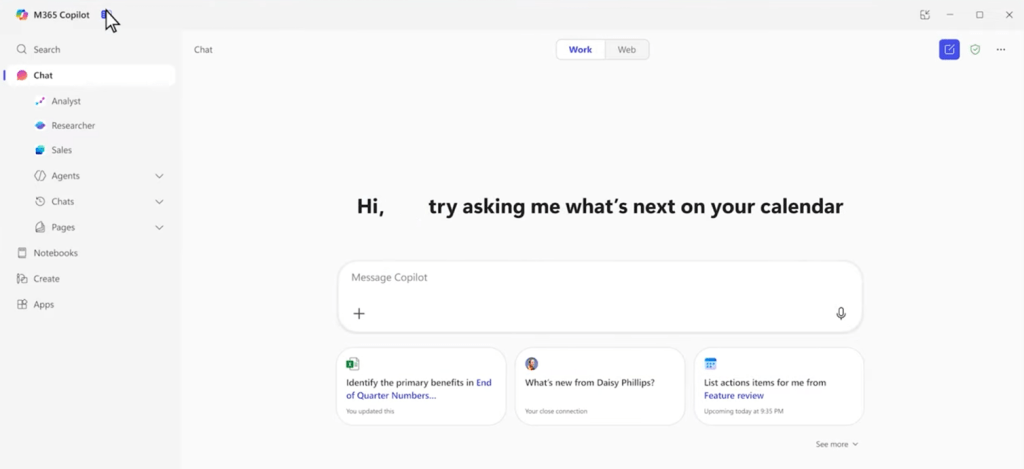
What else is coming to Copilot soon, are memory, personalization and AI Search. Copilot will learn how you work and begins to understand needs and preferences through interactions, such as chats, job profile, custom instructions and so on. This will make the interaction feel much more personal and less like one-off Q&As or like chatting with a bot. Over time, it should start feeling like Copilot understands my work patterns, my team, and the content that matters to me.


The result is that Copilot knows my context – who I am, what projects I’ve been working on, upcoming meetings on my calendar – and I can just ask it to help with whatever I need. Need a briefing on yesterday’s meetings? A draft of the agenda and background information for the next meeting with a client? To find that information (like a slide deck) buried in OneDrive? I simply tell what I need, and Copilot pulls together the answers and content. It’s like having a personal assistant who’s instantly familiar with all my work context and content.

Another big news is multimodality – the ability to use voice and vision, not just text. Notebooks will have an audio summary, for example. Have you played with snapping a picture of a document, and then using Copilot to intelligently extract the text or information from it? We’re just at the beginning of these capabilities, but already I’ve found that speaking or showing something to AI can be more natural and efficient than typing a long prompt. We can expect to see more and more multimodal interactions as part of Copilot’s evolution.

We are getting closer to the time, where it begins to feel like the Copilot turns the entire Microsoft 365 suite into a single cohesive workspace – one with AI in the center. I hope this means that I won’t be hunting through folders and apps; I just direct Copilot and agents to collect and bring the pieces together for me. This hints at why Microsoft calls Copilot “your everyday AI companion” – it’s aiming to be the new starting point for work. The journey there won’t be happening right away, but in steps. This gives people time to adapt to the (rapid) change, but organizations should be already walking on their AI road.

Create will utilize the GPT-4o model image creation capabilities, but it isn’t the only thing you can do in Create. You can also create videos from PowerPoint documents, as an example.

There are also other new capabilities coming to the Copilot app. Researcher and Analyst agents, People/skills, and various others. I will be touching those another time, except that I am really looking forward for trying out Researcher and Analyst agents to see what they can do to help me.
Copilot Notebooks
This is a very interesting upcoming feature, as Notebooks are part of the new Microsoft 365 Copilot app these are still at private preview – but should be out at Microsoft Build next week! Copilot Notebooks will be like smart scratch books collecting notes, links and content. If the Copilot app is the front door to your work, a Copilot Notebook is like a dedicated room where a specific personal project or topic lives. Copilot Notebooks are AI-powered and focused on the content that matters to your task at hand. In notebooks you can gather all your relevant resources – documents, chats, meeting notes, links, etc – related to a topic in one place (like a scratch book). It is not a snapshot, as notebooks are “constantly scanning your source material to update in real time as your data evolves”, this meaning that as documents and files content are updated, they stay up to date for Copilot and you to work on. I’ve used ChatGPT Projects to organize a information to projects: I added the docs, some links, a few pdfs, and images. With all that context loaded in, AI essentially “exists” or “lives” in that project (notebook) with me, always available to answer questions or generate content using just the project’s materials.

The magic of Notebooks is how Copilot’s assistance in it becomes highly focused. Because it’s grounded on the content you’ve added, it can answer incredibly specific questions and draw connections that would take time to compile manually. You could ask, “Copilot, what are the key issues and unclear requirements in this project?” and it will scan through the notebook’s references to find open issues or unclear requirements and then summarize them. It’s like AI intelligence on tap: having a project analyst always on call. You can include an agenda and ask Copilot to draft a status update presentation – it will pull out points from the spec and recent emails to outline the slides, all within the notebook context. Because the notebook content stays up-to-date, it becomes a living project hub. I can imagine using notebooks to assist me with blog writing in the future: collecting information, giving custom instructions, working with Copilot adding content to Pages.

I am looking forward getting my hands on Copilot Notebooks in real life (not just watching sessions and reading articles of it) and hope that I will experience less time wrangling documents and status updates, and more time thinking – with AI doing the tedious collation and analysis in the background. Having used similar tools in the past (ChatGPT projects for example), I am excited to see how Copilot Notebooks will reduce the time spent on document management and allow me to focus more on strategic thinking.
During M365Conf sessions it was mentioned that notebooks will be personal in the beginning, but in the future it will be possible to share notebook with colleagues. Contents in notebook (like documents, Copilot Pages) can be shared with others or collected in from Teams and other places.
Notebooks are powered by Microsoft Loop, and they are stored in user’s personal container in SharePoint Embedded. You can think of it as a second OneDrive for user containing Copilot Pages, Notebooks, and personal Loop pages. This is naturally something that needs to be taken care of during the exit-process.
Copilot Pages
While Notebooks will shine for projects / research / tasks / knowledge collections, Copilot Pages are the way to collaborate with AI and colleagues together, live. Microsoft built Copilot Pages on their Loop platform (which is all about flexible, shareable content), and it can be called a “canvas for multiplayer AI collaboration.” In practice, a Copilot Page is like a rich document where you and your teammates can all contribute in real time. You use Copilot to collect information and then add findings to a Copilot Page for further editing.
From a technical standpoint, Copilot Pages are Loop files ( Pages) , which means they’re fluid, shareable objects. You can send a Copilot-generated Page into a Teams message as a live component, for example. Pages themselves can be shared with just a link – colleagues can pop in instantly and start working. Copilot Pages fast, fluid, and fun too.
From Knowledge Worker to “Agent Boss”
Copilot is starting to reshape our roles at work. Microsoft’s 2025 Work Trend Index report introduced the term “agent boss” to capture a new aspect of many jobs. In the future, human employees will act as “agent bosses,” overseeing AI workforces like they manage people today. That might sound buzzwordy, but consider what’s already happening: I can already coordinate a handful of AI agents – one drafting content, another analyzing data, another monitoring for new information. It has gone from just doing the work myself to directing a team of AIs to do parts of it for me. We all will need to manage and be bosses of agents.

We’re already seeing hints of this “agent boss” dynamic. We are assigning tasks to Copilot: “summarize these notes,” “draft a reply to this email,” “summarize my inbox for anything from the client and flag it.” I’m not abdicating my work – I’m guiding the AI, checking its output, and giving feedback (much like you would with a junior human assistant). Someone from Microsoft said: “Working with agents is like onboarding a new team member — you don’t micromanage, but you need informed trust.” That rings true; I’ve learned when to trust AI to handle something vs. when to step in and correct or refine. In a sense, everyone is becoming a manager of AI helpers.
In Frontier Firms (A company powered by intelligence on tap, human-agent teams, and a new role for everyone: agent boss.), even entry-level employees are managers from day one – because they’re managing AI. Your value lies not just in what you can do yourself, but in how well you can direct AI to achieve an outcome.

Becoming an agent boss means new skills and responsibilities. Prompting, verifying AI outputs, understanding where the AI might go wrong – these are now part of the job. The Work Trend Index data shows leaders are aware of this: 51% of managers say AI training or upskilling will become a key responsibility for their teams within five years. In Microsoft’s study, 83% of global leaders believe AI will let employees take on more complex, strategic work earlier in their careers. Being an effective “agent boss” could become as important as being a good people manager.

Teams of the Future
All these AI collaborators are also changing how we organize teams and projects. Traditionally, companies have rigid org charts based on departments and roles. But when AI can provide on-demand expertise, those walls start to break down – even in traditional organizations. The Work Trend Index posits that the usual org chart may be replaced by a “Work Chart” – a dynamic, outcome-driven model where teams form around specific goals, powered by whatever mix of humans and AI agents are needed. It’s a bit like how film crews assemble for a movie and disband when it’s done. In this new model, if I have a business problem to solve, I might quickly spin up a small team of a few colleagues plus a set of AI agents (for research, analysis, copywriting, etc.), tackle the goal, then move on to the next. The “Work Chart” is fluid – less about hierarchy, more about harnessing the right expertise (human or AI) at the right time.
One practical concept from this is the “human–agent ratio.” Managers will soon have to think about how many AI agents should be working per human on a given task, and vice versa. Too few agents, and you might be underusing AI and leaving productivity gains on the table. Too many agents per person, and you risk overwhelming the human’s ability to supervise them, leading to errors or burnout. Finding the right balance is going to be a new managerial skill set.

Frontier Firms treat AI as “intelligence on tap.”. They can scale up AI usage wherever it brings value, almost like adding cloud servers in a data center. This gives Frontier Firms agility to meet demanding changes.
Crucially, none of this means humans would be less important – if anything, we become more important. When people have AI to shoulder the move work to, they can focus on higher-value activities. For example, one finding was that employees use AI for its 24/7 availability, speed, and endless ideas. I use Copilot to do the tedious stuff or spark initial ideas, but I still rely on colleagues for nuanced feedback and final decisions. AI hasn’t decreased my collaboration with teammates – if anything Copilot often gives us more to discuss and refine. It’s augmenting, not replacing, the human element.
Conclusion: Already Working with the AI
Living through this shift to AI-first work is both exciting and a can be dizzying. On one hand, I’m routinely delighted by what Copilot can do. On the other hand, it’s a new responsibility – I’m an “agent boss” now, accountable for what my AI helpers produce. This balance of empowerment and responsibility is the new normal that we’re all learning. Like any tool, Copilot can be misused or underused, but when you hit that sweet spot where it handles the grind and you apply the insight, it feels like flying.
The Copilot app and its Notebooks and Pages are giving us a glimpse of how work will function in the near future. It’s not a flashy vision of robots (no Mr Data or R2D2 yet) replacing humans; it’s more nuanced and frankly more interesting: humans and AI working together in a shared digital space.
We bring the direction, the critical thinking, the empathy; the AI brings the speed, the scale, and the “long memory” of everything in the cloud.
Already, my day feels different. I start work by conversing with an AI about my priorities. I collaborate on documents that have sections written by Copilot and sections written by me or my team, all mixed together. I delegate small tasks to an agent so I can focus on bigger questions. This was hardly imaginable a couple years ago, and now it’s real and tangible. I used AI to help me get started with a blog article, like this one, and then edit it further. I use AI to add new chapters, to rewrite some existing ones, ask it to review the whole document and suggest changes. AI is there 24/7. I also asked some people to review this, to gain their insights that are out of the box.
The challenge and opportunity now is to embrace this AI canvas thoughtfully – to reshape our habits, workflows, and skills around it so that it truly makes work better.
For enterprise decision-makers and knowledge workers reading this: the AI-first era is here. The upcoming Copilot app and Copilot Pages are one example of how our work surface is transforming. It’s early days, yes, but jump in, experiment, and start envisioning how your “work chart” might look when it includes AI assistants in every project. The organizations that figure this out – the Frontier Firms – are already pulling ahead. This technology can amplify human potential when guided correctly.
If you need a guide on this Future Work journey, reach out to me and let’s get you there!

 Vesa Nopanen - Future Work today
One thought on “AI-First Future with Microsoft 365 Copilot”