Microsoft Build’s theme this year was expected: focused on Copilot & AI and how they are transforming our work scenarios now and in the future. Out of all announcements and news, I selected ones that are the most relevant to Future Work.
Microsoft Teams and Teams Premium received several enhancements that will enrich the employee experience. These were not new, as they had been on the roadmap and announcements already earlier, so here is just a short list: Teams will allow uploading and using custom emojis, slash commands in the compose box, permalinks that unfold and more. What is cool is that Microsoft Loop is getting Code Blocks that support Loop (with Mermaid integration) and Loop components based on Adaptive Card. You can read more about these and other Teams and Loop updates from the Microsoft blog here.

Let’s go through the most interesting Future Work highlights from Microsoft Build 2024
- AI extensibility for Microsoft Mesh in preview
- Team Copilots
- Creating new copilots in SharePoint (easily!)
- Extend and customize Microsoft Copilot with Copilot extensions
- Copilot agents enable new kind of copilot experiences
- Azure OpenAI Services updates
- Conclusion
- Read and learn more from Microsoft blog posts, announcements, Build keynotes and sessions:
AI extensibility for Microsoft Mesh in preview
I am, of course, extremely happy that Microsoft Mesh is getting AI capabilities! Connecting Microsoft Mesh with Microsoft Azure OpenAI Service, means that developers can use AI in their Mesh experiences. This new feature, which is now in preview, lets users engage with AI guides (copilots) and interactivity inside Microsoft Mesh environments to get the advantage of AI while being in immersive settings. Developers can begin now by getting the Mesh 201 sample and tutorial and find out how Mesh with AI can help with productivity and decision making in immersive experiences.
Mesh Development overview – Microsoft Mesh | Microsoft Learn
Mesh 201 Overview, set up and get started – Microsoft Mesh | Microsoft Learn
Team Copilots

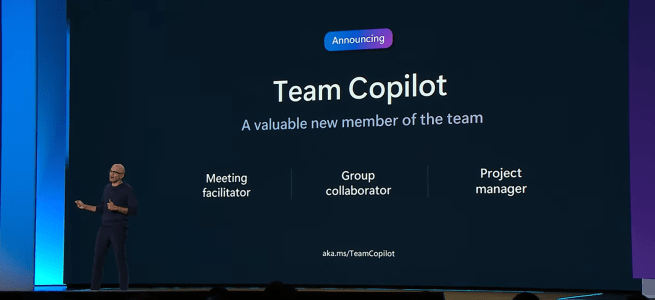
Team Copilot is a new feature in Copilot for Microsoft 365 that transforms the AI assistant into a team member, making it possible to use it to enhance collaboration and project management. With Team Copilot, it is possible to delegate tasks, track deadlines, manage agendas, take notes and more, all with natural language. Team Copilot can also act on behalf of your team, orchestrating workflows and integrating with other Microsoft 365 apps and services.
Team Copilot can help you and your team work more efficiently and creatively in various scenarios, such as:
- Meeting facilitator: Team Copilot can help you run productive meetings by managing the agenda, taking notes that everyone can co-author, and tracking action items and follow-ups. For example, you can ask Team Copilot to prepare a draft agenda based on your project goals. During the meeting, Team Copilot can record the key points, decisions, and feedback, and share them with the attendees. After the meeting, it can create (or at least suggest) tasks for the next steps with responsible team members and set reminders and deadlines.
- Group collaborator: Team Copilot can help you get the most out of your chats and conversations, by surfacing relevant information, suggesting tasks and reminders, and resolving issues. For example, you can ask Team Copilot to join a chat with your colleagues, and provide useful insights and suggestions based on the context.
- Project manager: Team Copilot can help you keep your projects on track, by creating and assigning tasks, monitoring progress and deadlines, and notifying team members when their input is needed. For example, you can ask Team Copilot to create a project plan based on your objectives, scope, and timeline, and break it down into manageable tasks and milestones. Team Copilot can also help you track the status of your project. If there are any issues or risks that might affect your project, Team Copilot can help you and suggest mitigation strategies.
Team Copilot is a changer for team collaboration and productivity, enabling you to focus on the work that matters and achieve more together. It will be available for customers in preview later this year. To access the preview, a Copilot for Microsoft 365 license will be required.
Creating new copilots in SharePoint (easily!)
Team Copilot is not the only way to leverage the power of Copilot for Microsoft 365. You can also create your own custom copilots based on the knowledge stored in your SharePoint libraries or files. This allows you to have a personalized and intelligent assistant that can help you with specific tasks, processes, or topics related to your work.

Creating a new copilot in SharePoint will be easy. This is truly meant for everyone in the organization. You just need to select the libraries or files that contain the information you want your copilot to use and give it a name. Copilot will automatically analyze the content and generate a copilot that can answer questions, provide suggestions, and guide you through workflows based on the information in the selected content.

You can use this for various purposes and scenarios, such as:
- Projects: Create a copilot for a project you are working on, and use it to find relevant documents, track progress, monitor risks, and more. For example, ask about project goals or to summarize the feedback from the client.
- HR: You can create a copilot for human resources, and use it to access policies, procedures, forms, and benefits information. For example, you can ask your copilot to explain the leave policy, or to help you fill out an expense report.
- Meetings: You can create a copilot for meetings and use it to prepare agendas and learn more about documents used in the meeting. For example, you can ask your copilot to create a meeting agenda based on the objectives or ask questions about the content used. This is not of course ideal for just any meeting, but those meetings where the number of related materials is large.
- Virtual teams: You can create a copilot for virtual teams, and use it to collect the knowledge about the team’s work to one location to enable use of copilot for gaining insights about content. For example, you can ask copilot to summarize latest sales documentations.

With the new copilot creation feature in SharePoint, you can empower yourself and your colleagues to work smarter and faster, with the help of AI assistants that understand your needs and context. You can also customize and enhance your copilots using Microsoft Copilot Studio, a low-code tool that allows you to design, build, and publish copilots with advanced capabilities.
This new feature is now available in an Early Access Program and will be available in preview later this year. This is a cool feature, and I am waiting to start with it!
This also means that the organization’s number of copilots will explode. There will be lots and lots of copilots created by employees. Now is a good time to think about the governance process and how to manage all copilots. However, don’t block people from creating new copilots, so people can take use of this great capability (when available).
Microsoft Build 2024: Create custom copilots from SharePoint – Microsoft Community Hub
Extend and customize Microsoft Copilot with Copilot extensions
Microsoft is unifying Microsoft Copilot extensibility concepts, including plugins and connectors, into a single construct called Copilot extensions. Extensions will enhance Copilot by enabling new actions and customized knowledge for grounding with your data within Copilot. With Copilot extensions, users will get an enhanced Copilot experience in the flow of their work.
It will be possible to create Copilot extensions with Microsoft Copilot Studio or by using Microsoft Teams Toolkit for Visual Studio Code. There are already some Copilot extensions in preview: Jira, Priority Matrix, Mural and custom line-of-business Copilot extensions created by the company. Developers will be able to include plugins in their Copilot extensions more easily from their API endpoints by using Teams Toolkit for Visual Studio Code and will be able to utilize new user experience features like AI Assistants. This new capability in Teams Toolkit is in preview.
IT admins will be able to control and manage access to extensions via the Microsoft 365 admin center.
New agent capabilities in Microsoft Copilot unlock business value | Microsoft 365 Blog
Copilot agents enable new kind of copilot experiences
Microsoft Copilot Studio will enable developers to build copilots that can act like agents, to run and orchestrate many common business processes, integrate line-of-business data directly into copilot experiences and publish new Copilot extensions.

These agents & new capabilities will be changing how we are working with copilots (or chatbots) as they allow us to create easily new copilots, that retain their conversational history automatically.
- Copilot agents are now in the Early Access Program. New capabilities in Microsoft Copilot will act as agents that can independently orchestrate tasks tailored to specific roles and functions. These new capabilities will allow users to delegate authority to Copilot to automate long-running business processes, reason over actions and user inputs, leverage memory and knowledge for context, learn based on user feedback and exception requests and ask for help when it encounters situations that it doesn’t know how to handle.
- A new conversational design experience, in preview, will enable easier development and configuration of copilots via conversational, human-like interaction. This update will simplify the authoring experience.
- Copilot connectors in Copilot Studio, in preview, will bring together Microsoft Graph and Power Platform connectors, AI skills in Microsoft Fabric (in private preview) and Microsoft Dataverse to make the process of grounding copilots in first- and third-party line-of-business data. This will enable developers to quickly incorporate their organizational knowledge into copilots, enable new actions and add real-time intelligent Q&A over productivity, operational and analytical data.
- Publish Copilot extensions to Copilot for Microsoft 365 and directly within Microsoft Teams, currently in private preview. These extensions will allow developers to customize copilots with instructions, knowledge from data sources and actions from plugins, Microsoft Power Automate flows and more. They will be simple to build and will enable extensibility and customization for specific domains or personas, such as expense reporting or employee onboarding, enabling a more relevant and personalized copilot experience.
- Copilot extensions will be published through Partner Center. This will allow Copilot extensions to be available to users to install from the store in Copilot and app stores in Microsoft 365 products like Teams and Outlook. This update is in preview.
- Conversational analytics in Copilot Studio, in preview, will give insights into user engagement with custom copilots, providing developers with metrics designed to enhance user satisfaction.
- Templates, in preview, will allow users to build copilots faster with pre-built templates including IT helpdesk, Order tracking, Travel assistance and more.
Microsoft Copilot Studio: Building copilots with agent capabilities | Microsoft Copilot Studio
Develop and deploy generative AI apps responsibly with Azure AI Studio (microsoft.com)
Azure OpenAI Services updates

- OpenAI’s latest flagship model on Azure AI, GPT-4o, is now generally available in Azure AI Studio and as an API. This is big news, as GPT-4o is a great improvement and a leap forward from previous models. At this point GPT-4o in AOAI API supports only text and images, so we can’t use the model (yet) to create speech powered experiences we saw in various demos.
- Assistants V2 preview API , used for creation of advanced virtual assistants and chatbots that enhance user interactions with their nuanced understanding and responsiveness, is now in preview
- Fine-tuning GPT-4 allows for unparalleled customization of AI models, ensuring outputs are closely aligned with an organization’s brand voice and specific needs, thereby revolutionizing customer service, content creation and more. This update is now in preview.
- Assistants API paves the way for the creation of advanced virtual assistants and chatbots that enhance user interactions with their nuanced understanding and responsiveness. This update is now generally available.
What’s new in Azure OpenAI Service? – Azure AI services | Microsoft Learn
Microsoft Build 2024 Book of News
Conclusion
Overall, this year’s Build was about AI and how its capabilities are creating the Future Work today. Yes, Copilot and AI were repeating there – but who is surprised about that? Not me. New Team Copilots, Agents, easy creation of new copilots in SharePoint and so on are enabling new scenarios and ways how AI is changing the Worklife and making the Future Work reality.
AI and Copilot are not only buzzwords, but real things that are transforming our WorkLife in many ways. Microsoft is really at the forefront and the leader of this innovation, with its investments in Copilot and other AI-powered tools & services in Azure that enable us to create, collaborate, and communicate more effectively. I am amazed (yes, I am – the pace these are happening is faster than ever!) by the progress that has been made in this field, and I can’t wait to see how these technologies will be applied to the real world at organizations and to get my hands on these and start experimenting with all these as these are Future Work made reality as soon as they are here.

And it is great to see Sulava, the company I work for, logo in the Build keynotes!

Read and learn more from Microsoft blog posts, announcements, Build keynotes and sessions:
New agent capabilities in Microsoft Copilot unlock business value | Microsoft 365 Blog
Microsoft Copilot Studio: Building copilots with agent capabilities | Microsoft Copilot Studio
Shaping tomorrow: Developing and deploying generative AI apps responsibly with Azure AI Studio

 Vesa Nopanen - Future Work today