
Boom! Here it is: Microsoft Ignite 2023 news! As before I have collected to my blog post the most interesting new features Microsoft has released or announced. No, we did not get away from this Ignite either without a name/brand change. There are a few of them, as well as aggregating apps to a unified studio experience, and so on. Microsoft Ignite 2023 was dominated heavily with AI & Copilot, as these are game changers, but we had also other interesting news on Teams, Mesh, Loop and so on. With all these apps, updates and capabilities, Microsoft continues making the Microsoft Cloud extremely innovative, exciting, and productive solution. It is easy to agree with what my CEO said, “Without Mesh and Copilot Microsoft Teams would be much more boring!”. One highlight: Microsoft Mesh and Teams Immersive Meetings are going to be generally available January 2024! Second highlight I am featured in couple of videos shown at Ignite: one within the breakout session Get ready for the future of work with Microsoft Teams and the other highlighted in the Microsoft blog post. While I didn’t make it to be physically at the Ignite this year, I still got my virtual avatar appearing! Almost like holopresence and holoportation!

Keep on reading and come back often as I will be updating this blog post during Ignite with images and additional information.

- Microsoft Teams and Teams Premium
- Microsoft Mesh, Immersive meetings and Mesh Copilot!
- Microsoft Copilot
- Microsoft Work Trend Index
- Microsoft Copilot Studio
- Mixed Reality Copilot in Dynamics 365 Guides
- Azure AI Studio, OpenAI Service GPT-4 turbo, and more
- Text-to-speech avatar and Personal Voice
- Microsoft Loop
- Microsoft Planner, Todo and Project
- SharePoint Premium
- Conclusion
- Summary
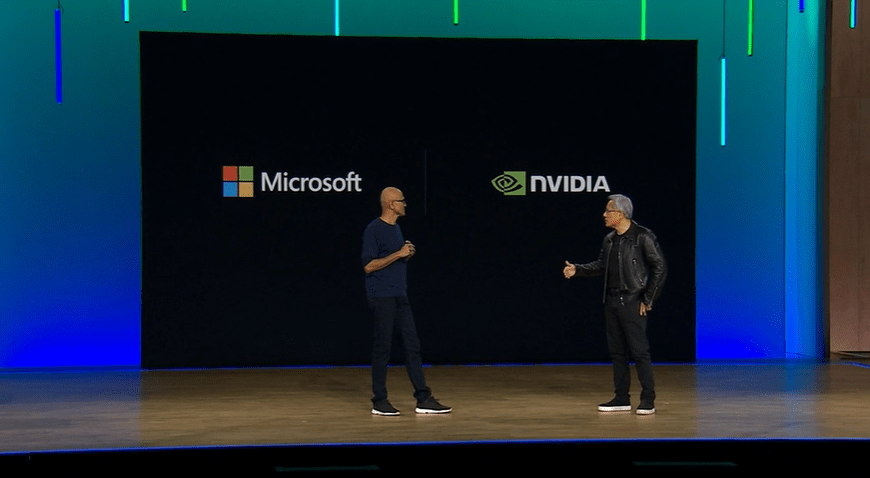
NVIDIA and Microsoft have built one of fastest supercomputers on Earth together in record-breaking speed. Together people and organizations can achieve more. NVIDIA Omniverse Cloud is now available on Azure Cloud.

NVIDIA AI Foundry Service runs on Azure. Another big success from Microsoft and NVIDIA partnership and working together.


Microsoft Fabric is now generally available.

The world of work has changed. Check out Get ready for the future of work with Microsoft Teams session.

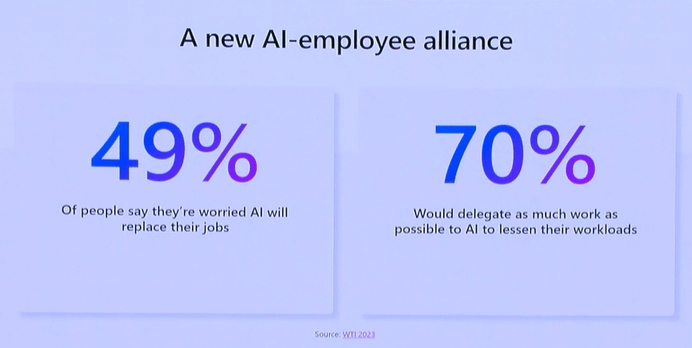

Microsoft Teams and Teams Premium
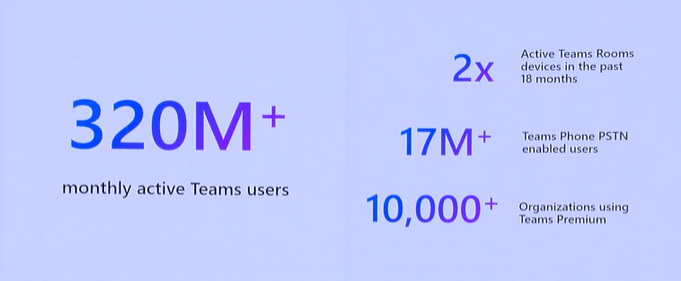
Microsoft Teams is rocking the world with over 320 million users! And with New Teams rolling out for everyone, you can expect some awesome updates to Teams in the next year (or sooner!). There were not as many Teams and Teams Premium announcements that I hoped for, but most of these are useful during daily work– especially the voice isolation!

Meetings
- Make your voice heard in Teams meetings and calls: With this AI-powered feature Voice isolation in Teams meetings and calls, you can cut through the noise and make sure only your voice comes through in a Teams meeting or call. AI in Teams will learn how you sound and mute other voices in the background when you speak. This is rolling out now and will be ready for everyone by early 2024.

- Decorate your background: Whether you’re meeting from a messy office or a barren basement, you can use generative background effects in Teams to make a great impression. With this feature you can let AI create a background that beautifies and enriches your real-world space, by removing clutter or adding greenery to a wall. Decorate your background will be coming soon in Teams Premium, early next year.

- Hide Attendee Names: Organizers can hide the names of attendees from other attendees during webinars and meetings. This capability will be available in early 2024 for users with a Teams Premium license. There is a blog post by Microsoft about Teams Webinars and Town Halls that have more details about this and other features.
- Teams Webinar Graph APIs is coming early 2024.

Chat and channels enhancements
- These are rolling out now through January 2024
- Get in the Loop with channels!!!: When composing posts in a channel it is possible to co-create and collaborate on Loop components, including tables, lists, progress trackers and all other familiar components we use today. This is something I have been really waiting for!

- Customize default emoji reactions: You can choose the emoji reactions you want to use in Teams chat and cut down on the clutter of too many reactions on your screen. I am looking forward to for this one, as we all know we really need that 🤦to be quickly available. I just which this would emerge in meetings as well, but we just need to settle with chats and channels for now.

- Forward chat: Share a message with another colleague by clicking on the message and select forward from the menu.
- Group chat profile picture: There will be a more fun way to show off team and group chat theme with personalized pictures. Group chat members can choose to upload an image or use ready-made illustrations and emojis.
- Channel announcement background: Create a personalized announcement background that engages teams in new ways. You can add images, type a description or use the power of generative AI to generate a personalized background. Creating an image using AI will be available in Teams Premium and Copilot. This means without Teams Premium or Copilot you can still add your own images and type in a description.


Other Teams Premium Updates:
- Customization for watermarking display
- Watermarking support for meeting recording and playback
- Priority account chat controls
- Advanced collaboration analytics
- Increased capacity for end-to-end encrypted meetings (50->200)
- Virtual Appointments Additional tenant level analytics and insights
- Virtual Appointment Graph API for SMS notifications
- Intelligent recap integration with Copilot
Check out Microsoft Teams Premium blog post for more details & info!
Other updates:
- Simplified notifications: Clear notifications in one click in activity, chat and channels and adjust Teams notification settings to prioritize what is most important. This update will be available to everyone in January 2024. This will help to unclutter that notifications feed a lot.
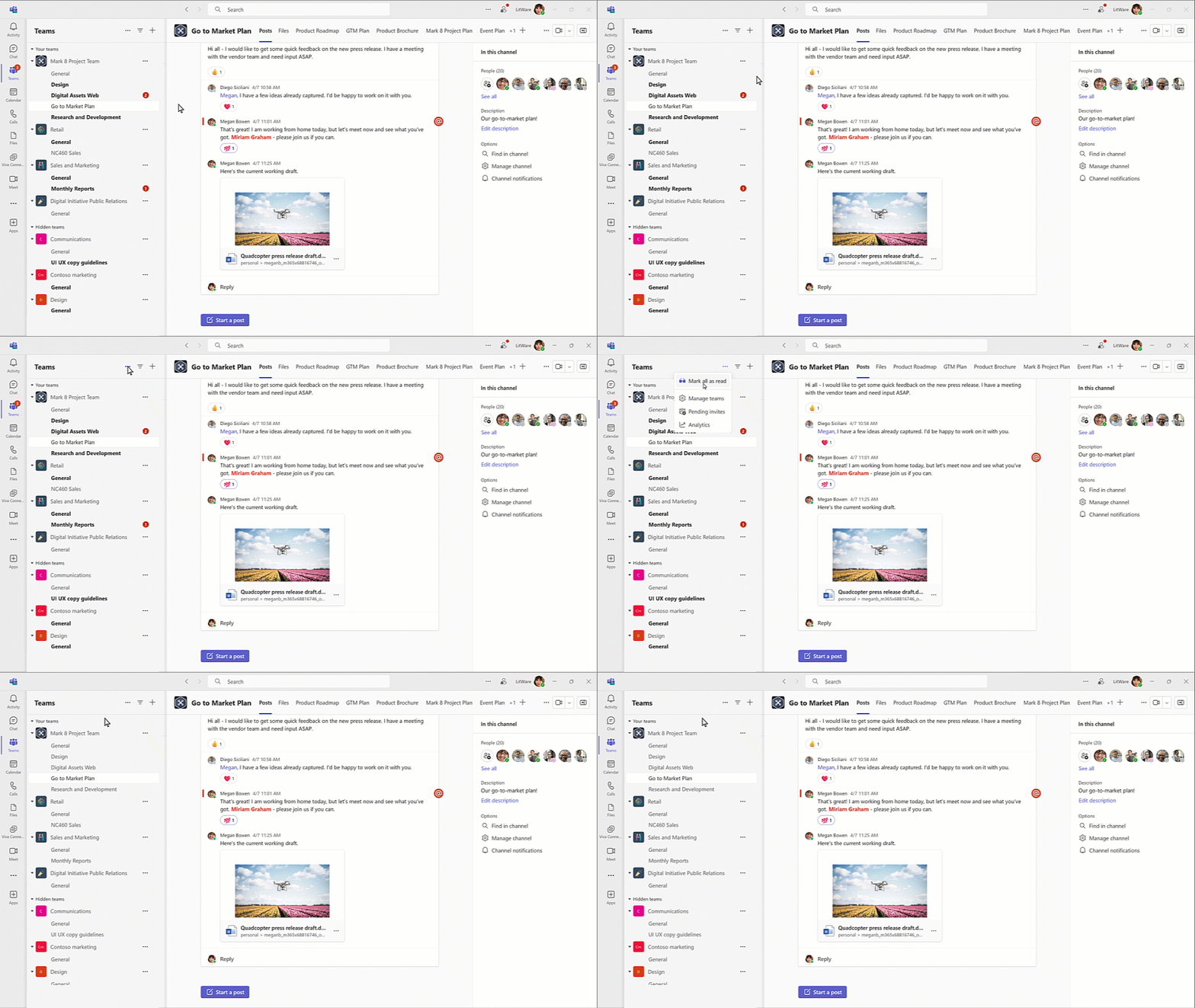
- Manage your teams and channels: Users can easily adjust the channels list in Teams to prioritize what is most important. When setting up a new collaboration space, users will be asked to create a channel, and when joining a new team users can select only the channels, they want to see in the channel list. When a channel is no longer active or relevant, a user can archive the channel, and it will be hidden and closed for further action, but the information can still be accessed. This update will be Generally Available in January 2024.
- Shared channels enhancements: Admins can enable a form that collects the user’s request to include an external member who is not from an approved organization. It will be possible for team members to create shared channels if allowed by the owner in team settings. It will be possible to send direct links to a channel, post or reply. This update will be available in January 2024.
- Get ready for the new Teams web experience: The New Teams app launched and went to GA for Windows and Mac, and now it is time for web users to enjoy the New Teams web experience that is now available for those who browse with Microsoft Edge or Google Chrome.
- New Teams keyboard shortcuts: New shortcuts include Alt+Shift+D to set status to DnD / Do Not Disturb and Alt+Shift+R to reply to the latest message received. The full list of keyboard shortcuts is available, and new shortcuts will be generally available by January 2024.
- Code block enhancements: Code blocks in Teams will have new features to help users share code easily. Users can use the format options or markdown to start a code block and choose/modify the code language for syntax highlighting when pasting or writing code. This update will be generally available by January 2024.
- Private team discovery: Admins can make private teams discoverable in their organization. Users can view and search for these private teams through the “Join team gallery”. This update will be generally available in January 2024.
- Teams AI library: Teams AI library, a new feature for app developers, is now generally available for JavaScript and .NET.
Check out Visual assets and read more about Microsoft Teams announcements from Microsoft blog post Learn more about what’s new in Microsoft Teams.
Microsoft Mesh, Immersive meetings and Mesh Copilot!
Microsoft Mesh will be Generally Available in January 2024. With Mesh, users will be able to create and join custom immersive spaces tailored to specific business needs, such as onboarding, situation rooms, digital twins, employee events, trainings, guided tours, product showcases, and more.

The Mesh editor lets you create your own customized experiences for your events without any coding. You can choose from different cool spaces and add your own stuff like images, videos and screen share on a 3D board that everyone can see. You can also move things around, make them bigger or smaller, or let the video play over and over so it looks good with your event – and you can control which artifacts are shown and when. You can save your work as a template and share it with your organization. I have written earlier about Mesh Events and how to use them.

When Mesh is Generally Available for everyone, it will have additional features that will make it easier for speakers to interact with the people who join their events in Mesh. Event organizers can let people ask questions by enabling them to raise their hands. Organizers will see who raised their hand first, and they can pick them to talk. When they pick someone, everyone in the event can see and hear them. This makes events more engaging and interactive, and it feels like a real-life meeting where organizers can answer questions during Q&A.

There is no change for licensing requirements: Teams Premium is needed for Microsoft Mesh, customizing, and using Mesh immersive spaces.
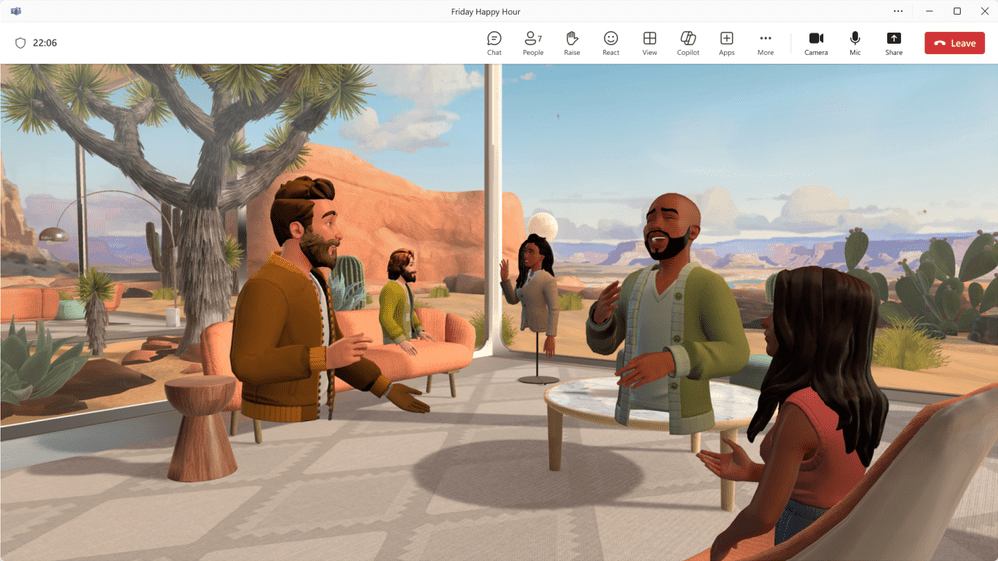
Immersive spaces in Microsoft Teams will also be Generally Available in January 2024. Immersive spaces in Teams will bring the power of Mesh into the hub of work – Microsoft Teams. Switching to 3D immersive space is easy: just select Immersive space from a view menu in a Teams meeting. Key capabilities in immersive spaces in Teams include Avatars, 3D environments, Seat assignments, Spatial audio and audio zones, Interactive activities (such as roasting marshmallows, throwing beanbags, using icebreakers etc.), and live reactions (like in regular Teams meetings).

Read more Learn more about what’s new in Microsoft Teams.
And nice, there is going to be Copilot in Mesh!

And looking this snip carefully, we can see raise hand on the toolbar right side and Copilot on the leftmost slot.
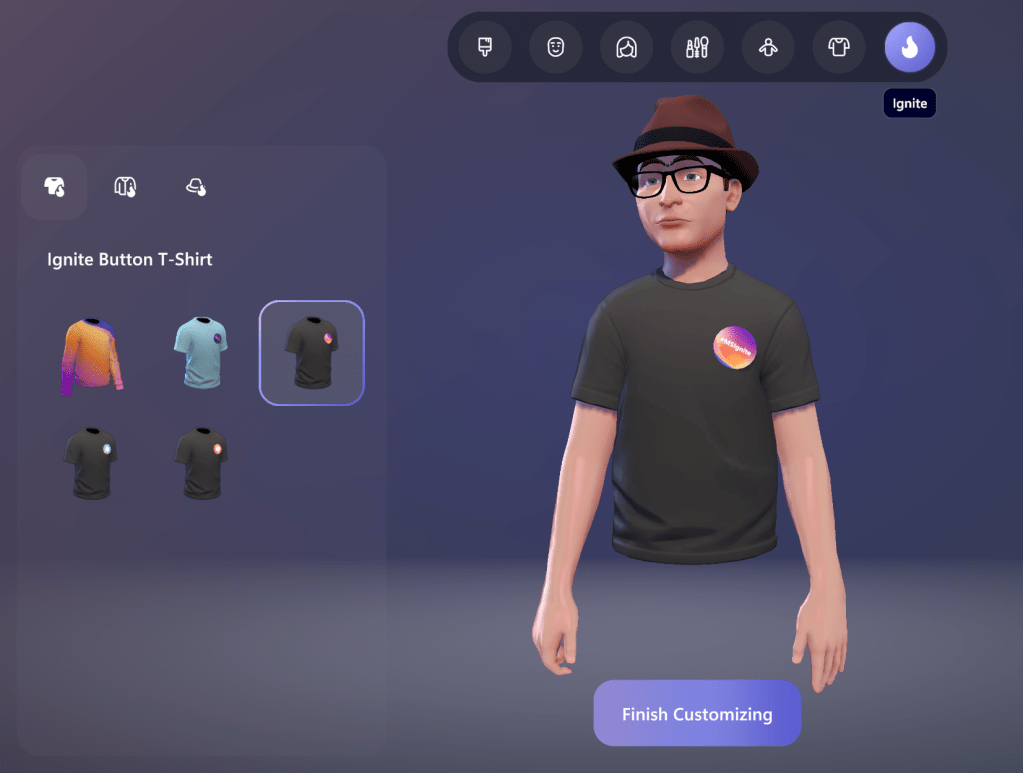
And there is also possibility to dress up your avatar with #MSIgnite clothing.

Sulava was also included in Microsoft Mesh early adopters list.

And you can also see me & few of my colleagues in Mesh in the video
Of course I want to add that we, at Sulava, has Mesh as a Service offering to our customers. Go ahead and check it out!
Microsoft Copilot


As expected, the Ignite was filled with Copilot news and announcements. And it is no wonder, since it is making a massive impact on our everyday work. Various Copilots are in preview now such as Copilot in Microsoft Fabric, Copilot for Azure. There was other news about Copilot for Sales, Copilot for Service, Copilot in Dynamics and so on. There was also news such as Bing Chat Enterprise getting a rename / rebrand to Copilot and they come out of preview & move to be generally available starting December 1st, 2023.
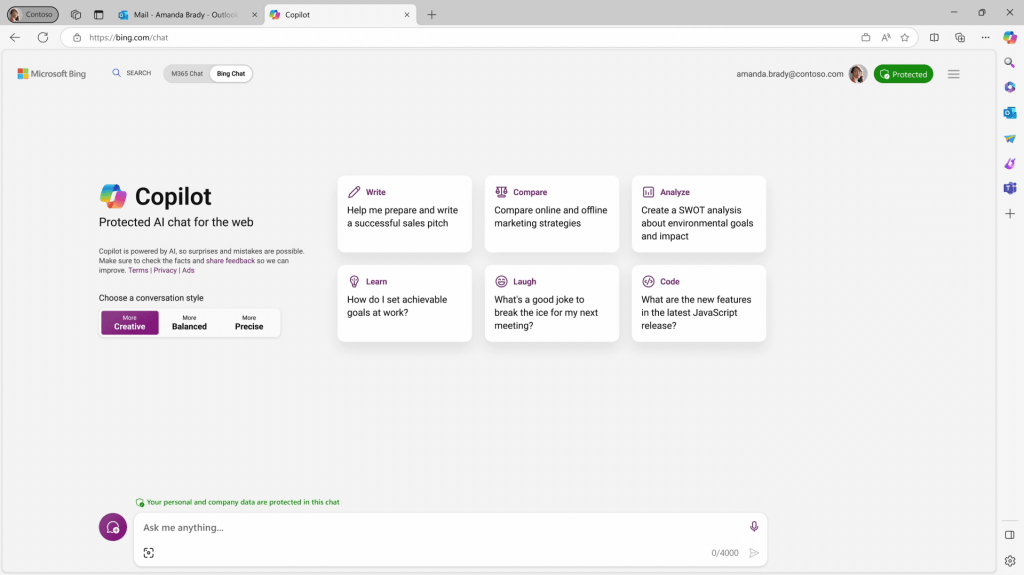
The real interest and focus what I have is with Microsoft Copilot in Microsoft 365 and Copilots in modern/future work domain. There is a bit clarified naming as separate Copilots in each application are called Copilot in Teams, Copilot in Word and so on – but they are all under Microsoft Copilot in Microsoft 365 brand. Do not be confused if all AI assistants and bots are being called Copilot from now on. This is already happening. In that way, talking about Copilot for Microsoft 365, Copilot in Teams and so on clarifies the assistant’s purpose and avoids confusion.
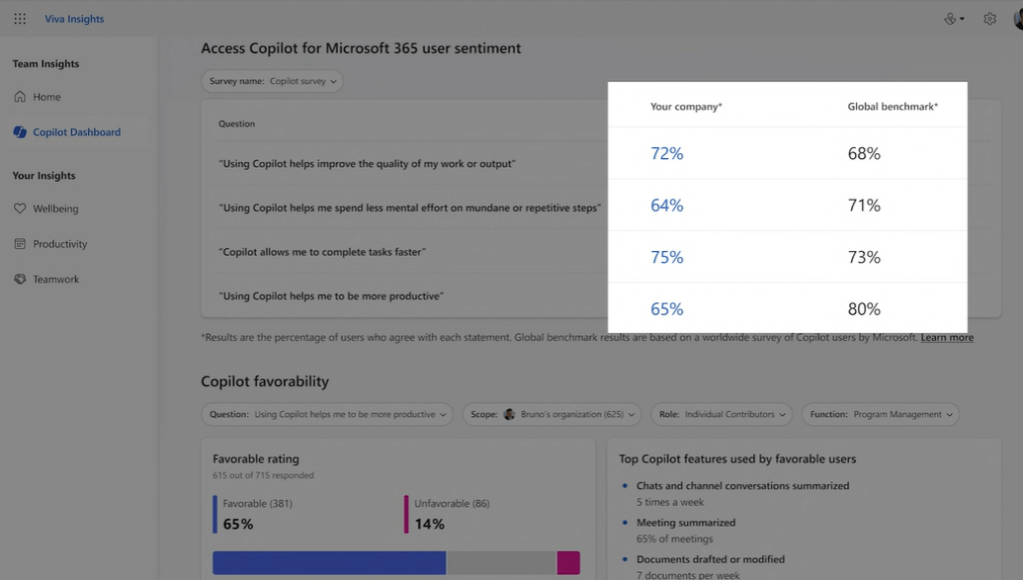
Microsoft Copilot Dashboard (powered by Microsoft Viva) is useful to see how people are using Copilot in the organization and plan for Copilot readiness & adoption and measure the impact of Copilot for Microsoft 365. Starting to roll to preview for Microsoft 365 customers later this month (November 2023).
I have been using Copilot for Microsoft 365, Power Platform etc. at work for some time now. I really love what you can do with Copilot in Teams – and especially in Teams meetings (or recap).
The Copilot in Teams is getting new features during 2024:
- Visualizing spoken discussion points and organizing them in Whiteboard which can be then shared with other meeting participants. It will also suggest more ideas to add to the Whiteboard during meeting. For participants with Copilot license this Copilot-generated summary will be available and shareable as a Loop component.

- The ability for Copilot to add automatically, in real time, meeting notes to meeting collaborative notes – if enabled before the meeting. For this, only one participant in the meeting must have a Copilot license. This is coming next year.

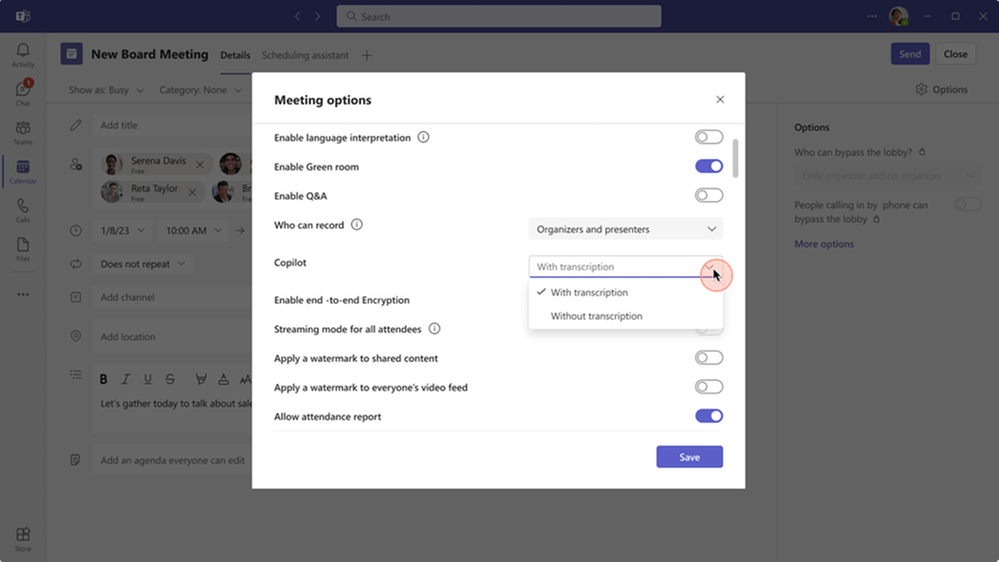
- Use Copilot in Teams meetings without retaining transcription. This is a Teams Admin Center setting where Copilot can be enabled to work within meetings without recording and transcribing. This way you can interact with Copilot during the meeting, such as asking questions, but after the meeting ends Copilot is not available. This is already available.
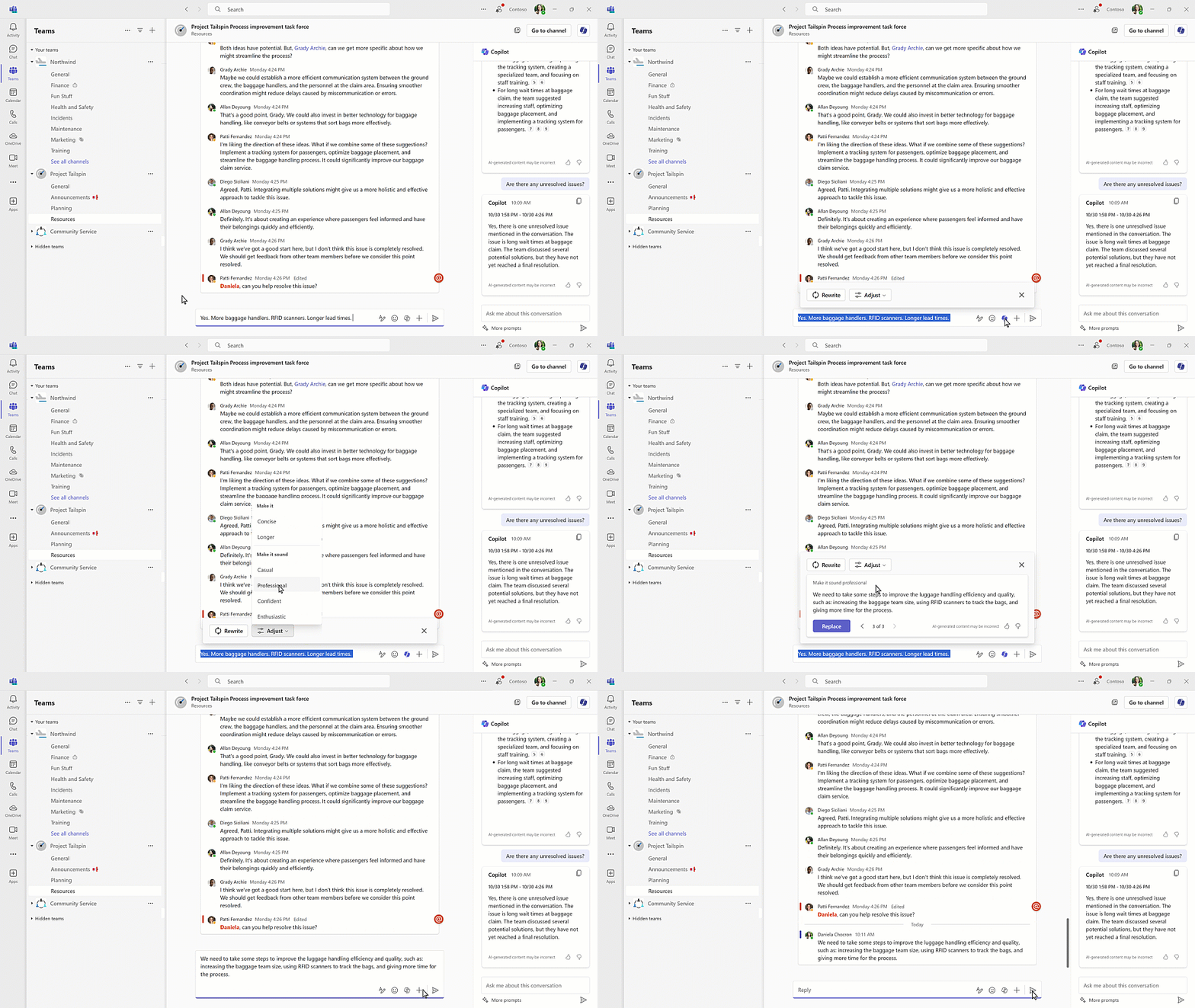
- Copilot is also available in Teams channels to summarize and synthetize key information from past conversations. When composing a message in Teams channels or chats you can use the compose box Copilot to help write or rewrite messages. Available now.
Copilot in Outlook is rolling out early 2024
- Helps to prepare for meetings by generating a detailed summary of upcoming meetings based on the invite, related emails, and attached files.
- Scheduling meetings for follow-up or other purposes from email summary. The copilot will create an agenda, title, list of attendees, context for the meeting and find the best available time slot for everyone.
Copilot in Loop will be able to use information from a linked document in the prompt to add more relevant response, and this is already rolling out for Loop web app. During next year Copilot in Loop will be able to adapt previous Loop pages to new pages, effectively create custom templates.
Copilot in Word is getting an excellent feature to stay better up to date in the collaborative document. It will allow us to ask questions like what and who has made changes in the document to reveal changes and revisions. We can expect to see this in early 2024.
Copilot plugins can be installed via the app store in Teams, Outlook and microsoft365.com and Graph connectors are installed by admins using Microsoft 365 admin center. So yes, plugins are already here in preview and can be used to extend Copilot capabilities. Admins can also manage plugins and plugin access controls by user, group, and tenant wide.
As we know, it is not that easy to get access to Copilot today if you are from a smaller organization or you just do not want to develop plugins and extensions in the production environment (which would be bad practice!) and need another location for development. Copilot for Microsoft 365 developer sandbox is now in private preview. It is a developer sandbox SKU for building and testing plugins and Graph connectors in a non-production environment.
And then Microsoft Copilot Studio was introduced. Read on.
Microsoft Work Trend Index

The latest Microsoft Work Trend Index focusing on Copilot was announced and released at Microsoft Ignite 2023.



While it may seem like a joke, it was included in the study and tells how important Copilot has become so quickly. I have been using M365 Copilot for a month and I would have answered the same. I don’t want to imagine working without a Copilot anymore – it is that helpful.

It is easy to agree with the following. I would not want to give Copilot up. Access to Copilot would influence my choice of employer. I am very happy that I have access to Copilot at Sulava.


Microsoft Copilot Studio
Microsoft Copilot Studio is a comprehensive conversational AI platform that enables users to build and tailor copilots using natural language or a graphical interface. Copilot Studio works with Microsoft Copilot for Microsoft 365, giving IT the ability to control and ensure the consistency of responses for key topics.
With this, users will be able to design, test and deploy copilots that fit specific scenarios and use the power of generative AI to dynamically produce multi-turn answers over data and dialogues. Think responses and workflows in expense management, HR onboarding, IT services and so on…
Now, does this sound familiar to you? A bit like Power Virtual Agents would you say? Copilot Studio is built on the foundations of Power Virtual Agents, and Power Virtual Agents are now part of Copilot Studio. It will provide new ways to build Copilots (AI assistants) and extend them as the Copilot Studio allows these to connect with the wider Microsoft Conversational AI stack through integrations with Azure AI Studio and additional Azure services. This will enable access to advanced features, like speech recognition, sentiment analysis, entity extraction and more.

With plugin builder, makers will be able to create, manage and test plugins, including Power Platform connectors and Power Automate flows. With prompt builder, makers will be able to create custom prompts, including ones that leverage generative AI.

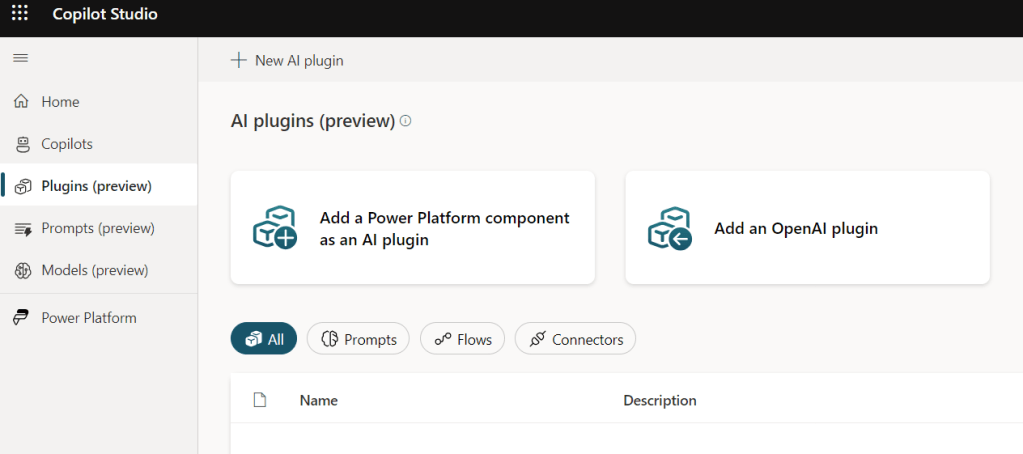
The best thing? It is already there!
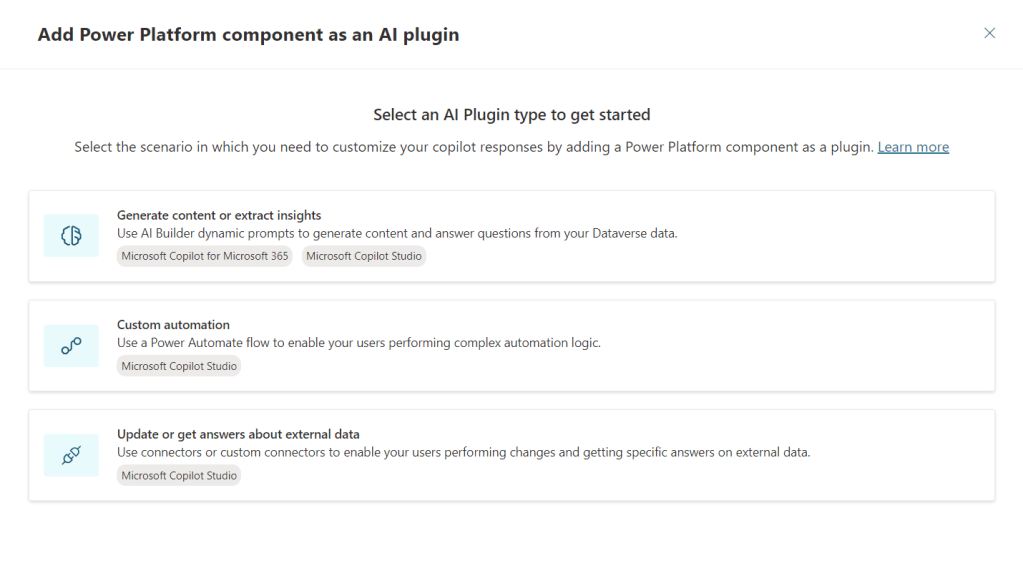
Learn more about Microsoft Copilot Studio.
There is also Windows AI Studio, a new AI experience to help enterprises and developers jumpstart local AI development and deployment on Windows, along with new updates to Dev Home and new enterprise features in Windows Subsystem for Linux (WSL) that enhance security and simplify deployment.
Mixed Reality Copilot in Dynamics 365 Guides
Copilot is coming to HoloLens 2! Dynamics 356 Guides gets a new capability that combines mixed reality and generative AI. It lets them talk to AI using natural language and get relevant information from a curated set of documents. The AI, powered by Azure OpenAI Service, can provide help with troubleshooting, procedures, details, service work history, device readings or work order forms. Workers can see holographic overlays that guide them through tasks without interruption. This is a great example how we will see AI to help workers and people as we can utilize the new user interface with computers: talking.

With Copilot in Dynamics 365 Guides, organizations can:
- Increase operational efficiency by giving workers the right information at the right time. Workers can point at a machine part that needs service or repair, ask questions and get smart that help them answers solve problems faster and reduce frustration.
- Speed up the onboarding of new workers and train existing workers effectively with a mixed reality and intelligent learning platform. It helps workers learn how to do a task with confidence and less cognitive overload. The feature can create personalized, role-based training to reduce onboarding time and retraining needs.
- Capture and integrate knowledge into existing workflows and access detailed repair guidance, historical service data and best practices in real time, helping to ensure consistent, high-quality maintenance while minimizing errors.
- Access and update forms and systems of record related to their work and equipment, without leaving the work flow.
During the Ignite opening keynote there was a great video how Copilot can be used in the metaverse / Mixed Reality. Do not miss that one. This is indeed working a lot better and AI for the frontline. I recommend to check this one out – it is the Metaverse meets reality moment. Mixed Reality x AI x Metaverse x Workers

Copilot in Dynamics 365 Guides is currently in private preview on HoloLens 2. I am looking forward seeing this tangible metaverse application in action and helping customers to get advantage of it. The only thing missing is.. where can I sign up for the private preview? 😁
Learn more about Copilot in Dynamics 365 Guides.
And it doesn’t stop there. December 2023 Dynamics 365 Field Service customers will have access to Dynamics 365 Guides and Dynamics 365 Remote Assist at no extra charge!
Azure AI Studio, OpenAI Service GPT-4 turbo, and more
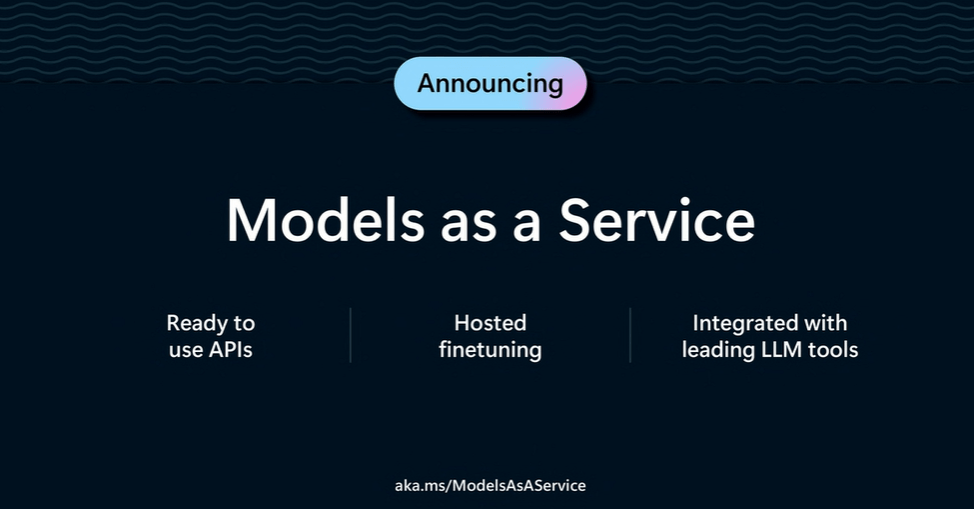
Preview of integrated AI platform was introduced. Now it is possible to manage and create AI experiences from one Studio, instead of having separate studios for different Azure AI capabilities.
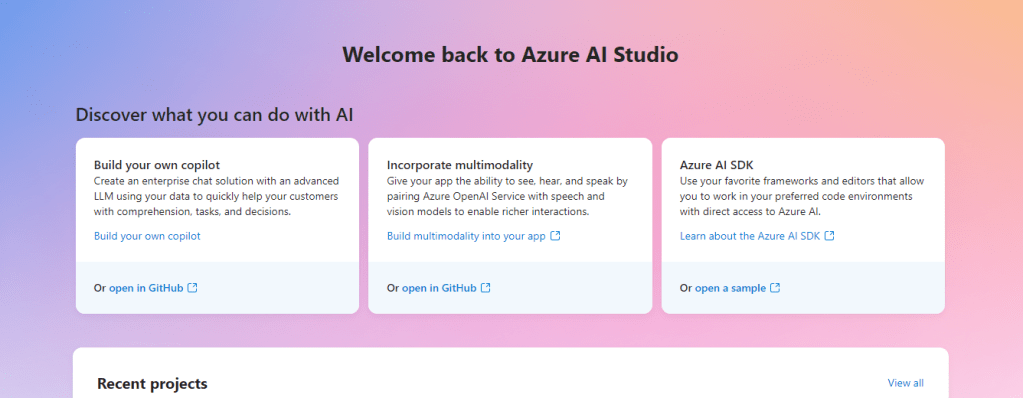
The new Azure AI Studio is designed with accessibility and responsibility in mind, will provide organizations with a one-stop shop to smoothly discover, build, test and deploy AI solutions using cutting-edge AI tools and machine learning models, all based on responsible AI practices. Developers will be able to build generative AI applications, including copilot experiences, using ready-made and customizable tooling and models.
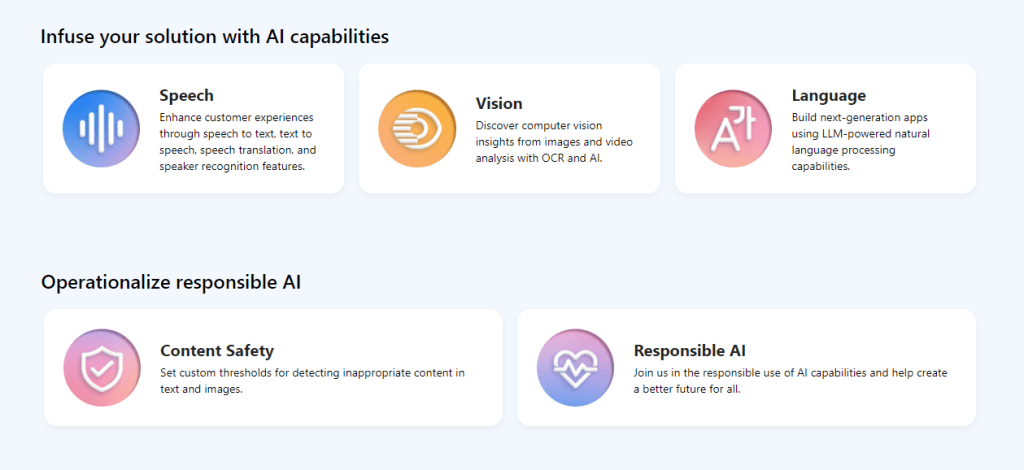
Users can select the data source, including Microsoft Fabric OneLake and Azure AI Search, for vector embeddings, choose models from a rich catalog of frontier and open-source models, orchestrate prompt flows, evaluate model responses, detect fine-tuning opportunities and scale proof of concepts into full production with continuous monitoring and refinement.

Learn more about Azure AI Studio.

Azure OpenAI Service multimodal AI capabilities allow to use generative AI with image, text and video.

- DALL-E 3 is in preview. Describe an image, with text, and DALL-E 3 will be able to create it.
- GPT-4 Turbo and GPT-3.5 Turbo model 16K: The latest models in Azure OpenAI Service will enable extended prompt length. Both models will be available in preview at the end of November 2023.
- GPT-4 Turbo with Vision (GPT-4V): When integrated with Azure AI Vision, GPT-4V will enhance experiences by allowing the inclusion of images or videos along with text for generating text output, benefiting from Azure AI Vision enhancement like video analysis. GPT-4V will be in preview by the end of 2023. This is so cool, as we get finally multimodal capabilities to Azure OpenAI Service.
- GPT-4 updates: Updates to GPT-4 include the ability for fine-tuning that allows to customize / train the AI model to better suit specific needs. In preview.
- Bing Search and Advanced Data Analytics plugins: Integration with Bing Search means that Azure OpenAI Service users can now access search engines directly from Azure applications. Additionally, the introduction of Advanced Data Analytics (formerly Code Interpreter), makes it easier to analyze and make sense of their data. These updates are generally available.
Azure OpenAI Service offers new opportunities for businesses and users alike with these improvements. DALL-E 3 and GPT-4 Turbo for Vision allow for unlimited creativity and make it easier to interact with machines. GPT-3.5 Turbo with a 16K token prompt length, and GPT-4 Turbo, together with GPT-4 updates, will enhance flexibility and performance, making them more valuable across various industries. Moreover, the combination of Bing Search and Advanced Data Analytics will streamline complex tasks, making data-driven decision making more attainable.
Azure AI Vision gets the Image Analysis 4.0 and it’s single, synchronous API endpoint introduces access to the state-of-the-art Image Analysis models, encompassing image captioning, OCR, object detection and more. The enhanced OCR model has improved accuracy for both typed and handwritten text in images. Image Analysis 4.0 is generally available already!

Other new features in Azure AI are a new task-optimization summarization capability in Azure AI Language, powered by large language models (GPT-3.5-Turbo, GPT-4, Z-Code++ and more), a new machine translation model capable of translating from one language to another without translating in English as an intermediary and can be customized to better align translations to industry’s context and Named entity recognition, document translation and summarization in containers will allow government agencies and industries, such as financial services and healthcare, with strict data residency requirements to run AI services on their own infrastructure.
Azure AI Search (earlier known as Azure Cognitive Search and will available in Azure AI Studio) updates include Vector search that turns documents and data into a numerical format, called a vector — a long floating point – and these indexes allow for faster, more efficient retrieval of good answers. Vector search is generally available.


Another name change: Semantic ranker (formally known as semantic search) prioritizes and ensures the most relevant search results are delivered first. Semantic ranker is generally available, but I do not see the name updated yet in my AI Search.
Azure AI Content Safety is now ready for production / generally available. This enables organizations to identify and reduce harmful content and improve online interactions as it can be used as an integrated-safety system within Azure OpenAI Service, or as a separate API service.
That is a big bunch of Azure AI news – and I am not even going to Machine Learning. But there is still more to cover – realistic text-to-speech avatars!
Text-to-speech avatar and Personal Voice
Text-to-speech avatar is a new cool and awesome text-to-speech capability that will generate a realistic digital twin of a person speaking based on input text and video data of a real person speaking. Prebuilt and custom avatars are now in public preview. We at Sulava have been in the private preview for some months now, and we can’t wait to show you what we have done with this! Meanwhile, learn more about these photorealistic avatars from blog post and here is information how to use them.

Personal voice is a new custom neural voice feature that will enable to create custom neural voices with 60 seconds of audio samples. Read more about Personal voice from Microsoft’s blog post.
Speech avatar and Personal voice ares limited access features.

Together these features allow us to create digital twins of people. Imagine the CEO from the company welcoming every new employee and helping them during the onboarding process. In the consumer facing applications it will be a much more pleasant experience to talk with something that looks like a real person with a persona – instead of having to use something we use today.. I am really hyped up about the possibilities these technologies enable!
Read more about Azure AI Speech Ignite news from Microsoft’s post!
Microsoft Loop
Microsoft Loop is now Generally Available for the web and mobile (iOS and Android) for commercial customers. The Loop mobile app (iOS and Android) is also generally available for consumer customers as well. Business customers with Microsoft 365 E3, E5, Business Standard and Business Premium licenses will have full functionality including workspaces.
There are cool capabilities bubbling under and coming available.
- Workspace status: This feature is in private preview right now, and it will show information like upcoming due dates and status updates to give a clear summary and help people decide what to focus on.
- Workspace descriptions: Loop intelligently suggests files and documents that might be relevant to the project when a workspace is set up. A more detailed prompt can be added to the workspace title to get more accurate results and start a workspace with all the necessary resources. This capability is in preview.
- Power Automate: Loop will work with Power Automate to help make task tracking and project management easier. A Loop table can have a new rule that sends automatic notifications when the table changes. This automation will help teams keep up with their progress while saving time to concentrate on what matters. This capability is in preview.
- Start a workspace from Teams: Following a Teams meeting, a Loop workspace can be made and will have the relevant documents and notes from the meeting already in it, making it easy for a team to begin their project. This feature will be in preview by the end of 2023.
On top of features I need to highlight that we, Sulava, have been highlighted by Microsoft Loop product group in both story and video. Did you spot me there? 🔎
Read more about Microsoft Loop GA news from Microsoft Article. That video is included in the article. I love using Microsoft Loop, and it has been fantastic on what it enables in modern work collaboration.
Microsoft Planner, Todo and Project
Microsoft Planner will be a single, unified experience that combines Microsoft To Do, Microsoft Planner, and Microsoft Project for the web. This experience will first launch in the Planner app in Microsoft Teams in spring 2024, followed by web experiences later in 2024. The new Planner will be collaborative and enhanced by AI. It will handle, from team-based tasks to more complex project management to enable and manage their work in one place with AI-enabled features. Yes, there will be a Copilot in Planner to help users set up a plan with simple prompts and as the plan progresses.
The Tasks by Planner and To Do app in Microsoft Teams will be renamed Planner. Microsoft Project for the web will also get a new name in the coming months. The new Planner app in Microsoft Teams with premium work management features and AI-powered experiences will be Generally Available in spring 2024, with the web experience coming later.
SharePoint Premium
SharePoint went to the Premium Road as Microsoft published there will be a Premium SKU for SharePoint. It will enhance content management in Microsoft 365 to enable organizations to use their content more effectively throughout their lifecycle and integrate it with the workflow of various roles, such as information workers, IT pros, developers, and others. Services that are part of SharePoint Premium will become available gradually from now until the first half of 2024. It has a pivotal role in building structure, security, and governance to prepare information for AI, especially Copilot, to ground to.
In SharePoint Premium you can find Content experiences to help information workers in their flow of work, allowing to discover, interact and collaborate with hundreds of file types, and create fresh content using AI analytics with branded document packaging. There are also Content solutions for optimizing critical business processes with AI, security, and automated workflows.
SharePoint Premium also includes content processing and content governance services and solutions, with both new and existing capabilities from Microsoft Syntex and Microsoft SharePoint Advanced Management.
I sense there will be a licensing discussion ahead, as this is one more Premium add-on added to Microsoft 365.
Conclusion
This Ignite was not different Ignites of previous years. There were a TON of updates and announcements that will affect how we are working and collaborating. As expected, there were a lot of announcements and updates about AI and Copilot. I am happy that Microsoft Teams and Mesh also got visibility. I was and was not surprised about SharePoint Premium. It was inevitable, but I hoped it would not happen.
And I did not even want to cover Azure generally, Data or Microsoft Viva, for example, in this article as it became longer and longer… Yes, there were a lot of updates & Copilots on those topics as well!
The future is even more exciting today than it was yesterday. Well done, people & product groups at Microsoft! Meanwhile, I just need to sit on top of my hands in anticipation of when I can get my hands onto some of these features.

Read all announcements from Microsoft Ignite Book of News! And also check out related Microsoft blog posts and articles on Ignite announcements.
Summary
Here is the summary of the document created by Copilot in Word.
- Microsoft Ignite 2023 news: The blog post covers the most interesting new features and announcements from Microsoft Ignite 2023, a conference that showcases the latest innovations in Microsoft Cloud.
- Microsoft Teams and Teams Premium updates: Microsoft Teams, the hub for teamwork and communication, has over 320 million users and is getting new features and enhancements, such as voice isolation, generative background effects, Loop integration, simplified notifications, and more
- Microsoft Mesh and Immersive meetings: Microsoft Mesh, a platform for creating and joining immersive spaces, will be generally available in January 2024, along with immersive spaces in Microsoft Teams, which will allow users to switch to 3D environments and interact with avatars, spatial audio, and interactive activities.
- Microsoft Copilot and Copilot Studio: Microsoft Copilot is a conversational AI assistant that helps users with various tasks and scenarios in Microsoft 365 and other applications, such as Teams, Outlook, Loop, Word, and more. Copilot Studio is a platform for building and customizing copilots using natural language or a graphical interface.
- Azure AI Studio, OpenAI Service, and more: Azure AI Studio is a new integrated AI platform that enables users to discover, build, test, and deploy AI solutions using cutting-edge AI tools and models, such as DALL-E 3, GPT-4 Turbo, and more. Azure AI also offers new features and updates for Azure AI Vision, Azure AI Search, and Azure AI Content Safety.
- Text-to-speech avatar and Personal Voice: Text-to-speech avatar is a new text-to-speech capability that generates a realistic digital twin of a person speaking based on input text and video data. Personal voice is a new custom neural voice feature that creates custom neural voices with 60 seconds of audio samples.

 Vesa Nopanen - Future Work today