
Ever since Microsoft Mesh was announced, two and half years ago, I have been fascinated by its potential to transform the way we work and collaborate. I have been Meshing around for half a year now. As a Principal Consultant of Metaverse and Future Work at Sulava, I have been experimenting with Microsoft Mesh and testing different scenarios and use cases for creating and accessing shared experiences in virtual reality.
Microsoft Mesh has been in Public Preview for two weeks now, and I am thrilled to see the curiosity and excitement it has generated among people who are interested in new technologies and their possibilities. We, at Sulava, have started several customer projects where we are building immersive experiences to Microsoft Mesh. The first larger scale public use of Microsoft Mesh happened last week as the City of Helsinki organized a hybrid event for its employees last week. It was very likely the first in the world where Mesh was in the event with thousands of attendees, as City of Helsinki has over 37 000 employees! The event took place physically in the Helsinki town hall, virtually online, and immersively in Mesh, where there was a panel discussion about how Microsoft Mesh and Virtual Reality can change the work and bring new opportunities for everyone. The panelists were using Microsoft Mesh, and Sulava (namely me ) was supporting them to run it smoothly. It was an immense success and sparked a lot of interest among the participants. And this is just the first step on the road towards the full usage of Mesh and Metaverse.
In this article, I will share with you some of the insights and learnings I have gained from my journey with Mesh so far. I hope you will find it informative and inspiring, and that you will join me in exploring the possibilities of immersive spaces.
- What is Microsoft Mesh and why you should be interested in it?
- Enter Mesh!
- What are the benefits of using Mesh?
- Immersive Teams Meetings
- How can I learn more and try out Mesh?

What is Microsoft Mesh and why you should be interested in it?
Microsoft Mesh is a cloud-based platform that enables new kinds of interaction, collaboration, and content creation in virtual worlds. With Mesh, you can join and create immersive experiences, collaborate across distances in new ways, and explore possibilities and opportunities that virtual reality offers.
Microsoft Mesh is not just for meetings, but for a variety of scenarios, such as employee orientation and training, virtual workspaces for managing large entities, innovation workspaces, event organization, presentations, product development, and more. In the future we will also see how artificial intelligence is used to enhance experience and enable new capabilities.
Microsoft Mesh is part of Microsoft’s vision of the metaverse, a term that refers to the convergence of physical, digital, and virtual worlds.
Enter Mesh!
To enter Mesh, you need a Microsoft 365 account and the Mesh app, which is available for PC and Meta Quest headset. On top of that you need appropriate licenses for Mesh app and/or Mesh for Teams. Speaking of Teams, you can also join Mesh using Microsoft Teams, which has a built-in feature for immersive meetings. You can invite other participants to join you in Mesh if they are within your organization and have the same requirements met (sorry, no externals – at least not yet). Note that a virtual reality headset is not required, but it will improve the experience. For example, I have noticed I do enjoy being in a meeting using Meta Quest Pro – if I am not the only one in the immersive space. After all Mesh is best as shared experience. This gives me a better feeling “of being there with my colleagues” than with traditional 2D Teams meeting. Spatial audio and 3D space do make a significant difference to meeting experience. On top of that I am much more focused and present than I am in normal meetings. That is because I cannot multitask. This can be a benefit (I am fully in the meeting) or not (I can progress other work, and not giving 100% attention to a single thing).
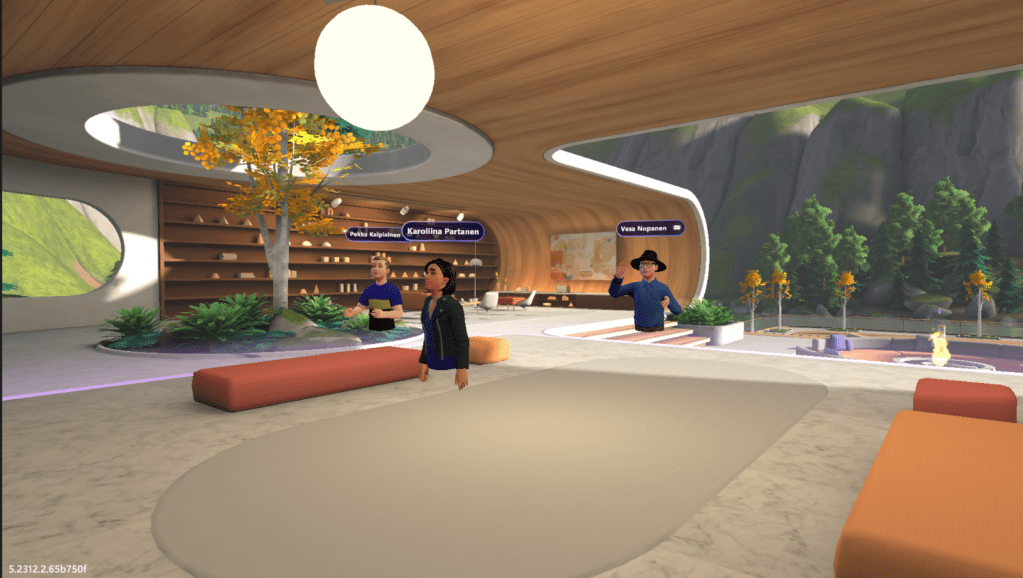
Once you are in Mesh, you can interact with other participants and the environment using your voice, gestures, and controllers. Spatial audio creates a realistic sound experience based on your location and orientation. In Immersive Teams meetings you can have up to 16 people join the immersive space, but you can have the normal number of people in 2D meeting (1000 attendees).
You can also join or create Mesh events, which are larger and more complex experiences that can host up to 200 participants + 16 hosts. Mesh events can have multiple rooms and utilize custom environments with triggers, and integrations and more. You can also save your events as templates and reuse them later. I wrote about these in my previous blog – check out How to customize Microsoft Mesh events.
What are the benefits of using Mesh?
Using Mesh can bring many benefits to your work and collaboration, such as:
- Enhancing creativity and innovation by enabling you to visualize and manipulate information in 3D
- Improving engagement and productivity by creating more immersive and interactive experiences
- Reducing travel costs and environmental impact by connecting people across distances in virtual worlds
- Increasing diversity and inclusion by allowing people to express themselves in diverse ways (avatars) and overcome physical barriers
- Having fun and building team spirit by exploring new possibilities and having fun with your colleagues
- Reducing 2D meeting fatigue by using virtual reality on selected meetings.
Keep also in the mind the following:
- Ensure that your network and devices meet the technical requirements for Mesh. This is mostly making sure certain ports and endpoints are allowed, Mesh application can be installed, and Mesh Immersive Spaces app is allowed in Teams.
- Adapt to the new norms and etiquette of virtual collaboration and communication
- Find the right balance between using Mesh and other tools and methods for your work
Immersive Teams Meetings
One of the exciting features of Mesh is the ability to switch from a Teams meeting to an immersive space by changing the meeting view. This allows you to have a more engaging and interactive experience with your colleagues in a virtual environment. In custom spaces only the imagination is the limit, however for Immersive Teams meetings you don’t need to (and actually can not) do any configuration, setup or coding. They are ready to be used in Teams meetings. This lowers the bar to test these out – when people learn how to switch to Mesh they can try them out.

You can join an immersive space from a Teams meeting by clicking on the View icon in the meeting toolbar and selecting the option to change the meeting view to Immersive Space. Once you select an immersive space, you will be transported to 3D experience. Other meeting participants can also choose to switch to the immersive space.
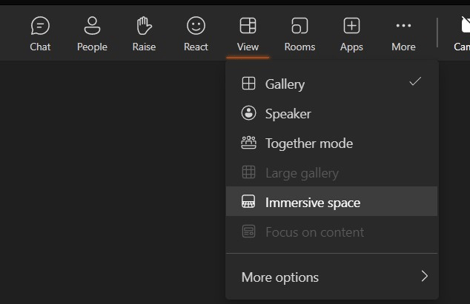
In an immersive space, you can use your avatar to move around, gesture, and interact with the environment and other participants. You can also use voice, chat, or hand signals to communicate with others. You can also share your screen or application window with others in the immersive space when you are using a PC app. If you are using a VR (Virtual Reality) headset, you do not have the option to share anything at the meeting.
You can invite up to 16 attendees to join the immersive space, but the Teams meeting can have the normal amount of people. People can talk to the immersive space and back, so they can be in the meeting together as there is a meeting zone in the immersive space. When people in Mesh are in that area, their voices can be heard by people in the traditional meeting (2D Teams). And vice versa: they can hear anything people say in the “normal” Teams meeting.
You can switch back to the Teams meeting view at any time by clicking on the Mesh icon again and selecting the option to return to the meeting.
There are a variety of reasons why I find immersive meetings better than traditional ones. More focus and present in the meeting, not being able to multitask and the feeling of being there. Of course it is not possible to spend a day in VR – it would not be ideal. I love to be able to have a bit of change of view so to say – it inspires more than “yet another similar meeting“. And regards the tech: Meta Quest Pro took 56% of battery for a bit over one hour Immersive Teams meeting.. Mesh doesn’t use controller’s options to recognize when fingers are on it or not – and there isn’t a key to point with finger for example. But I can use normal reactions from the toolbar and of course use my hands and move my head. With spatial sound the experience is extremely good with VR headset, but also when using a large screen (if it supports spatial audio) or a wired headset.

I recommend you also to read my good friends Chris’s and Miska’s blog articles about Teams Immersive meetings.
Immersive Teams meetings are a fantastic way to enhance your collaboration and communication with Mesh. They allow you to have more fun, creativity, and connection with your team and stakeholders, while still using the familiar and reliable features of Teams. Try it out today and see how Mesh can transform your work and your world.
How can I learn more and try out Mesh?
If you want to learn more and get started with Mesh, you can:
- Visit the Microsoft Mesh website and learn more about the platform and its features
- Try Microsoft Mesh in Public Preview in Teams and Mesh App.
- For custom spaces explore the Mesh 101, Toybox, and other examples of Mesh experiences using Unity and Mesh Toolkit. I recommend Mesh 101 as it gives a good idea about developing custom functionalities in baby steps. And you learn the idea of Visual Scripting there as well. Visual Scripting is like Power Automate – low code.
- Join Mesh Creators in Tech Community.
- Subscribe to my blog and join my online (or onsite) presentations see the demos of Mesh in action. If you are, or will be, a customer of Sulava or The Digital Neighborhood, then you can book a meeting with me or us.
Microsoft Mesh is the most welcome addition for collaboration and communication in the future of work. By using Mesh, you can create and join shared immersive experiences, collaborate through distances in new ways, and explore possibilities and opportunities that virtual worlds offer to the business and development.
Are you ready to Mesh around?


 Vesa Nopanen - Future Work today
One thought on “Thoughts from the Microsoft Mesh road”