
I am back after a few weeks break I had. It was really good to be on vacation but it is always fantastic to get back to business. This time July was exceptionally good, because I received great news regarding Microsoft MVP. I did not only renew my M365 Apps & Services but I also got another category where I have been recognized as MVP: Mixed Reality. I feel honored, happy, humble and proud about this at the same time! As I enjoy sharing knowledge with the community, this feels superb. And thank you for all messages you have sent to me or placed comments to articles here. It is great to hear articles have been helpful.

Information work and AI
Information workers process, or analyze information and create content daily. This comes with a price: facing challenges such as information overload, complex tasks, and time pressure. Microsoft Teams is, of course – my opinion, the best tool for this kind of work – you can collaborate, meet, use apps and work with content without having to switch to another context. Regarding AI, what is good is that Teams can be extended and customized on various ways – and that is what should be done with AI!
I assume that readers here know what AI, generative AI, and large language models, such as GPT, are. If you don’t – ask Bing Chat or ChatGPT about those to learn more. In fact if you are using Edge when reading this you can do it in the Bing section on the right.

As you have very likely seen, there has been more AI in this blog than before. When considering the future of work – and also the metaverse – artificial intelligence plays a huge role there on enabling experiences, capabilities and of course productivity. It won’t be far when we can embed versatile use of AI in metaverse – enabling new level experiences faster than ever. Meanwhile we can already take advantage of AI in tools we use already today and supercharge our work with new – and smart – capabilities.

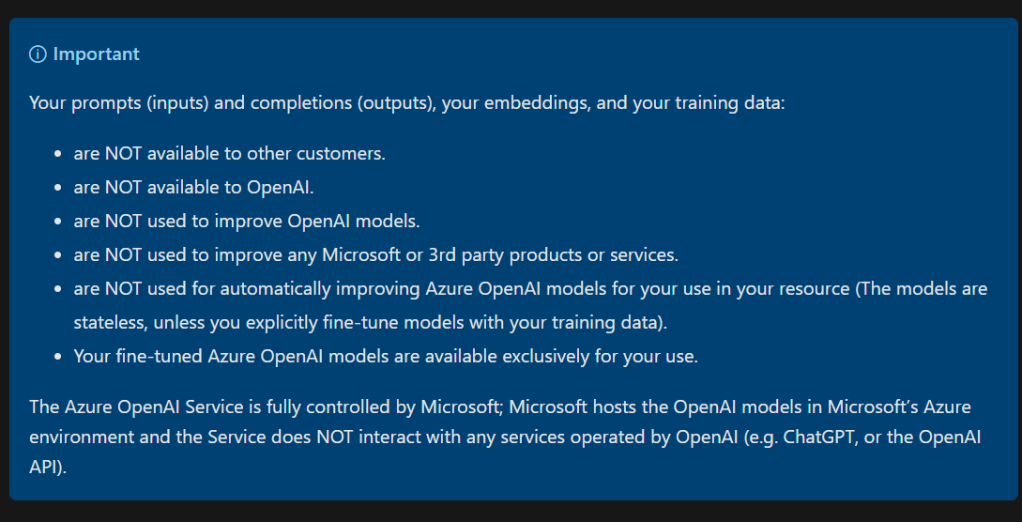
Why infuse AI with Teams, you may ask? Why not wait for the Copilot? Because you can get benefits already today – and you can customize it. With AI it is important to collect experiences how and where it should be used. And when you use Azure OpenAI it gives you security – your confidential business information is safe and not used to train the model or to other purposes than what you are doing with it.
Combining Teams and Azure AI together it is possible to help people, especially information workers, out. Here are a few ideas where AI could be used.
- Generate content. Whether there is a need to write an email, a report, a blog post, or a presentation, AI can help by generating text draft relevant to the topic. GPT-4 can be used to produce human-sounding written content. DALL-E can be used to create images based on descriptive text prompts. These capabilities can save time and effort, as well as give inspiration and ideas for content.
- Summarize information. Information workers have a need to digest large amounts of information from various sources, such as articles, books, reports, or websites. AI can help by summarizing the key points and insights from these sources in a concise and clear way. These tools can help to understand the main ideas and trends from the information.
- Analyzing information. Going through free form feedback and creating sentiment analysis manually can take a lot of time for a person. AI can help out with this and generate summary of feedbacks, sentiment analysis, pinpoint problems and so on.
- AI can answer questions. There is often a need to find answers to specific questions related to their work, such as facts, definitions, calculations, or opinions. AI can help by answering these questions based on the available data and knowledge. Especially when AI is connected and limited to the organizational data, it can help find the required information quickly and accurately.
- AI can optimize your work. When there is a need to improve the quality and efficiency of work, such as by checking grammar, spelling, style, or logic errors; by finding the best way to present their data or arguments; or even by discovering a solution to a problem. Language translations are one good example of optimizations that are easy to start with AI can create the first draft to speed the process up. Very often service desk can benefit from smart bots that help them to serve customers better.
- Automating processes fully or partially by adding actions and checkpoints that are taken care by AI. Human can, and at this point, very often should make final changes and approvals.
- Be your colleague. You can use AI to test out and improve new ideas, to work as a sparring partner. This improves innovation, ideation and creativity. AI is kind of your new co-worker – or at least one in the team.
And that list is not the complete one. There will emerge new, innovative, ways to use AI to help information workers in current situation when they have stress due to limited available time. It is a good practice to think how AI can improve worklife of employees by freeing some time that they can use to breath a bit and concentrate on more complex tasks. AI is not a replacement for human intelligence and creativity, but a complement and a tool that can augment capabilities. By using AI wisely and responsibly, you can make your day easier and more productive. AI is a great colleague and ally for people, but it can not replace human innovation and creativity!

Taking the step back towards the Microsoft Teams, there are various options how to add AI to your work there. Microsoft Azure AI services such as OpenAI and Cognitive Search services are a great start for experimenting. Let’s look at this list:
- Secure ChatGPT. I have been working with various customers who want to start with a secure ChatGPT they can offer to their employees as a Teams bot.
- AI with Power Automate to reduce repeating or time consuming tasks. For example automating document summarizing when documents are dropped to certain libraries or sentiment analysis on free form feedbacks.
- Ask AI for details or summary about what’s been discussed in Teams channel or pick a message and use it’s text with AI to generate new content – for example you could ask AI to generate you a project status summary (if all details are in the message) with a different formatting. Like email to the steering group. Of course for project work it would make more sense to connect the AI to actual data project has – and then ask questions about the project status, progress and so on.
- Retrieving information with Power Virtual Agent with Power Automate that connect Azure OpenAI to organization’s data. Power Virtual Agents have boost feature (in preview), where you can give the bot some links to your internal (or external if you so choose, it could be your website if you have lots of information your employees could utilize ) data locations and it considers those when user asks questions if the question doesn’t end up in any predefined topic.
That is very easy to get started with, but for more control and flexibility customizing the bot using Add your data feature (and functions calling) in Azure OpenAI is a far better way. - Use the new Teams AI Library to give existing or new bots smart language understanding capabilities. AI Library makes it possible even to use different large language models, but my testing with Azure OpenAI GPT-4 has been something I continue. The Library adds also possibility to add functions that are triggered when AI notices the intent from user’s prompt.
I am showcasing some of these examples, how AI can make Microsoft Teams awesome , at Scottish Summit 2023 this Saturday in Manchester, UK. If you happen to be around come and say hi!

 Vesa Nopanen - Future Work today
One thought on “Supercharging information work with AI”