
Teams got a new feature out today! You can start a screen sharing directly in a chat (1:1 or group chat) without making a call first.
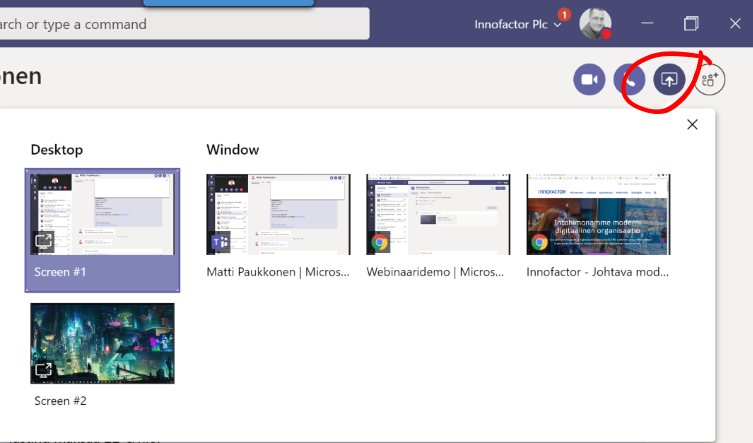
There is a new screen sharing button that can be found in chat. Then you choose what you want to share with others.
It is good to note a few things
- you can’t activate a audio or video call if you are sharing a screen
- you can’t share a screen in one session and participate in another call at the same time
- If you are in a call and you start a screen sharing in another chat: the current call goes to hold
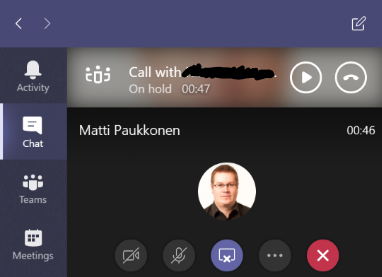
Basically a screen sharing in a chat is a call/meeting with limited features

 Vesa Nopanen - Future Work today
will this be enhanced to allow an in progress meeting to NOT be placed on hold while screensharing in a separate chat without a voice call? This is a bit of a hindrance when trying to be productive.
LikeLike
agree 1000000% with monica this sucks and skype didn’t do this. if i make a call phone my phone and want to share screen on a different system, it puts the call on hold. this is awful.
LikeLike
Can you explain a bit more about what you do to get call on hold? Using a phone for calls or desktop?
In Teams screensharing, meetings and calls are in essence all kind of meetings (excluding Voice here, just talking about VOIP calls). You can have only one active in a client (others few will be on hold).
What I do very often, is that I use also browser Teams. If am in a meeting using Teams Desktop I can start a new chat/meeting/screenshare using browser Teams and thus both will be online at the same time.
For example when I was producing Teams Nation event I had all 11 rooms open at the same time: each room was in a different browser profile. This allowed me to jump quickly between rooms to check out the situation – and I used browser tab mute to keep all but 1-3 muted.
LikeLike
I have experienced this as well and is a major flaw preventing full use of Microsoft Phone System. There are a couple cases I’ve ran into where this is terrible. You place a MS Teams Client to place a telephone only call, say to the cell phone of a co-worker. During the call, they come back to their computer and you want to show them something on the desktop, so you want to initiate a “share desktop only session” (no audio via Teams to the called party). What happens is that the cell phone call gets placed on hold, and the initiator can only stop sharing or end the call! There needs to be an option to proceed. Just because the far end has MS Teams doesn’t mean they are equipped to answer the call on MS Teams audio/headset, especially if you called them on another device!
LikeLike
That is because both screen share and call are kind of similar to meeting from Teams perspective. In that scenario you describe an ad hoc meeting with the receiver would be a right option (or switch from phone call to meeting). Option that would do this automatically would indeed be very good for end user experience.
LikeLike