I use Teams meetings and calling a lot. I also do tons of work from various other places than my home office. Some other locations are for example a train when I commute to Helsinki, when I am visiting our headquarters, occasionally in a café or restaurant, lobby, .. You name it. Simply put: I … Continue reading Jabra Elite 85h: the best modern worklife headphones I’ve had so far
Tag: Future Work with Microsoft 365
Copying files to Private Channel using Graph API
I was approached with a scenario: Once I have created a Private Channel how can I automatically copy files there? Since I didn't have a direct answer it was time to open Graph Explorer and start digging. Create a Private Channel You need to have a suitable team first. /me/joinedTeams is quite a good Graph … Continue reading Copying files to Private Channel using Graph API
Teams features hidden in plain sight: right-clicks and pinning applications
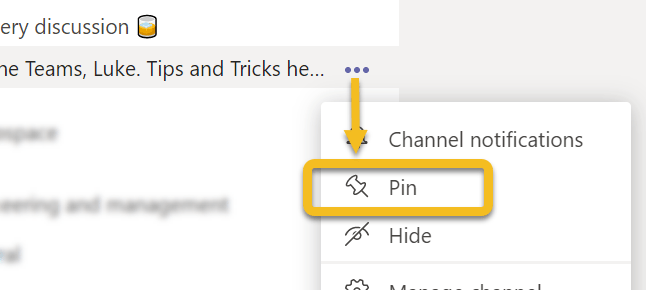
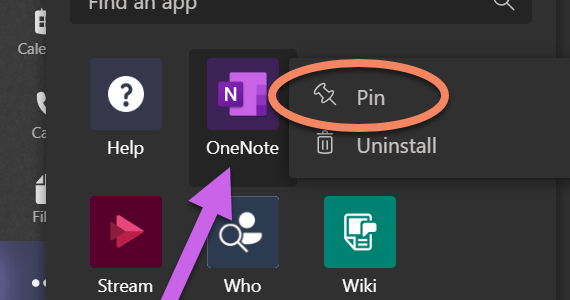
Microsoft Teams doesn't always tell you what you can do in it's interface. Since it is a kind of web application we have used to use left click around different menus. However, there are some features in Teams that will make your life easier if you right-click on them. And I am not talking about … Continue reading Teams features hidden in plain sight: right-clicks and pinning applications
Survival Guide to Microsoft Teams with multiple accounts
One very often heard challenge with Teams is that it is difficult to handle work when you have to use multiple identities (accounts). Usually you have your homebase (home tenant) where you have your work account. And I agree - using Teams with just one account is the most simple use case. However, it is … Continue reading Survival Guide to Microsoft Teams with multiple accounts
Adding PowerApps as Teams application to Teams via Graph API
You may already be aware that you can export a PowerApps to Teams. In case you haven't heard about this part check this URL: https://powerapps.microsoft.com/en-us/blog/add-your-canvas-apps-to-teams/ However, the real interest is in what we can do with PowerApps once we have uploaded the application to Teams App Catalog. You need to figure out, before progressing, a … Continue reading Adding PowerApps as Teams application to Teams via Graph API
Looking back at 2019
2019 was a quite amazing year for me. It all started when I was honored receiver of Microsoft MVP Award on 1.1.2019. Becoming MVP was a big thing for me personally and it did gave me an access to meet lots of new people in different events and also to participate more in communities than … Continue reading Looking back at 2019
Testing Microsoft Teams Graph Presence API
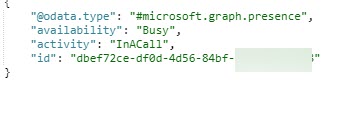
Teams Presence information is now available via Graph API beta interface. It is fairly simply to test using Graph Explorer by calling /beta/me/presence. Note: you will need to give a admin consent to these API calls. You can not do this with delegated user permissions. You may want to refer for Presence API documentation in … Continue reading Testing Microsoft Teams Graph Presence API
Microsoft Teams is also about inclusivity and accessibility
What is inclusiveness? Including different types of people and treating them all fair & equal. In other words: everything is accessible by everyone, no-one is left out. I had the base of this article in my mind for some days but it was this tweet that finally hit me to write it. Especially Situational accessibility … Continue reading Microsoft Teams is also about inclusivity and accessibility
Microsoft Teams Wikis and Meeting Notes: breakdown
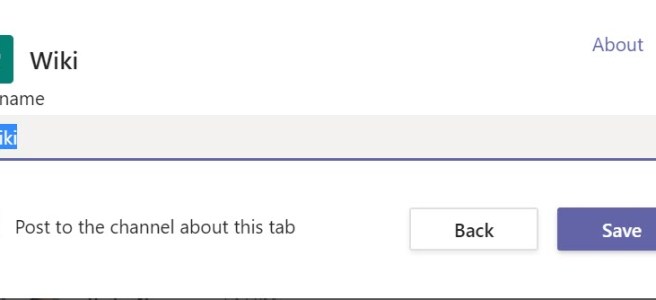
What are Teams Wiki and Meeting Notes. What you need to know about them and why you should be using OneNote instead of them. Yes, that's right. Even through this blog post gives you an overview about how Wikis look don't use them. OneNote is good. OneNote is your friend. Be a happy Teams user … Continue reading Microsoft Teams Wikis and Meeting Notes: breakdown
Microsoft Teams Spotlight: Latest features and roadmaps – watch my webinar recording
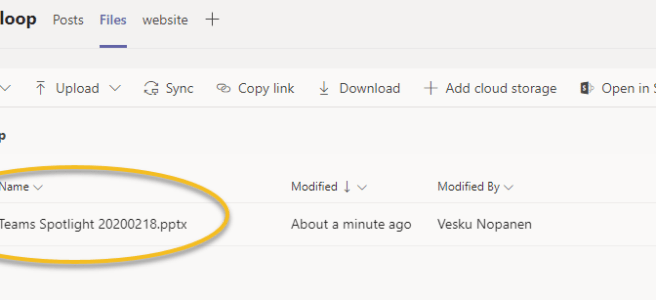
Feel free to watch my latest webinar about Microsoft Teams! The agenda: https://youtu.be/lIAxaQV6wT8 Timestamps for different parts:Private Channels: 2:55Live Events: 19:15Teams Meetings:35:50Microsoft Teams Rooms:55:18Keeping Teams noise in control: 1:02:05What's new & on the roadmap: 1:12:57
Start syncing your OneDrive for Business using Microsoft Teams
Sometimes a feature doesn't have to be a big one. Sometimes you don't use it very often - perhaps just once or a few times. But without it's existence you would might not even consider it. Yes, I am talking about a Sync button that appeared in Team's OneDrive. It gives you an easy way … Continue reading Start syncing your OneDrive for Business using Microsoft Teams
Teams Meetings: Organizers, presenters and attendees are out!
If you have had a Teams meeting today, you may have noticed that you can now do changes who can present in Teams meetings! I tested these in a scheduled meeting, meet now and in a channel meeting. All meetings work in the same way -> whoever is scheduling or starting the meeting is the … Continue reading Teams Meetings: Organizers, presenters and attendees are out!
How to add a custom status message with @mentions in Teams
Microsoft Teams did it again: there has been a update to status messages. Now you can do the following atmention one or more people in your status message to let people know who to contact in your absenceset a custom date for how long your status is active This allows others to see that you … Continue reading How to add a custom status message with @mentions in Teams
Adding a GMail guest user to Microsoft Teams using one-time passcode (.. and something about federated authentication too)
One of the recent updates (might be still rolling out) to guest access is to allow adding guests without the need to create a Microsoft Account during the process. Guests can use their Gmail email. For more information about guest access in general, check Docs.Microsoft.Com article and this roadmap item. Note this one-time passcode isn't … Continue reading Adding a GMail guest user to Microsoft Teams using one-time passcode (.. and something about federated authentication too)
Art of Pinning Channels, part two “What if”
I wrote about Art of Pinned Channels last week in my blog post. I decided to continue experimenting and gathering some more experience with this feature. This time I focus on "What if" scenario called "What if I choose to use to only pinned channels to manage my Teams"? Let's start with a more reasonable … Continue reading Art of Pinning Channels, part two “What if”
How to use Whiteboard in Teams meetings
Are you aware that every Microsoft Teams meeting includes a Microsoft Whiteboard that you can use before, during and after the meeting? When you create a meeting you can access the Whiteboard even before the meeting has started. All you need to do is to open the meeting chat and click on the Whiteboard tab, … Continue reading How to use Whiteboard in Teams meetings
Art of Pinning channels to the top and using channel notifications for effect
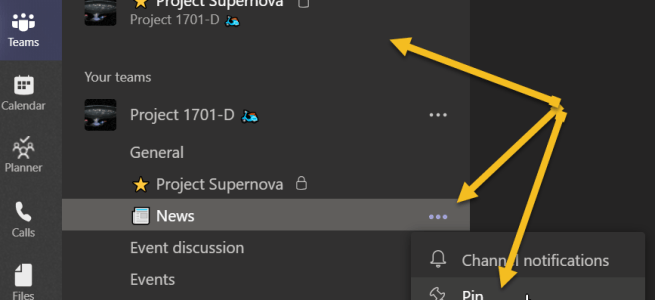
Pin channel is a feature that came out during the Microsoft Ignite. While it is a simple feature, you can use it to organize your Teams a lot better than before. Let's just with the How to. You click on the channel's "magic three dot" menu and choose Pin. Then the selected channel will appear … Continue reading Art of Pinning channels to the top and using channel notifications for effect
Private Channels Survival Guide
A week ago Private Channels started to appear in Teams across several Office 365 tenants. As this #1 awaited feature is now usable, it has also spurred out several questions. This guide tries to clarify when and why to create a private channel, what it means, what to avoid and some practices that you can … Continue reading Private Channels Survival Guide
What’s new and coming for Teams from Microsoft Ignite
It has been a magnificent Microsoft Ignite so far!! The keynote show was different this year than before: it happened all around in the Hub and 3000 attendees were there to see everything quite close. The big message was about Tech intensity. It was great to be able to view the Keynote from different places. … Continue reading What’s new and coming for Teams from Microsoft Ignite
Best Practice on sharing Teams Live Event links (and other links as well)
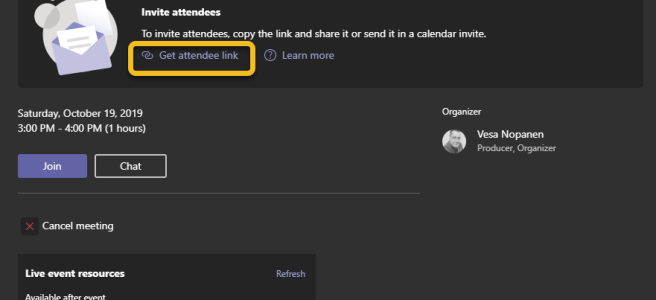
Have you ever created a Teams Live Event, shared the link and find when already started the meeting that By lumberjacks' beard!! I forgot to add the Q&A to the event and we already started!!! What usually happens next, is that you either arrange Q&A some other way (external app)go on without Q&Arecreate the event … Continue reading Best Practice on sharing Teams Live Event links (and other links as well)
Channel Cross Posting “dive-in how to guide”
Channel Cross Posting was released to Teams this week. It is one feature in a long list of anticipated updates to Teams. While the description and it's use is simple "Post once, publish the same post to several target channels " here is post describing it step by step - along with some use cases … Continue reading Channel Cross Posting “dive-in how to guide”
A guide to better meetings in Teams
Microsoft Teams known not only for it's modern work enabler, but also for fantastic modern meeting capabilities. What makes Teams the "tool" for meetings? Here is the short list of Team's features that back it up Works in almost any device. You can join into meeting using a Desktop client, browser (Chrome, Edge) or mobile … Continue reading A guide to better meetings in Teams
Teams Mobile App: add, annotate and edit securely images to Teams
Adding photos or images into Teams discussions has always been easy. There are some new features you might want to benefit. Add a photo or image You can start adding a new photo or existing image from your mobile device Photo library (or from any device connected services like OneDrive, GDrive,..). You can Tap on … Continue reading Teams Mobile App: add, annotate and edit securely images to Teams
Teams + Kaizala + Flow = working together beyond organization boundaries
Microsoft Kaizala was originally a Garage-project tool developed to Indian market to address collaboration needs for Field Workers. Since then it has gotten a lots of wind beneath it's wings. While everyone can install Kaizala on their phones (iOS, Android) the real potential can be unlocked with Kaizala Pro that is being added to Office … Continue reading Teams + Kaizala + Flow = working together beyond organization boundaries
Work with Dynamics / CRM directly in your Teams
Today I noticed that you can now start using Preview of Dynamics Application in Teams. This gives a whole new level to work with sales and with customers. There are great possibilities like Create a customer team, access customer account information directly from TeamsAdd contacts, notes, leads, opportunities etc easilyCreate a new tab for individual … Continue reading Work with Dynamics / CRM directly in your Teams
Access your workspace documents and folders easily from Teams
Prior adding Teams, did you had a Office 365 Groups with a set of folders in the Document Library? Did you notice it is not that easy to access your old folders from Teams? Or do do you have another Document Library in some other workspace you want to add to your Team but you … Continue reading Access your workspace documents and folders easily from Teams
You can now move your existing Forms to your team
How many times you have started to create a Forms without thinking, if it should be used by your team or not? Of course you had a option to share it to collaboration - but ownership was always on your account. When the owner left the company, for example, it was the ready recipe for … Continue reading You can now move your existing Forms to your team
Add tabs to your chat discussions
Teams is rolling out a new feature, which lets you to customize chat discussions. Using this you can add more benefits and value to either private one-to-one chats (let's say manager-employee development discussions) or group chats when the topic does not require a full team. You can't add all Teams tabs there, but I think … Continue reading Add tabs to your chat discussions
Sharing a screen in a chat without a call/meeting
Teams got a new feature out today! You can start a screen sharing directly in a chat (1:1 or group chat) without making a call first. There is a new screen sharing button that can be found in chat. Then you choose what you want to share with others. It is good to note a … Continue reading Sharing a screen in a chat without a call/meeting
Teams Mobile app: Drive mode & Share content
Teams Mobile app got a new feature just recently: Drive mode. When you have joined a meeting you can set your mobile device into Drive mode, which makes it is easier to focus on - say - driving since in Drive mode Teams won't be showing screen sharing or incoming videos to you. Also leaving … Continue reading Teams Mobile app: Drive mode & Share content
Teams allows a meeting guest to start and stop recording in mobile app
There is a possible bug in Teams Mobile App at the moment - or perhaps this feature is intentional and coming to desktop apps later. What I recently discovered was that invited external user into Teams meeting and they join using mobile app they can start and stop recording - overriding host's recording. I tested … Continue reading Teams allows a meeting guest to start and stop recording in mobile app
Teams: Code Snippets editor
Are you aware that you can include code snippets in Teams messages? You can actually add multiple code snippets to one post, since each one can have their own title. You need first to open the Format/larger view to post a message. From the "advanced editor" choose Code Snippet. The code snippet part is actually … Continue reading Teams: Code Snippets editor
5 reasons to start doing channel meetings in Teams
Channel meetings and Meet now are very useful and easy ways to engage and empower people in your organisation. Creating a meeting is easy. Just use Meet now or schedule it via Teams calendar. When you use Meet now, you get choose if you have your camera on or not. I recommend you start to … Continue reading 5 reasons to start doing channel meetings in Teams
My Tasks in Teams: a view to my Planner tasks
You are responsible of tasks in multiple Planners all across your Teamsverse but how do you get a good view of your tasks without opening Planner separately? This simple feature in Teams is very easy to miss. You need to check out the ... menu on the (usually) left side. If you don't see Planner … Continue reading My Tasks in Teams: a view to my Planner tasks
Lighter side of Teams: custom memes
Yes. Memes. One of Team's ways to enable communication beyond chat and calls. Adding memes can be disrupting at worst or connecting team with smile at best. Listen to your team - how do your members feel about memes/gifs and create shared practices that you all follow. I, personally, like to use all these little … Continue reading Lighter side of Teams: custom memes