Teams Meetings: Organizers, presenters and attendees are out!

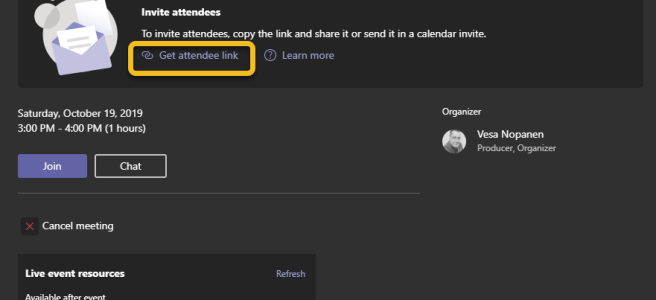
If you have had a Teams meeting today, you may have noticed that you can now do changes who can present in Teams meetings! I tested these in a scheduled meeting, meet now and in a channel meeting. All meetings work in the same way -> whoever is scheduling or starting the meeting is the … Continue reading Teams Meetings: Organizers, presenters and attendees are out!

How to add a custom status message with @mentions in Teams

Microsoft Teams did it again: there has been a update to status messages. Now you can do the following atmention one or more people in your status message to let people know who to contact in your absenceset a custom date for how long your status is active This allows others to see that you … Continue reading How to add a custom status message with @mentions in Teams

Adding a GMail guest user to Microsoft Teams using one-time passcode (.. and something about federated authentication too)

One of the recent updates (might be still rolling out) to guest access is to allow adding guests without the need to create a Microsoft Account during the process. Guests can use their Gmail email. For more information about guest access in general, check Docs.Microsoft.Com article and this roadmap item. Note this one-time passcode isn't … Continue reading Adding a GMail guest user to Microsoft Teams using one-time passcode (.. and something about federated authentication too)

Art of Pinning Channels, part two “What if”

I wrote about Art of Pinned Channels last week in my blog post. I decided to continue experimenting and gathering some more experience with this feature. This time I focus on "What if" scenario called "What if I choose to use to only pinned channels to manage my Teams"? Let's start with a more reasonable … Continue reading Art of Pinning Channels, part two “What if”

How to use Whiteboard in Teams meetings

Are you aware that every Microsoft Teams meeting includes a Microsoft Whiteboard that you can use before, during and after the meeting? When you create a meeting you can access the Whiteboard even before the meeting has started. All you need to do is to open the meeting chat and click on the Whiteboard tab, … Continue reading How to use Whiteboard in Teams meetings

Art of Pinning channels to the top and using channel notifications for effect

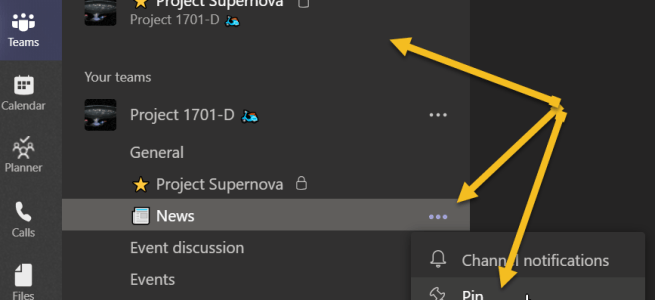
Pin channel is a feature that came out during the Microsoft Ignite. While it is a simple feature, you can use it to organize your Teams a lot better than before. Let's just with the How to. You click on the channel's "magic three dot" menu and choose Pin. Then the selected channel will appear … Continue reading Art of Pinning channels to the top and using channel notifications for effect

Private Channels Survival Guide

A week ago Private Channels started to appear in Teams across several Office 365 tenants. As this #1 awaited feature is now usable, it has also spurred out several questions. This guide tries to clarify when and why to create a private channel, what it means, what to avoid and some practices that you can … Continue reading Private Channels Survival Guide

What’s new and coming for Teams from Microsoft Ignite

It has been a magnificent Microsoft Ignite so far!! The keynote show was different this year than before: it happened all around in the Hub and 3000 attendees were there to see everything quite close. The big message was about Tech intensity. It was great to be able to view the Keynote from different places. … Continue reading What’s new and coming for Teams from Microsoft Ignite

Best Practice on sharing Teams Live Event links (and other links as well)

Have you ever created a Teams Live Event, shared the link and find when already started the meeting that By lumberjacks' beard!! I forgot to add the Q&A to the event and we already started!!! What usually happens next, is that you either arrange Q&A some other way (external app)go on without Q&Arecreate the event … Continue reading Best Practice on sharing Teams Live Event links (and other links as well)

Channel Cross Posting “dive-in how to guide”

Channel Cross Posting was released to Teams this week. It is one feature in a long list of anticipated updates to Teams. While the description and it's use is simple "Post once, publish the same post to several target channels " here is post describing it step by step - along with some use cases … Continue reading Channel Cross Posting “dive-in how to guide”

A guide to better meetings in Teams

Microsoft Teams known not only for it's modern work enabler, but also for fantastic modern meeting capabilities. What makes Teams the "tool" for meetings? Here is the short list of Team's features that back it up Works in almost any device. You can join into meeting using a Desktop client, browser (Chrome, Edge) or mobile … Continue reading A guide to better meetings in Teams

Teams Mobile App: add, annotate and edit securely images to Teams

Adding photos or images into Teams discussions has always been easy. There are some new features you might want to benefit. Add a photo or image You can start adding a new photo or existing image from your mobile device Photo library (or from any device connected services like OneDrive, GDrive,..). You can Tap on … Continue reading Teams Mobile App: add, annotate and edit securely images to Teams

Teams + Kaizala + Flow = working together beyond organization boundaries

Microsoft Kaizala was originally a Garage-project tool developed to Indian market to address collaboration needs for Field Workers. Since then it has gotten a lots of wind beneath it's wings. While everyone can install Kaizala on their phones (iOS, Android) the real potential can be unlocked with Kaizala Pro that is being added to Office … Continue reading Teams + Kaizala + Flow = working together beyond organization boundaries

Work with Dynamics / CRM directly in your Teams

Today I noticed that you can now start using Preview of Dynamics Application in Teams. This gives a whole new level to work with sales and with customers. There are great possibilities like Create a customer team, access customer account information directly from TeamsAdd contacts, notes, leads, opportunities etc easilyCreate a new tab for individual … Continue reading Work with Dynamics / CRM directly in your Teams

Access your workspace documents and folders easily from Teams

Prior adding Teams, did you had a Office 365 Groups with a set of folders in the Document Library? Did you notice it is not that easy to access your old folders from Teams? Or do do you have another Document Library in some other workspace you want to add to your Team but you … Continue reading Access your workspace documents and folders easily from Teams

You can now move your existing Forms to your team

How many times you have started to create a Forms without thinking, if it should be used by your team or not? Of course you had a option to share it to collaboration - but ownership was always on your account. When the owner left the company, for example, it was the ready recipe for … Continue reading You can now move your existing Forms to your team

Add tabs to your chat discussions

Teams is rolling out a new feature, which lets you to customize chat discussions. Using this you can add more benefits and value to either private one-to-one chats (let's say manager-employee development discussions) or group chats when the topic does not require a full team.  You can't add all Teams tabs there, but I think … Continue reading Add tabs to your chat discussions

Sharing a screen in a chat without a call/meeting

Teams got a new feature out today! You can start a screen sharing directly in a chat (1:1 or group chat) without making a call first.  There is a new screen sharing button that can be found in chat. Then you choose what you want to share with others. It is good to note a … Continue reading Sharing a screen in a chat without a call/meeting

Teams Mobile app: Drive mode & Share content

Teams Mobile app got a new feature just recently: Drive mode. When you have joined a meeting you can set your mobile device into Drive mode, which makes it is easier to focus on - say - driving since in Drive mode Teams won't be showing screen sharing or incoming videos to you. Also leaving … Continue reading Teams Mobile app: Drive mode & Share content

Teams allows a meeting guest to start and stop recording in mobile app

There is a possible bug in Teams Mobile App at the moment - or perhaps this feature is intentional and coming to desktop apps later. What I recently discovered was that invited external user into Teams meeting and they join using mobile app they can start and stop recording - overriding host's recording. I tested … Continue reading Teams allows a meeting guest to start and stop recording in mobile app

Teams: Code Snippets editor

Are you aware that you can include code snippets in Teams messages? You can actually add multiple code snippets to one post, since each one can have their own title. You need first to open the Format/larger view to post a message. From the "advanced editor" choose Code Snippet. The code snippet part is actually … Continue reading Teams: Code Snippets editor

5 reasons to start doing channel meetings in Teams

Channel meetings and Meet now are very useful and easy ways to engage and empower people in your organisation. Creating a meeting is easy. Just use Meet now or schedule it via Teams calendar. When you use Meet now, you get choose if you have your camera on or not. I recommend you start to … Continue reading 5 reasons to start doing channel meetings in Teams

My Tasks in Teams: a view to my Planner tasks

You are responsible of tasks in multiple Planners all across your Teamsverse but how do you get a good view of your tasks without opening Planner separately? This simple feature in Teams is very easy to miss. You need to check out the ... menu on the (usually) left side. If you don't see Planner … Continue reading My Tasks in Teams: a view to my Planner tasks

Lighter side of Teams: custom memes

Yes. Memes. One of Team's ways to enable communication beyond chat and calls. Adding memes can be disrupting at worst or connecting team with smile at best. Listen to your team - how do your members feel about memes/gifs and create shared practices that you all follow.  I, personally, like to use all these little … Continue reading Lighter side of Teams: custom memes

Quiet hours in Teams

Did you notice you can add Quiet Hours to Teams Mobile app? If you go to your Teams mobile app settings and notifications you can find a mention about Quiet hours there. Tap the text and you get to set your quiet hours and days. Easy and useful in many situations - you don't have … Continue reading Quiet hours in Teams

Favorite Teams and Channels and the art of @mentions

For some reason, I had been under impression that when a Team is not in your favorite list, you don't get any Team or Channel notifications from it. It seems I was wrong. Perhaps this has been always as is (and avoided my tests) or the behavior has changed over the course of time. So … Continue reading Favorite Teams and Channels and the art of @mentions

Microsoft Search and Teams conversations. Yes, it does work!

I was able to test new Microsoft Search and of course I was curious how it works with Teams and Yammer. Let's just say here are couple of snips. What was great, is that once I had written those messages they appeared in the search immediately. There isn't much delay. I wrote those messages, switched … Continue reading Microsoft Search and Teams conversations. Yes, it does work!

Some Ignite Teams news

A lots of new and upcoming features were announced to Microsoft Teams yesterday. Here is a one picture of what's happening next - and what already is available. Note: Have you started to plan how to migrate your organization from Skype for Business to Teams? If not - start it. It will take time before … Continue reading Some Ignite Teams news

Goodbye for Skype for Business Online!

Starting with smaller tenants (<500 seats) you cannot get a new Office 365 tenant with Skype in October! It is TeamsOnly!  Also, beginning in November some tenants (which ones - not certainity yet) with less than 500 seats will get a automatic migration offer from Microsoft. You can postpone the migration, but it is not … Continue reading Goodbye for Skype for Business Online!

Change is supported

Does your apps for work come with "Change is Supported"? As my work evolves and changes constantly, so does my teams and Teams. #TeamsDay #TeamsTuesday Teams is my interface to my WORK It contains my workspaces and communications, it is about people (groups, conversations, calls, meetings) and content that is connected to the context like … Continue reading Change is supported

My Teams experiences

I have been using Teams actively over 1.5 years. Why I love this tool? What are benefits for me in my daily work? #TeamsDay #TeamsTuesday   I love the way I can stay connected to my closest inner teams (easily, fluently) and yet I can work as easily with other people in other teams as … Continue reading My Teams experiences

Do you want to move ahead to TeamsOnly from SkypefBO?

Do you want to stop using SkypefB and switch to use only Teams? You could communicate with externals (federated users) and not care if they are using Skype or Teams. Can do! This was a hit for me immediately, because there is no more need to open the SkypefB app when someone sends me a … Continue reading Do you want to move ahead to TeamsOnly from SkypefBO?

TeamsOnly so far

What does it mean, when you have fully upgraded your Skype for Teams? How does it change your daily work? #TeamsTuesday #TeamsDay Last week I volunteered (requested!) to start testing #TeamsOnly mode. This means that I no longer use Skype for Business Online, but instead I use Teams as my sole communication tool, on top … Continue reading TeamsOnly so far

How do drive organization to use Teams?

QuizTime! What are the best ways to drive in Teams or other new tools in your organization? What needs to happen, before You and your colleagues change the way you work? #TeamsDay #TeamsTuesday   Choose one or more and tell me in comments which of these hit you the most: Trainings: Formal classroom or online … Continue reading How do drive organization to use Teams?