I reviewed Microsoft Surface Headphones 2 in late 2020. Recently I got the change to try the Microsoft Teams Certified version of Surface Headphones 2+. These headphones are tagged "for business" and it also marks the opening era of Teams Certified headsets for Surface family. No, they don't look much different from the outside. Controls … Continue reading Review: Microsoft Surface Headphones 2+
Category: General
Review: upgraded my workspace to modern with Logitech MX Keys and MX Master 3 mouse
As some of you might know I used to work exclusively on Surface Pro -devices and for almost two years I had The Best Mouse to go with it: Microsoft Surface Precision mouse. Desktop computer I had was a lot older model and thus I used it only occasionally - the keyboard I had with … Continue reading Review: upgraded my workspace to modern with Logitech MX Keys and MX Master 3 mouse
My 2021 so far: a mid-year look back + turning on vacation mode in Microsoft Teams and Office 365
Today is a good day - despite this being the third published blog post on today, which may be a kind of record even for me 😂. I am start my annual summer vacation and that gives me a welcome break to recharge some precious brain batteries. Perhaps even take some walks, bicycling and seeing … Continue reading My 2021 so far: a mid-year look back + turning on vacation mode in Microsoft Teams and Office 365
Viva Insights – updated and improved with Headspace!
I was just preparing my other post and going through some Viva Insight when I noticed the front page had been updated with Headspace! The previous meditation part is gone and it has been replaced with the new functionality. Behind Headspace you can find these Guided meditations Virtual Commute now includes Headspace meditation. In the … Continue reading Viva Insights – updated and improved with Headspace!
Heads up! Microsoft Teams preview to follow Office Preview
In case you haven't seen the Admin Center bulletin here is important information if you have been using Office Preview or Microsoft Teams Public Preview. This is a change that can affect many of your users in Microsoft Teams: giving them option to turn on Teams Public Preview. This does not affect people in TAP … Continue reading Heads up! Microsoft Teams preview to follow Office Preview
Review: Poly Voyager Focus 2
The audio is #1 feature in meetings. If your audio is not clear or you don't hear what others say then the meeting quality and value is quickly degenerating. Of course there are other key elements in meetings as well. However Audio is the Number One. Too often sub-par devices with connectivity issues are used … Continue reading Review: Poly Voyager Focus 2
New Microsoft Teams client (2.0) announced with Windows 11!
Last Thursday, 24th of June 2021, marked a great day - not just for opening Midsummer break in Nordic countries but especially for the announcement(*) of the new Microsoft Teams client along with Windows 11! The new Teams chat, call & meet client was highlighted during the Windows 11 announcements & intro but the true … Continue reading New Microsoft Teams client (2.0) announced with Windows 11!
App highlight: Squarl – first impressions
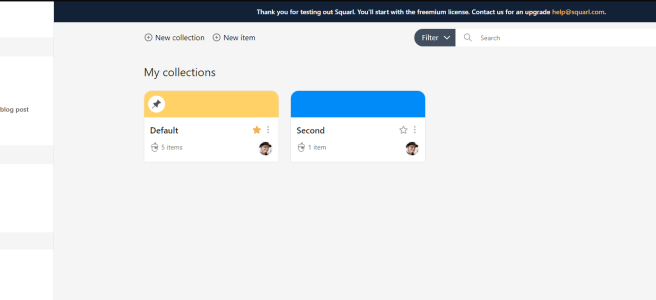
I got an early access to Squarl application. It is (visioning to become) all-in-one management application that people can use to get all relevant loosely connected bits and pieces into a single application so they can be reviewed and accessed easily later. In short: you can add links, notes and Teams conversations into a single … Continue reading App highlight: Squarl – first impressions
Roadmap watch: what’s coming to Teams during Summer 2021?
What can be expected to roll out to Microsoft Teams during this summer? Short answer: a lot! Massively! I highlight some of those features in this blog post as a summary. As always - schedules can change. Some features may be pushed back if the testing reveals some issues there. While it does sting when … Continue reading Roadmap watch: what’s coming to Teams during Summer 2021?
Microsoft HoloLens 2 – experiencing the future today
I have been very enthusiastic about HoloLens 2 -devices when I first saw them demonstrated during 2019. I have been staying up to about HoloLens throughout these two years - especially thinking and learning about use cases in different industries and bringing in Line of Business applications to it. The latest big news was the … Continue reading Microsoft HoloLens 2 – experiencing the future today
Chat Bubbles in Team meetings
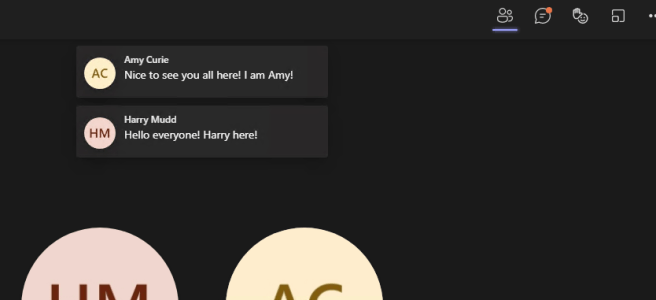
Chat Bubbles is a new feature to display chat messages in Teams meetings that just hit Public Preview (yes, you need to have Public Preview enabled in Teams Desktop client to be able to use these preview features). And no, you don't see them in browser-Teams nor in mobile-Teams at this phase. Just the Desktop … Continue reading Chat Bubbles in Team meetings
PowerPoint Live in Teams: now with laser pointer and inking!
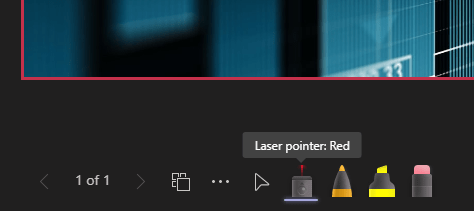
It was a pleasant surprise to test our Teams meetings features recently: Laser Pointer & Inking features are available in PowerPoint Live! This means it is possible to start laser-pointing your slides, ink on them (in various colors & thicknesses) to highlight the content and of course use highlighter to really stand something out. I … Continue reading PowerPoint Live in Teams: now with laser pointer and inking!
Review for Poly Sync 20: a Microsoft Teams certified Speakerphone
I had the opportunity to test out Poly's Sync 20 -speakerphone for Teams for couple of months now. Previously I have taken a look at Poly Calisto 5300 in late 2020, so I was really interested to try Sync 20 out. Of course since this too is certified for Microsoft Teams, and optionally comes with … Continue reading Review for Poly Sync 20: a Microsoft Teams certified Speakerphone
How to create Task from a message in Teams (Out of the Box version)
I can see Create Task has appeared in Teams Public Preview! This new feature makes it really easy to turn conversation into tasks in your personal To Do or to Team Planner. This saves the trouble of having to activate it yourself and especially the need to do copy-paste to get message contents to Tasks. … Continue reading How to create Task from a message in Teams (Out of the Box version)
Roadmap watch: What new to expect to Microsoft Teams in June 2021 (and a bit beyond)?
It is time to take a brief look at Teams roadmap, since there has been plenty of changes recently. As always, when looking for most up to date information about a specific feature I urge you to check Microsoft 365 Roadmap. This blog post works as a curated summary of those items I feel are … Continue reading Roadmap watch: What new to expect to Microsoft Teams in June 2021 (and a bit beyond)?
Shared Channels: Collaborate beyond borders in Microsoft Teams
Microsoft Teams is getting Shared Channels! This new feature will make it possible to work with other people in a channel by invited an internal or external (in other organizations) members to a Shared Channel. At first the biggest things why this matters: externals don't have to switch tenants to work with you - and … Continue reading Shared Channels: Collaborate beyond borders in Microsoft Teams
New file sharing experience: review / block download in Teams chat
The new sharing experience is rolling to Microsoft Teams chat. When you drop/upload/select a file to be shared you can now define what the recipient can do with the file. This makes it possible to share files and prevent others from downloading them. And yes - this comes from the OneDrive so this capability is … Continue reading New file sharing experience: review / block download in Teams chat
Presenter Mode (standout) is in Public Preview!
It is always fun to check what Microsoft Teams features are available in Public Preview. To my surprise this time it was the Presenter Mode! Only one of modes is there: Standout but I think it will be very often used one. This means that I need to start thinking how slides are built, so … Continue reading Presenter Mode (standout) is in Public Preview!
Microsoft Teams News and Announcements at Microsoft Build #MSBuild
Microsoft Build (#MSBuild if you tweet / post to social about it) information is flowing.. fluiding in! I especially love the way Collaborative applications are presented in one picture. Collaborative Experiences is a great term - ties up nicely with Employee Experience. This blog post focuses on announcements and news around Microsoft Teams. Picture from … Continue reading Microsoft Teams News and Announcements at Microsoft Build #MSBuild
How to build your own Together Mode scene to Microsoft Teams. Without coding! #NoCode
Microsoft Teams announcements and news at Microsoft Build (#MSBuild if you tweet / post to social about it) focus on more at extensibility and how these result in the benefit of people using Teams. There are lots of interesting features that will make applications more rich and more versatile in Teams. One of those announcements … Continue reading How to build your own Together Mode scene to Microsoft Teams. Without coding! #NoCode
Surface Duo : a modern employee experience device
I was lucky enough to get my hands to Surface Duo device for a month. Surface Duo is a dual-screen mobile "phone" that can also be called a Modern Work Productivity Device. There has been quite a many of reviews of the device in the social for some time so I don't dive into phone … Continue reading Surface Duo : a modern employee experience device
How to disable attendee video/camera in Microsoft Teams meetings
Video control (ability to disable) attendee video is rolling to Microsoft Teams meetings. This will be possible to set in meeting options (not rolled out yet) and seems to be present only in Teams Desktop app at the moment. It tells that the rollout is in early steps and you can not prepare this in … Continue reading How to disable attendee video/camera in Microsoft Teams meetings
I am speaking at Microsoft Build 25. – 27.5.2021!
I got the honor to be speaking and in "virtual booths" at Microsoft Build next week. You can find me and my friends hosting a Table Talk on Tuesday, right after Satya Nadella's keynote! #MSBuild Unleash the power of Dataverse with Microsoft Teams9:30am PDT/Seattle5:30pm GMT/UK6:30pm CEST/Central Europe7:30pm EEST/Finland The space is limited on Table Talks … Continue reading I am speaking at Microsoft Build 25. – 27.5.2021!
How to create Webinars with Microsoft Teams
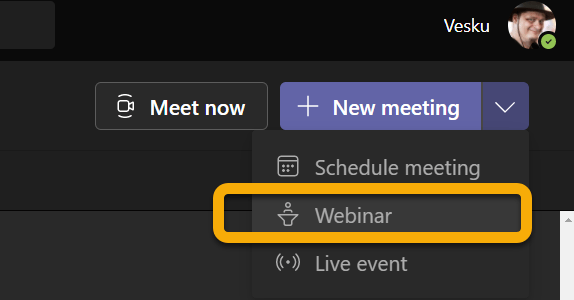
Plenty of Webinar features have rolled into Microsoft Teams recently! Earlier the support for "overflow" meetings (=view-only attendees) have been followed by large meetings (1K) and now also registration support. What is still on the waiting list is the attendee engagement information. Some facts to get started Included in E3, E5, Business Standard, Business Premium … Continue reading How to create Webinars with Microsoft Teams
I am hosting Teams Spotlight Webinar tomorrow: Tuesday 18th at 9am CEST
Hello my dear readers! I am presenting my Microsoft Teams what's new & upcoming webinar tomorrow. In this webinar I go through latest Microsoft Teams features and information and there are plenty of live demos in it. Since this is a Sulava (my employer) webinar I have also a few company slides in it and … Continue reading I am hosting Teams Spotlight Webinar tomorrow: Tuesday 18th at 9am CEST
How to present from PowerPoint desktop directly to Microsoft Teams meeting
You can easily present your PowerPoint directly to Teams meeting using PowerPoint Desktop. This makes it very easy to project your presentation directly to Team meeting that is open. This is most of all about usability and an another skill in PowerPoint Live's big hat. You need to have a meeting open in Microsoft Teams … Continue reading How to present from PowerPoint desktop directly to Microsoft Teams meeting
How to reply to a Teams message with delay
I have heard from various people, in various situations, that they would love to have a feature for Microsoft Teams that would allow them to reply to a message - but the reply would be sent later. That capability has in fact been there since last autumn, but it is now easier to add than … Continue reading How to reply to a Teams message with delay
How to use Microsoft Teams Approvals with eSign: Adobe Sign
If you are using Microsoft Teams in Public Preview then you can already try out Approvals application integration with eSign using Adobe Sign provider. It has been stated that more providers will be added in the future. However Adobe Sign is a very popular service so it is a good way to get started with … Continue reading How to use Microsoft Teams Approvals with eSign: Adobe Sign
How to create and use Approval templates in Microsoft Teams
Approval Templates are now available for testing in Microsoft Teams Public Preview. You may have to ask your administrator to enable Public Preview for you - or just wait a little longer until feature is fully tested before it rolls to generally available production. However if you are the one sharing information in your organization … Continue reading How to create and use Approval templates in Microsoft Teams
Microsoft Whiteboard in Teams meeting has new look and tools
I had a pleasant surprise a couple of weeks back to see that Microsoft Whiteboard in Teams meeting and in the web version has gotten a new look and also some new functionalities. I will highlight to you in this blog post what it is all about. When you create a Teams meeting and open … Continue reading Microsoft Whiteboard in Teams meeting has new look and tools
New content sharing experience is now in Public Preview
Microsoft Teams Public Preview is bringing in new features in a nice speed. Every organization should have at least few people using the Public Preview version so they can get some experience what is coming up to Teams and how they should inform and train their employees. The latest one is the new sharing experience … Continue reading New content sharing experience is now in Public Preview
Microsoft Viva Insights: Home-tab
I had a pleasant surprise today when I checked my Insights-app. It has just gotten the new Home-tab and thus more functionalities are now available with it! Looking at the app, after those couple of welcome screens, we can see four key areas there Motivational helloHow are you feeling for a quick reflectionEasy way & … Continue reading Microsoft Viva Insights: Home-tab
Shared Channels (Microsoft Teams Connect) : rescheduled for November 2021
When looking at the Microsoft Teams roadmap some surprises are good - some quite the opposite. What are Shared Channels?This new feature will make it possible to work with other people in a channel by invited an internal or external (in other organizations) members to a Shared Channel. The really big thing is that externals … Continue reading Shared Channels (Microsoft Teams Connect) : rescheduled for November 2021
Power Virtual Agents bot setting the Out Of Office
It is always interesting to hit the wall with limitations when you are working with Power Automate. Some limits are due to licensing but some are due to other good reasons. I was running a PoC where a person interacting with a Power Virtual Agent bot required to do actions on behalf of that person. … Continue reading Power Virtual Agents bot setting the Out Of Office
Dynamic View, Translating slideshow content and other Teams roadmap updates
There has been again some changes in the roadmap for Microsoft Teams. Let me highlight you some of them Dynamic View is now in the public preview! This means you can start enjoying the benefits of much better Teams meeting experience. I have been using that for a while already - and I have to … Continue reading Dynamic View, Translating slideshow content and other Teams roadmap updates