Survival Guide to Microsoft Teams with multiple accounts

One very often heard challenge with Teams is that it is difficult to handle work when you have to use multiple identities (accounts). Usually you have your homebase (home tenant) where you have your work account. And I agree - using Teams  with just one account is the most simple use case. However, it is … Continue reading Survival Guide to Microsoft Teams with multiple accounts

Adding PowerApps as Teams application to Teams via Graph API

You may already be aware that you can export a PowerApps to Teams. In case you haven't heard about this part check this URL: https://powerapps.microsoft.com/en-us/blog/add-your-canvas-apps-to-teams/ However, the real interest is in what we can do with PowerApps once we have uploaded the application to Teams App Catalog. You need to figure out, before progressing, a … Continue reading Adding PowerApps as Teams application to Teams via Graph API

Approvals in Team Channel using Power Automate and Adaptive Cards

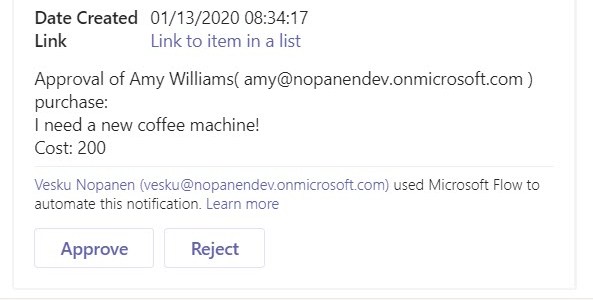
While there has been possible to create personal approvals using Power Automate, there is also a possibility to divert those requests to Team Channel and so anyone who is a member of that team can approve the request. This can create speed, transparency and flexibility into decision making - especially if there is any discussion … Continue reading Approvals in Team Channel using Power Automate and Adaptive Cards

Create a Teams Private Channel using Graph API and Power Automate (Flow)

Have you thought about creating a private channel in Teams using a API? Yes, it is possible to do so in case you were wondering is that really supported or not. Using Graph Explorer is simple, fast and easy for this testing. First you need to figure out a few IDs: Team ID (for example … Continue reading Create a Teams Private Channel using Graph API and Power Automate (Flow)

What is cooking for Teams 2020?

Year 2020 is here tomorrow. Or most likely - when you are reading this - it is no longer the dark/inspiring future but the exciting present day. I thought it would be nice to take a look what is cooking and boiling for Teams during next year. But first, looking from 80s, 90s 00s and … Continue reading What is cooking for Teams 2020?

Looking back at 2019

2019 was a quite amazing year for me. It all started when I was honored receiver of Microsoft MVP Award on 1.1.2019. Becoming MVP was a big thing for me personally and it did gave me an access to meet lots of new people in different events and also to participate more in communities than … Continue reading Looking back at 2019

Microsoft Teams is also about inclusivity and accessibility

What is inclusiveness? Including different types of people and treating them all fair & equal. In other words: everything is accessible by everyone, no-one is left out. I had the base of this article in my mind for some days but it was this tweet that finally hit me to write it. Especially Situational accessibility … Continue reading Microsoft Teams is also about inclusivity and accessibility

Microsoft Teams Wikis and Meeting Notes: breakdown

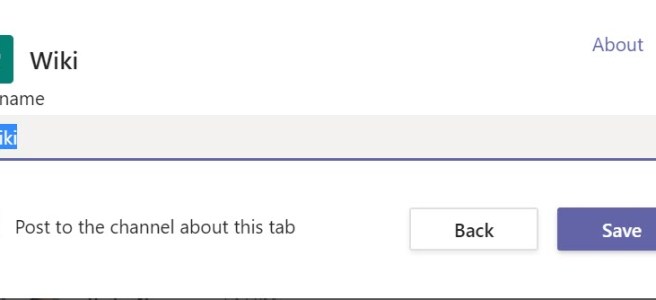
What are Teams Wiki and Meeting Notes. What you need to know about them and why you should be using OneNote instead of them. Yes, that's right. Even through this blog post gives you an overview about how Wikis look don't use them. OneNote is good. OneNote is your friend. Be a happy Teams user … Continue reading Microsoft Teams Wikis and Meeting Notes: breakdown

Teams got Live Captions to meetings, UI change and federated 1:1 chat are out

Live Captions feature is a big thing. Yes - it is not perfect. Yes - it does sometimes funny mistakes. But the benefits are big: People with hearing problems and read what's being said It may be a serious issue but it may affect your way to get the message from the presenter.You may have … Continue reading Teams got Live Captions to meetings, UI change and federated 1:1 chat are out

Microsoft Teams Spotlight: Latest features and roadmaps – watch my webinar recording

Feel free to watch my latest webinar about Microsoft Teams! The agenda: https://youtu.be/lIAxaQV6wT8 Timestamps for different parts:Private Channels: 2:55Live Events: 19:15Teams Meetings:35:50Microsoft Teams Rooms:55:18Keeping Teams noise in control: 1:02:05What's new & on the roadmap: 1:12:57

Start syncing your OneDrive for Business using Microsoft Teams

Sometimes a feature doesn't have to be a big one. Sometimes you don't use it very often - perhaps just once or a few times. But without it's existence you would might not even consider it. Yes, I am talking about a Sync button that appeared in Team's OneDrive. It gives you an easy way … Continue reading Start syncing your OneDrive for Business using Microsoft Teams

Uploading files directly to Teams using Forms and mentioning team with Power Automate.

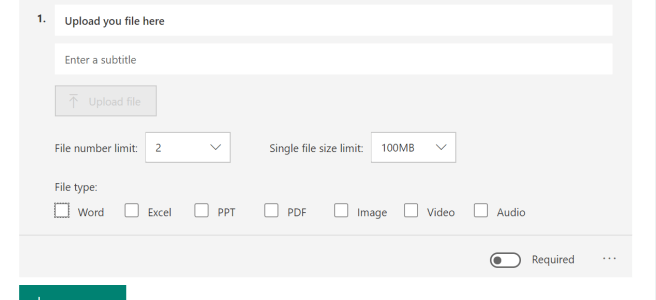
Microsoft Forms has gotten a new skill: file uploading. It is a easy way to starting processing and automating files forward. It could be a application, report, public announcement or whatever organizations come up with. In a way it is a substitute for building a file upload PowerApps or a more user friendly way than … Continue reading Uploading files directly to Teams using Forms and mentioning team with Power Automate.

Teams Meetings: Organizers, presenters and attendees are out!

If you have had a Teams meeting today, you may have noticed that you can now do changes who can present in Teams meetings! I tested these in a scheduled meeting, meet now and in a channel meeting. All meetings work in the same way -> whoever is scheduling or starting the meeting is the … Continue reading Teams Meetings: Organizers, presenters and attendees are out!

Microsoft Teams with Jabra Evolve 75 and Logitech Zone Wireless

Microsoft Teams meetings experience is heavily affected by the audio quality. If you are in a meeting where you get the annoying echo (hearing your own voice) or encounter a situation where noise is "howling" (circling from speakers back to mic and only gets stronger and stronger .. ) it doesn't leave room for the … Continue reading Microsoft Teams with Jabra Evolve 75 and Logitech Zone Wireless

How to add a custom status message with @mentions in Teams

Microsoft Teams did it again: there has been a update to status messages. Now you can do the following atmention one or more people in your status message to let people know who to contact in your absenceset a custom date for how long your status is active This allows others to see that you … Continue reading How to add a custom status message with @mentions in Teams

Adding a GMail guest user to Microsoft Teams using one-time passcode (.. and something about federated authentication too)

One of the recent updates (might be still rolling out) to guest access is to allow adding guests without the need to create a Microsoft Account during the process. Guests can use their Gmail email. For more information about guest access in general, check Docs.Microsoft.Com article and this roadmap item. Note this one-time passcode isn't … Continue reading Adding a GMail guest user to Microsoft Teams using one-time passcode (.. and something about federated authentication too)

How to use Whiteboard in Teams meetings

Are you aware that every Microsoft Teams meeting includes a Microsoft Whiteboard that you can use before, during and after the meeting? When you create a meeting you can access the Whiteboard even before the meeting has started. All you need to do is to open the meeting chat and click on the Whiteboard tab, … Continue reading How to use Whiteboard in Teams meetings

Art of Pinning channels to the top and using channel notifications for effect

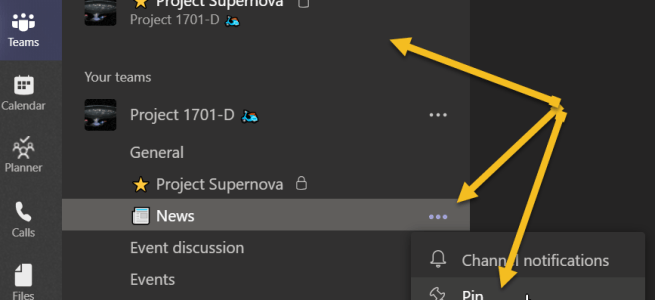
Pin channel is a feature that came out during the Microsoft Ignite. While it is a simple feature, you can use it to organize your Teams a lot better than before. Let's just with the How to. You click on the channel's "magic three dot" menu and choose Pin. Then the selected channel will appear … Continue reading Art of Pinning channels to the top and using channel notifications for effect

Private Channels Survival Guide

A week ago Private Channels started to appear in Teams across several Office 365 tenants. As this #1 awaited feature is now usable, it has also spurred out several questions. This guide tries to clarify when and why to create a private channel, what it means, what to avoid and some practices that you can … Continue reading Private Channels Survival Guide

What’s new and coming for Teams from Microsoft Ignite

It has been a magnificent Microsoft Ignite so far!! The keynote show was different this year than before: it happened all around in the Hub and 3000 attendees were there to see everything quite close. The big message was about Tech intensity. It was great to be able to view the Keynote from different places. … Continue reading What’s new and coming for Teams from Microsoft Ignite

Tiesitkö näitä vinkkejä Teamsista?

Microsoft Ignite tulee tuomaan runsaasti uutta ensi viikolla Teamsiin (mm. uusi tiedostonäkymä on nyt jo näkyvissä joissain ympäristöissä!) , mutta tällä välin on hyvä palata vielä muutamaan perusasiaan. Tässä siis lyhyesti vinkkejä Teamsin käyttöön ja sitä helpottamaan Järjestä tiimit haluamaasi järjestykseen Tiimisi-näkymässä olevat tiimit itse voi raahata haluamaansa järjestykseen. Piiloitetut tiimit sen sijaan ovat siinä … Continue reading Tiesitkö näitä vinkkejä Teamsista?

Last minute tips for Microsoft Ignite 2019 attendees

First, there are multiple blog articles about how to prepare yourself to Microsoft Ignite. You want to read at least some of those. Here are two good ones Matt Wade’s Quick Guide to Microsoft Ignite 2019Participating for MS Ignite 2019 at Orlando as a first timer? The time for preparing is naturally getting short now - … Continue reading Last minute tips for Microsoft Ignite 2019 attendees

Best Practice on sharing Teams Live Event links (and other links as well)

Have you ever created a Teams Live Event, shared the link and find when already started the meeting that By lumberjacks' beard!! I forgot to add the Q&A to the event and we already started!!! What usually happens next, is that you either arrange Q&A some other way (external app)go on without Q&Arecreate the event … Continue reading Best Practice on sharing Teams Live Event links (and other links as well)

Microsoft Ignite: etäosallistujan opas

Kuva napattu Microsoftin blogista: https://techcommunity.microsoft.com/t5/Microsoft-Teams-Blog/The-Microsoft-Teams-Guide-to-Ignite-2019/bc-p/951269 Marraskuun alun Microsoft Ignite on valtava tapahtuma, jossa on paikan päällä on 20 - 30 tuhatta ihmistä. Esityksiäkin on 1000+, joten jokaiselle Microsoft-teknologiaan liittyvään aiheeseen on varmasti tarjolla sisältöä. Et pääse paikan päälle? Katso striimit ja osallistu etänä! Tänäkin vuonna iso osa esityksistä on katsottavissa striiminä ilman osallistumismaksua. Tämä on … Continue reading Microsoft Ignite: etäosallistujan opas

Channel Cross Posting “dive-in how to guide”

Channel Cross Posting was released to Teams this week. It is one feature in a long list of anticipated updates to Teams. While the description and it's use is simple "Post once, publish the same post to several target channels " here is post describing it step by step - along with some use cases … Continue reading Channel Cross Posting “dive-in how to guide”

Office 365 -tiedostot ja offline käyttö mobiililaitteella: tiesitkö tämän?

Kannettavalla Office 365 tiedostojen mukaanotto on erittäin vaivatonta: OneDriven avulla synkronoidaan tiedostot mukaan paikalliselle levylle ja merkataan ne säilytettäväksi aina koneen levyllä. Tämä on se tapa, jota itse käytän aktiivisesti âž¡ tiedostot ovat Surfacessani mukanani esimerkiksi junamatkalla tai lentokoneessa. OneDrive (Files on Demand) mahdollistaa vaikka koko työtilan synkronoimisen koneelle niin, että voin valita mitä haluan … Continue reading Office 365 -tiedostot ja offline käyttö mobiililaitteella: tiesitkö tämän?

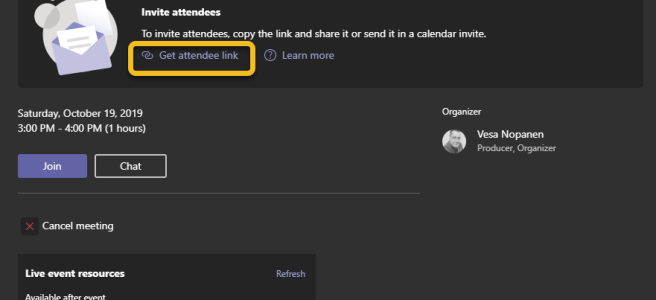
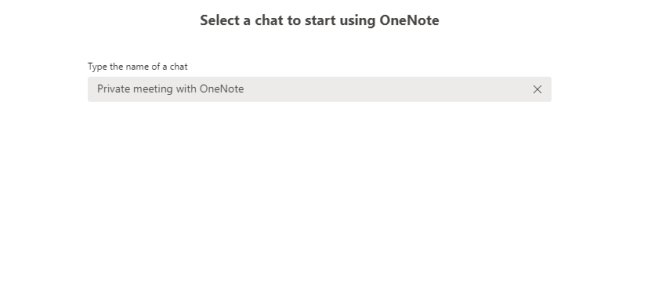
How to add a OneNote to (private) Teams Meetings

While using a team OneNote in channel meetings is very intuitive and straight-forward (it is usually in channel's tabs) did you know that you can add or create a OneNote to private Teams meetings as well? What is a private Teams meeting? That is the meeting you get when you create a meeting using Outlook, … Continue reading How to add a OneNote to (private) Teams Meetings

Mitä Teamsiin on odotettavissa?

Tähän väliin on hyvä nostaa pieni Teamsin roadmap/tiekarttapäivitys. Microsoft Ignite on edessä muutaman viikon päästä ja odotettavissa on että siellä saadaan uutisia ja jatkoa kartalle. Minä olen myös puhujana ja tänä vuonna myös teatterisessiot striimataan - ajankohdat esityksilleni ovat suomiystävällisesti illalla klo 22-23 välillä sekä maanantaina (22:25) että tiistaina (22:40). Tiedot esityksistäni löytyvät täältä - … Continue reading Mitä Teamsiin on odotettavissa?

Create a Planner board to team using Graph API

Continuing on Graph API series: this time I show how to create a Planner board, add a bucket and task into it and attach it to a team as template. The setup I am showing these snippets as example, they are not a full solutionsI use PowerShell and Graph Explorer to post commands inExperiment, learn … Continue reading Create a Planner board to team using Graph API

Exporting team channel messages into OneNote page using Graph API

There is now and then a need to delete a channel or team. While moving documents and other content in team to a new team or onto other storage the question remains about messages. Sometimes the need is even as simple as moving a channel to a another team (reorganizing). Very often messages are wanted … Continue reading Exporting team channel messages into OneNote page using Graph API

Viestien lainaus keskustelussa mobiilisovelluksella + muistakaa Teamsin kamera ja puhelimen näytön jakaminen

Teamsin mobiilisovellus on saanut uuden ominaisuuden: viestien lainaus keskustelussa. Tämä toimii vain yksityis/ryhmäkeskusteluissa. Lainaaminen tapahtuu painamalla sormella pitkään viestiä jota haluaa lainata ja valitsemalla "reply". Suomennos ei ole vielä ehtinyt mukaan. Tämän jälkeen viestiin vastataan tuttuun tapaan. Erona on, että lainattu viesti näkyy ruudulla. Kun keskustelussa on paljon viestejä, tämä voi pitää keskustelua vähän kasassa: … Continue reading Viestien lainaus keskustelussa mobiilisovelluksella + muistakaa Teamsin kamera ja puhelimen näytön jakaminen

Teams Meetings: video spotlight (pin a meeting participant)

This new feature in Teams is easily overlooked, since it only shows next to attendees in a meeting: the ability to pin/spotlight a person's video feed into screen. When you use this, you can "focus/spotlight" on specific person's video - and it doesn't matter who is talking. This is very useful in all hands / … Continue reading Teams Meetings: video spotlight (pin a meeting participant)

Kokous … Pikakokous!

Teamsiin ilmestyi viime viikolla jälleen uusi käyttökelpoinen ominaisuus: pikakokous (Järjestä kokous nyt). Painike tähän löytyy kalenterista. Kokouksen aloittaminen on helppoa - napsauttaa vain "Järjestä kokous nyt"-painiketta ja valitsee tuttuun tapaan omat laiteasetukset. Kokous saa automaattisesti nimekseen "Tapaaminen järjestäjän Vesa Nopanen kanssa" - otsikon voi kuitenkin muuttaa itse mieleisekseen. Tämän jälkeen kokous toimii kuten aikataulutettu Teams-kokous. … Continue reading Kokous … Pikakokous!

Solved: Microsoft Authenticator draining battery on Android phone

During the summer I got the issue onto my OnePlus 6T phone. It involved the Microsoft Authenticator app that is used to Multi-factor Authentication confirmations. In short: the Authenticator was eating my charge quite rapidly. And when a battery is being drained rapidly there is the matter of heat. Yes, OnePlus is a hot phone … Continue reading Solved: Microsoft Authenticator draining battery on Android phone

Adding a SharePoint page or list as tab to Teams using Graph API

I've been preparing my SPS Helsinki & Teams Virtual Summit Oktoberfest sessions "Teams Graph API Fun/in practice" which are both a demo session about lots of fun (/practical) possibilities you can do with Graph API in Microsoft Teams - or in Teams related features. While I was experimenting (yes, this is a lots of experiments … Continue reading Adding a SharePoint page or list as tab to Teams using Graph API