How to use Whiteboard in Teams meetings efficiently II

When you need to collaborate in more visual way with your team members you want to take a look at Microsoft Whiteboard that automatically available with every Teams meeting. If your collaboration with your team is more text-based then I advice to use OneNote. For more visual needs, free form planning or just because you … Continue reading How to use Whiteboard in Teams meetings efficiently II
Art of Pinning Channels III

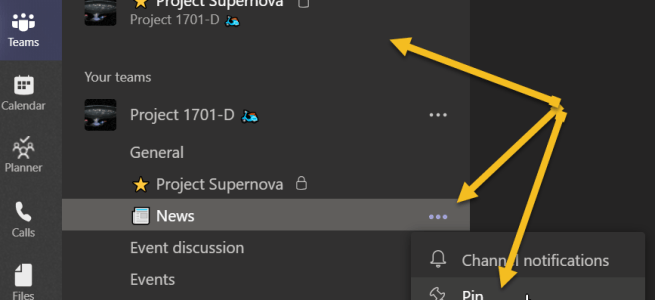
I wrote last year two posts in this blog about Pin channels feature in Microsoft Teams. The first one was more about "what is Pin channels and how do you use it"   and the second was "what if you would turn Teams to more channel oriented". This one is more about my experiences since … Continue reading Art of Pinning Channels III

Easy Teams onboarding by welcoming new members automatically

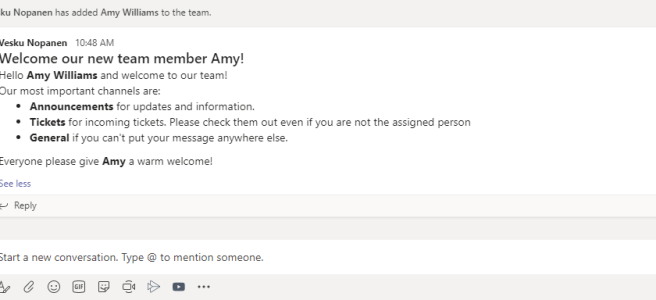
You are added to a new team and look around. While some teams are familiar from the click one, there are some that would require a bit of more knowledge. What is the team's purpose, what are those channels, are there some agreed team practices? Instead of having to ask around for these the team … Continue reading Easy Teams onboarding by welcoming new members automatically

Sharing a teams conversations using Outlook

A new feature recently rolled out to Teams. You can now choose to share a Teams conversation using Outlook. The feature is found via message's ... (three dots, ellipses) menu. This shares the message and all it's replies. Then the Outlook-style window will open up. You can add your comments, do editing of message etc. … Continue reading Sharing a teams conversations using Outlook

Jabra Elite 85h: the best modern worklife headphones I’ve had so far

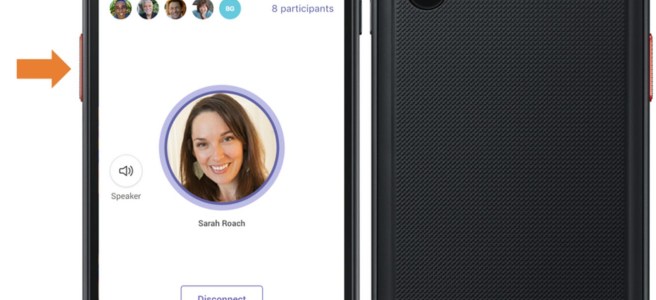
I use Teams meetings and calling a lot. I also do tons of work from various other places than my home office. Some other locations are for example a train when I commute to Helsinki, when I am visiting our headquarters, occasionally in a café or restaurant, lobby, .. You name it. Simply put: I … Continue reading Jabra Elite 85h: the best modern worklife headphones I’ve had so far

Copying files to Private Channel using Graph API

I was approached with a scenario: Once I have created a Private Channel how can I automatically copy files there? Since I didn't have a direct answer it was time to open Graph Explorer and start digging. Create a Private Channel You need to have a suitable team first. /me/joinedTeams is quite a good Graph … Continue reading Copying files to Private Channel using Graph API

Teams features hidden in plain sight: right-clicks and pinning applications

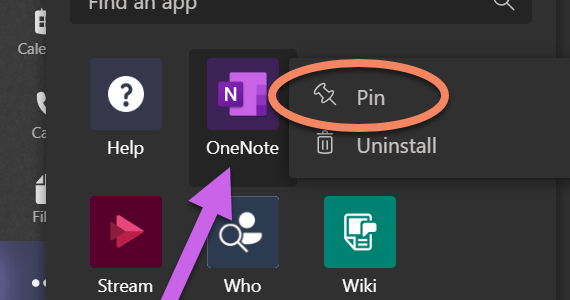
Microsoft Teams doesn't always tell you what you can do in it's interface. Since it is a kind of web application we have used to use left click around different menus. However, there are some features in Teams that will make your life easier if you right-click on them. And I am not talking about … Continue reading Teams features hidden in plain sight: right-clicks and pinning applications

Survival Guide to Microsoft Teams with multiple accounts

One very often heard challenge with Teams is that it is difficult to handle work when you have to use multiple identities (accounts). Usually you have your homebase (home tenant) where you have your work account. And I agree - using Teams  with just one account is the most simple use case. However, it is … Continue reading Survival Guide to Microsoft Teams with multiple accounts

Adding PowerApps as Teams application to Teams via Graph API

You may already be aware that you can export a PowerApps to Teams. In case you haven't heard about this part check this URL: https://powerapps.microsoft.com/en-us/blog/add-your-canvas-apps-to-teams/ However, the real interest is in what we can do with PowerApps once we have uploaded the application to Teams App Catalog. You need to figure out, before progressing, a … Continue reading Adding PowerApps as Teams application to Teams via Graph API

What’s next on Teams’ radar

There are lots of interesting features of Teams that ought to come out during the first two quarters of 2020. I know we all are waiting for a few of them, like multiwindow functionality and new Tasks application. What I really look forward and hope multiwindow fulfills the need to "spread out" the meeting to … Continue reading What’s next on Teams’ radar

Approvals in Team Channel using Power Automate and Adaptive Cards

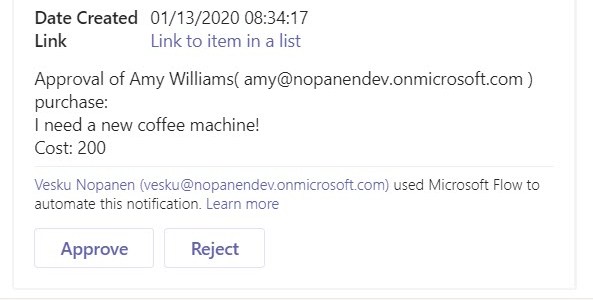
While there has been possible to create personal approvals using Power Automate, there is also a possibility to divert those requests to Team Channel and so anyone who is a member of that team can approve the request. This can create speed, transparency and flexibility into decision making - especially if there is any discussion … Continue reading Approvals in Team Channel using Power Automate and Adaptive Cards

Create a Teams Private Channel using Graph API and Power Automate (Flow)

Have you thought about creating a private channel in Teams using a API? Yes, it is possible to do so in case you were wondering is that really supported or not. Using Graph Explorer is simple, fast and easy for this testing. First you need to figure out a few IDs: Team ID (for example … Continue reading Create a Teams Private Channel using Graph API and Power Automate (Flow)

What is cooking for Teams 2020?

Year 2020 is here tomorrow. Or most likely - when you are reading this - it is no longer the dark/inspiring future but the exciting present day. I thought it would be nice to take a look what is cooking and boiling for Teams during next year. But first, looking from 80s, 90s 00s and … Continue reading What is cooking for Teams 2020?

Looking back at 2019

2019 was a quite amazing year for me. It all started when I was honored receiver of Microsoft MVP Award on 1.1.2019. Becoming MVP was a big thing for me personally and it did gave me an access to meet lots of new people in different events and also to participate more in communities than … Continue reading Looking back at 2019

Testing Microsoft Teams Graph Presence API

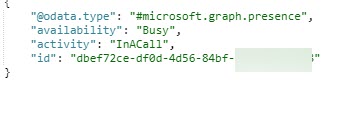
Teams Presence information is now available via Graph API beta interface. It is fairly simply to test using Graph Explorer by calling /beta/me/presence. Note: you will need to give a admin consent to these API calls. You can not do this with delegated user permissions. You may want to refer for Presence API documentation in … Continue reading Testing Microsoft Teams Graph Presence API

Microsoft Teams is also about inclusivity and accessibility

What is inclusiveness? Including different types of people and treating them all fair & equal. In other words: everything is accessible by everyone, no-one is left out. I had the base of this article in my mind for some days but it was this tweet that finally hit me to write it. Especially Situational accessibility … Continue reading Microsoft Teams is also about inclusivity and accessibility

Microsoft Teams Wikis and Meeting Notes: breakdown

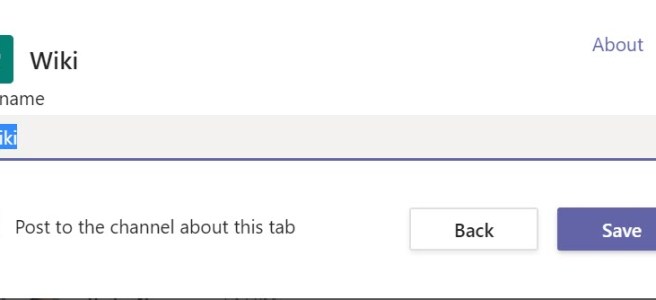
What are Teams Wiki and Meeting Notes. What you need to know about them and why you should be using OneNote instead of them. Yes, that's right. Even through this blog post gives you an overview about how Wikis look don't use them. OneNote is good. OneNote is your friend. Be a happy Teams user … Continue reading Microsoft Teams Wikis and Meeting Notes: breakdown

Teams got Live Captions to meetings, UI change and federated 1:1 chat are out

Live Captions feature is a big thing. Yes - it is not perfect. Yes - it does sometimes funny mistakes. But the benefits are big: People with hearing problems and read what's being said It may be a serious issue but it may affect your way to get the message from the presenter.You may have … Continue reading Teams got Live Captions to meetings, UI change and federated 1:1 chat are out

Microsoft Teams Spotlight: Latest features and roadmaps – watch my webinar recording

Feel free to watch my latest webinar about Microsoft Teams! The agenda: https://youtu.be/lIAxaQV6wT8 Timestamps for different parts:Private Channels: 2:55Live Events: 19:15Teams Meetings:35:50Microsoft Teams Rooms:55:18Keeping Teams noise in control: 1:02:05What's new & on the roadmap: 1:12:57

Start syncing your OneDrive for Business using Microsoft Teams

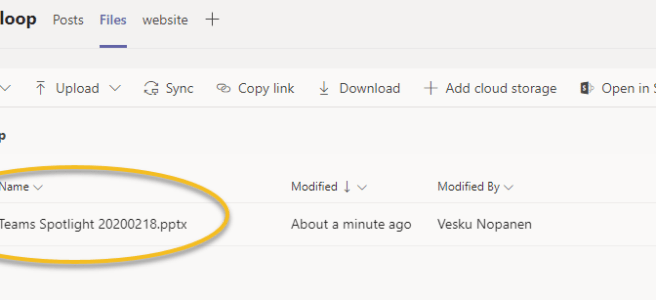
Sometimes a feature doesn't have to be a big one. Sometimes you don't use it very often - perhaps just once or a few times. But without it's existence you would might not even consider it. Yes, I am talking about a Sync button that appeared in Team's OneDrive. It gives you an easy way … Continue reading Start syncing your OneDrive for Business using Microsoft Teams

Uploading files directly to Teams using Forms and mentioning team with Power Automate.

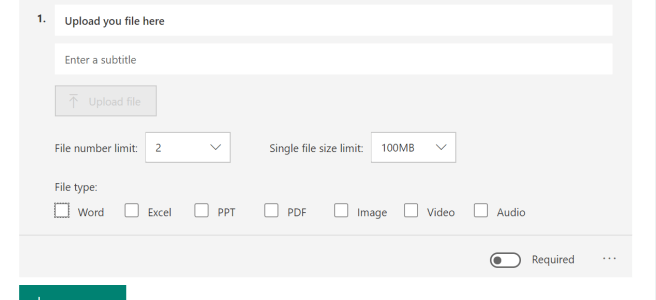
Microsoft Forms has gotten a new skill: file uploading. It is a easy way to starting processing and automating files forward. It could be a application, report, public announcement or whatever organizations come up with. In a way it is a substitute for building a file upload PowerApps or a more user friendly way than … Continue reading Uploading files directly to Teams using Forms and mentioning team with Power Automate.

Teams Meetings: Organizers, presenters and attendees are out!

If you have had a Teams meeting today, you may have noticed that you can now do changes who can present in Teams meetings! I tested these in a scheduled meeting, meet now and in a channel meeting. All meetings work in the same way -> whoever is scheduling or starting the meeting is the … Continue reading Teams Meetings: Organizers, presenters and attendees are out!

Microsoft Teams with Jabra Evolve 75 and Logitech Zone Wireless

Microsoft Teams meetings experience is heavily affected by the audio quality. If you are in a meeting where you get the annoying echo (hearing your own voice) or encounter a situation where noise is "howling" (circling from speakers back to mic and only gets stronger and stronger .. ) it doesn't leave room for the … Continue reading Microsoft Teams with Jabra Evolve 75 and Logitech Zone Wireless

How to add a custom status message with @mentions in Teams

Microsoft Teams did it again: there has been a update to status messages. Now you can do the following atmention one or more people in your status message to let people know who to contact in your absenceset a custom date for how long your status is active This allows others to see that you … Continue reading How to add a custom status message with @mentions in Teams

Muistitko? Teamsissa voi luoda kanavakokouksen myös mobiilisovelluksella. [Finnish]

Teamsin mobiilisovelluksessa on monta kätevää ominaisuutta, joista osa vain pitää tietää / tiedostaa jotta ne pysyvät muistissa. Yksi sellainen on kanavan nimen päällä "pitkä sormen painallut", jolloin mobiilisovelluksellakin voi kiinnittää kanavan huipulle tai tiiminäytössä oikean yläkuvan pystyssä olevien ... (kolme pistettä) valikon näpäytys josta pääsee hallitsemaan tiimejä, luomaan uuden tiimin, selaamaan tiimejä tai liittymään tiimiin … Continue reading Muistitko? Teamsissa voi luoda kanavakokouksen myös mobiilisovelluksella. [Finnish]

Adding a GMail guest user to Microsoft Teams using one-time passcode (.. and something about federated authentication too)

One of the recent updates (might be still rolling out) to guest access is to allow adding guests without the need to create a Microsoft Account during the process. Guests can use their Gmail email. For more information about guest access in general, check Docs.Microsoft.Com article and this roadmap item. Note this one-time passcode isn't … Continue reading Adding a GMail guest user to Microsoft Teams using one-time passcode (.. and something about federated authentication too)

Art of Pinning Channels, part two “What if”

I wrote about Art of Pinned Channels last week in my blog post. I decided to continue experimenting and gathering some more experience with this feature. This time I focus on "What if" scenario called "What if I choose to use to only pinned channels to manage my Teams"? Let's start with a more reasonable … Continue reading Art of Pinning Channels, part two “What if”

How to use Whiteboard in Teams meetings

Are you aware that every Microsoft Teams meeting includes a Microsoft Whiteboard that you can use before, during and after the meeting? When you create a meeting you can access the Whiteboard even before the meeting has started. All you need to do is to open the meeting chat and click on the Whiteboard tab, … Continue reading How to use Whiteboard in Teams meetings

Art of Pinning channels to the top and using channel notifications for effect

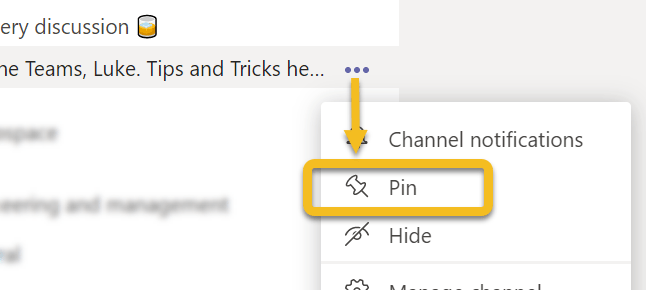
Pin channel is a feature that came out during the Microsoft Ignite. While it is a simple feature, you can use it to organize your Teams a lot better than before. Let's just with the How to. You click on the channel's "magic three dot" menu and choose Pin. Then the selected channel will appear … Continue reading Art of Pinning channels to the top and using channel notifications for effect

Private Channels Survival Guide

A week ago Private Channels started to appear in Teams across several Office 365 tenants. As this #1 awaited feature is now usable, it has also spurred out several questions. This guide tries to clarify when and why to create a private channel, what it means, what to avoid and some practices that you can … Continue reading Private Channels Survival Guide

What’s new and coming for Teams from Microsoft Ignite

It has been a magnificent Microsoft Ignite so far!! The keynote show was different this year than before: it happened all around in the Hub and 3000 attendees were there to see everything quite close. The big message was about Tech intensity. It was great to be able to view the Keynote from different places. … Continue reading What’s new and coming for Teams from Microsoft Ignite

Tiesitkö näitä vinkkejä Teamsista?

Microsoft Ignite tulee tuomaan runsaasti uutta ensi viikolla Teamsiin (mm. uusi tiedostonäkymä on nyt jo näkyvissä joissain ympäristöissä!) , mutta tällä välin on hyvä palata vielä muutamaan perusasiaan. Tässä siis lyhyesti vinkkejä Teamsin käyttöön ja sitä helpottamaan Järjestä tiimit haluamaasi järjestykseen Tiimisi-näkymässä olevat tiimit itse voi raahata haluamaansa järjestykseen. Piiloitetut tiimit sen sijaan ovat siinä … Continue reading Tiesitkö näitä vinkkejä Teamsista?

Last minute tips for Microsoft Ignite 2019 attendees

First, there are multiple blog articles about how to prepare yourself to Microsoft Ignite. You want to read at least some of those. Here are two good ones Matt Wade’s Quick Guide to Microsoft Ignite 2019Participating for MS Ignite 2019 at Orlando as a first timer? The time for preparing is naturally getting short now - … Continue reading Last minute tips for Microsoft Ignite 2019 attendees

Best Practice on sharing Teams Live Event links (and other links as well)

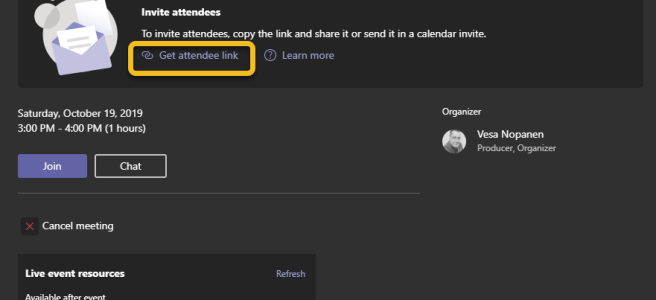
Have you ever created a Teams Live Event, shared the link and find when already started the meeting that By lumberjacks' beard!! I forgot to add the Q&A to the event and we already started!!! What usually happens next, is that you either arrange Q&A some other way (external app)go on without Q&Arecreate the event … Continue reading Best Practice on sharing Teams Live Event links (and other links as well)

Microsoft Ignite: etäosallistujan opas

Kuva napattu Microsoftin blogista: https://techcommunity.microsoft.com/t5/Microsoft-Teams-Blog/The-Microsoft-Teams-Guide-to-Ignite-2019/bc-p/951269 Marraskuun alun Microsoft Ignite on valtava tapahtuma, jossa on paikan päällä on 20 - 30 tuhatta ihmistä. Esityksiäkin on 1000+, joten jokaiselle Microsoft-teknologiaan liittyvään aiheeseen on varmasti tarjolla sisältöä. Et pääse paikan päälle? Katso striimit ja osallistu etänä! Tänäkin vuonna iso osa esityksistä on katsottavissa striiminä ilman osallistumismaksua. Tämä on … Continue reading Microsoft Ignite: etäosallistujan opas