
It’s been a while since my last blog post. After the summer, life accelerated — projects, travels, events, and family time have kept me fully occupied. Sometimes the best way to keep balance is to pause something you love doing for a while — in my case, writing. The autumn has been busy with events, including the AI-Native Workplace Summit 2025 where I was the main organizer. As a small spoiler: The AI-Native Workplace Summit will return 2026!
My next few weeks will be also very hectic, as I am going to speak in-person at Microsoft AI Tour Frankfurt in Germany, at Experts Live Emirates in Dubai, United Arab Emirates, and at Microsoft Ignite 2025 in San Francisco, USA. That will be quite a trip ( longest for me so far in both days and distance) , and I am thankful for the support I get from both home and from Sulava MEA to be able to do this. Check out My upcoming speaking and events page where to see me either in-person or virtually.
I’m doing my best to get back on track in writing and share more insights again. And what better way to restart than with something that literally changes how AI perceives the world around us: Copilot Vision.
- A New Sense for Copilot
- Copilot Vision
- About data protection
- Practical scenarios that change how we work
- Privacy and governance – building trust by design
- Frontier Firm perspective – from reactive to perceptive
- The bottom line
- 🔗 Sources & further reading
A New Sense for Copilot
Copilot has been able to read, write, hear and talk — it understands text, documents, conversations, and audio. With Copilot Vision, it gains a new sense: it can see. Copilot now supports audio context and speech understanding, Microsoft’s AI assistant is evolving from a purely textual companion into a multi-sensory colleague.
That’s a leap from just a language to perception. From reacting to what we say to understanding what we see and hear.
And it is not just about what it sees, for example in the video I have shared a PowerPoint presentation to Copilot with Vision on. It understands the whole presentation, not just the slide that I have selected. I was able to ask questions and improvements to the whole deck without switching slides.
🎥 Watch: Introducing Copilot Vision
Check and like the post we at Sulava MEA did at LinkedIn about this: Sulava MEA Copilot Vision LinkedIn post
Copilot Vision
Copilot Vision enables Copilot to interpret visual context from what’s on your screen — a document, app, or web page — or camera and assist you accordingly.

Where you can use Copilot Vision
- 🖥️ Windows app – Desktop Share lets Copilot view and analyze open windows.
- 🌐 Microsoft Edge – Vision powers a “see-and-assist” browsing mode that can read visible page content, charts, or tables to provide insights.
- 📱 Mobile app (iOS & Android) – Copilot can use the phone camera to analyze images or scenes for contextual help.
Vision began rolling out in the US earlier 2025 and is now globally available.

In short: Copilot Vision lets AI understand not only your words — but your app, workspace, environment: what it sees when using the camera or what is shared to it.
About data protection
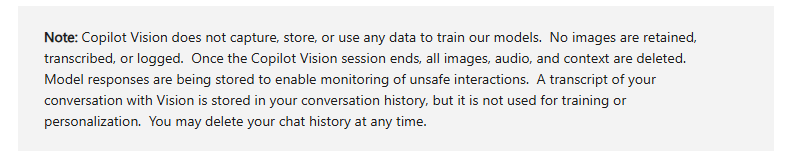
It’s important to note that Copilot Vision is part of the consumer Copilot experience, not Microsoft 365 Copilot for enterprise. This means Enterprise Data Protection (EDP) and Microsoft’s commercial compliance framework are not applied when using Vision.
That’s why I would not recommend using Copilot Vision today with sensitive or confidential data — for example, personal health information, internal business documents, customer records, or financial material.
However, despite that limitation, there are already many valuable and safe scenarios:
training, onboarding, non-confidential support tasks, product documentation, translation, and general productivity assistance.
And once Vision (or similar capability) reaches Microsoft 365 Copilot with enterprise-grade protections, even more transformative scenarios will open — such as HR, Dynamics 365, and other line-of-business processes.
Practical scenarios that change how we work
1️⃣ Training and onboarding
Copilot Vision can observe an application interface and walk a user through steps directly on screen. It could guide new employees through the process — explaining buttons, fields, and workflows in real context.
2️⃣ Support and troubleshooting
When you hit an unfamiliar dialog or error message, Copilot Vision can instantly interpret it and suggest documentation or fixes. Support no longer needs to start with a screenshot and a ticket.
3️⃣ Exploring public data and insights
You can open graphs or dashboards from public data sources — such as the Nord Pool electricity price charts, World Bank energy trends, or Eurostat household cost indices — and ask Copilot Vision to analyze them for you.
It can identify trends, highlight anomalies, or even suggest explanations and actions, like comparing price fluctuations between regions or estimating household impact over time. This makes data exploration more interactive, insightful, and visual — without touching any confidential material.
4️⃣ Real-world and mobile use
With Copilot Vision on mobile, you can point your phone camera at a whiteboard, product label, or machine display and get explanations, translations, or summaries in seconds.
5️⃣ Preparing a presentation with Copilot Vision
When working on a PowerPoint presentation, Copilot Vision can see and read your slides — not just the one currently open. For example, when I’m preparing a session for an upcoming event, I can ask Copilot Vision for feedback and improvement ideas: Is the story clear? Are the visuals consistent? What could be better explained?
Privacy and governance – building trust by design
Whenever AI gains a new sense, governance must evolve with it.
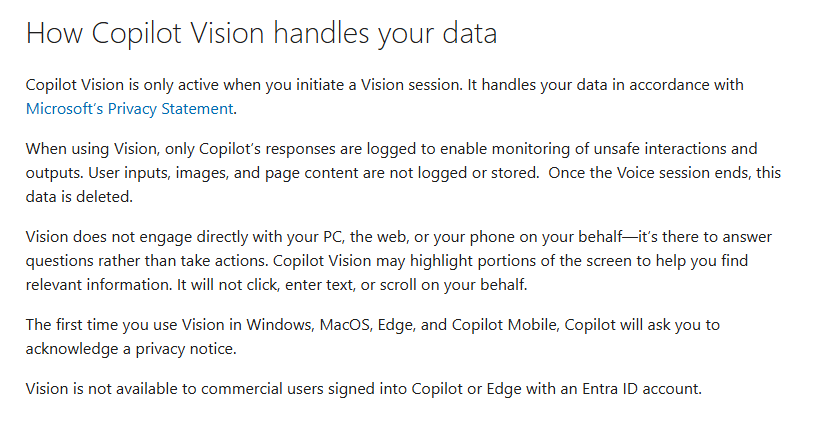
Microsoft emphasizes that Vision works under explicit user consent. You choose when to share your screen or camera feed. According to Microsoft Support, only Copilot’s responses are logged; your screen content, images, or audio are not stored and are deleted when the session ends.
Frontier Firm perspective – from reactive to perceptive
Vision transforms Copilot from a reactive tool to a perceptive collaborator.
It’s the first true step toward ambient AI — copilots that understand the situation, not just the text.
This evolution from language to perception marks the emergence of multi-modal work intelligence:
- Seeing your environment, workspace, documents, or what camera sees
- Hearing your context
- Reading your documents
- Responding with understanding
For AI-Native organizations, that opens entirely new collaboration patterns — training copilots, support copilots, even creative copilots that work with visuals, not only words.
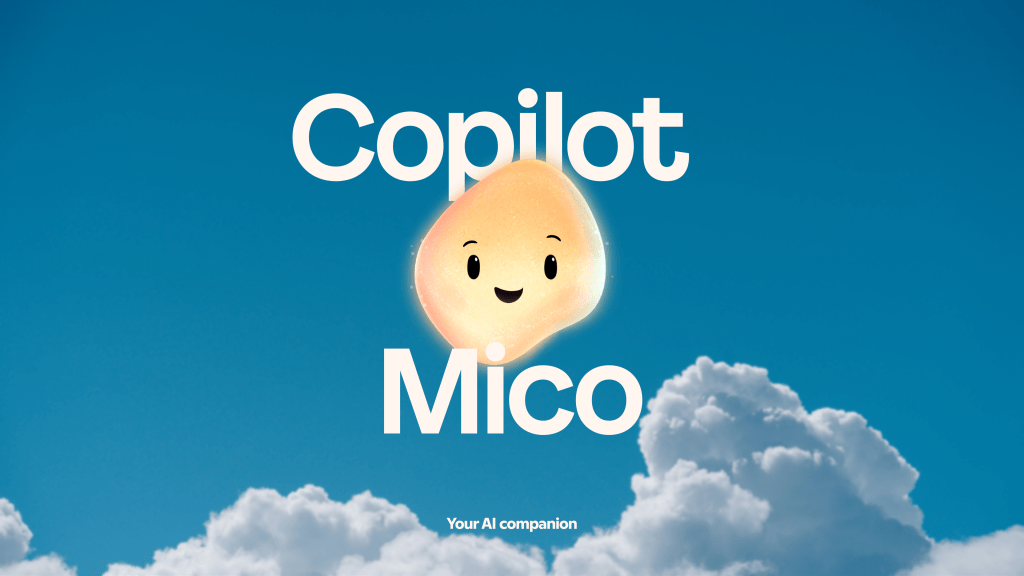
And just think about Microsoft Mico.
The new Mico character – its name a nod to Microsoft Copilot – is expressive, customizable, and warm. This optional visual presence listens, reacts, and even changes colors to reflect your interactions, making voice conversations feel more natural. Mico shows support through animation and expressions, creating a friendly and engaging experience.
Human-centered AI blog post by Microsoft
It’s not just AI that answers; it’s AI that perceives, listens, has personality, and acts.
The bottom line
Vision isn’t just another feature. It’s a new sense for AI — and together with hearing, it signals the start of a new era where digital teammates can perceive our environment almost like humans do.
There’s no information yet about when Vision will appear inside Microsoft 365 Copilot (Word, Excel, PowerPoint, Outlook, or Teams). Combined with Memory, Pages, and multi-agent orchestration, Vision-enabled agents could soon provide a new level of context continuity — understanding what you’re seeing, hearing, and doing across devices and applications.
We’re still early, but it’s clear: the future of work is perceptive.
Human-led. AI-operated. Context-aware at every step.
🔗 Sources & further reading
- Copilot Vision: A new way to browse (Microsoft Copilot Blog, Dec 2024)
- Copilot on Windows – Vision and File Search begin rolling out to Windows Insiders (Apr 2025)
- Copilot Vision on Windows with Highlights now available in the U.S. (June 2025)
- Using Copilot Vision with Microsoft Copilot – Privacy and Consent (Support Article)

 Vesa Nopanen - Future Work today
One thought on “When Copilot Sees Your Screen: Copilot Vision”