
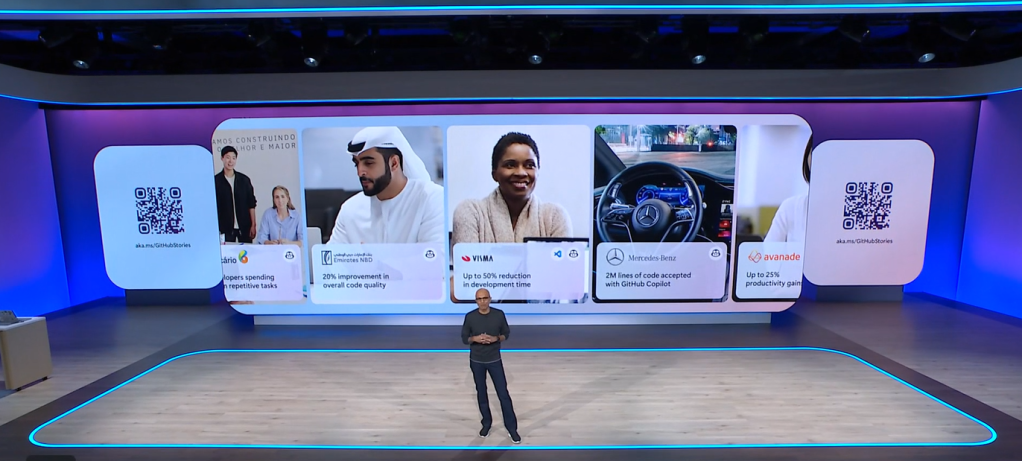
Microsoft Build 2025 was all about turning the vision of AI-Native workplace into reality. We’re no longer talking about AI in abstract terms – we’re seeing concrete features that make AI a true collaborator in our daily work. I have selected the most important announcements from Microsoft Build 2025 related to Microsoft 365 Copilot and AI at work. As the title says, there is content about co-creation, agents, multi-agents, and other selected Copilot announcements. I will update the blog post with relevant content as it is being published at Build. But trust me – there is lot to unpack. The speed of change is accelerating every day.
- Co-Create with AI: Copilot as Your Collaborative Partner
- Microsoft 365 Copilot Tuning: Teaching the AI Your Business
- Agents and Multi‑Agent Workflows: AI Colleagues Working Together
- Let Copilot Do the Clicking: New “Computer Use” Automation & other Tool Upgrades
- Microsoft 365 Copilot API: Bringing AI Superpowers to Your Own Apps
- Azure AI Search Goes Agentic: Smarter Knowledge Retrieval
- Dynamics 365 Meets Copilot
- GitHub Copilot: From Assistant to Autonomous Agent
- Conclusion: The Frontier of Work – Humans and AI Side by Side
- Learn more from Microsoft Blogs and articles
Co-Create with AI: Copilot as Your Collaborative Partner
One big theme at Build is co-creation– humans and AI working together. Microsoft’s announcements show how Copilot is evolving into a true collaborator, as a team member or colleague. In fact, Microsoft 365 Copilot Wave2 spring release is rolling out with features that make Microsoft 365 Copilot even more capable of working alongside you:

- A Copilot that’s built for teamwork: the new Microsoft 365 Copilot app is generally available: The Copilot interface itself has been updated for better human–AI collaboration. In practice, that means you are co-creating with Copilot: when you interact with Copilot it is more “built-in” on the canvas all the time, instead of “lets open that AI-app”. And it will become more like a helpful colleague you can ask anything 24/7, a colleague that remembers context and keeps the conversation going, rather than a one-off Q&A bot. Copilot is getting memory capabilities in June that will enhance the new Microsoft 365 Copilot app experience.
- “Create” with Copilot (now including images, banners, and more): One cool addition is a new Create experience that brings OpenAI GPT-4o image generation into Copilot. This means you can ask Copilot to create a diagram or generate a header image – and it will look good. There is a big improvement from the previous Dall-E version. If you’re brainstorming a slide deck or a product concept, you ask Copilot to create a draft for you very easily. Multimodality is the next step we are already taking on our AI journey.
- Copilot Notebooks – your smart scrapbook: The concept of Notebooks in the Copilot app really embodies co-creation. A Copilot Notebook is like a shared space where you and AI can contribute, and it collects references into a collection that Copilot uses as a grounding source. You might gather meeting notes, documents, and links in one Notebook, and then use Copilot to analyze or summarize parts of it – or generate content based on that. It turns your content and data into instant insights and actions. For example, if you dump a bunch of sales reports into a Notebook, you can then ask Copilot, “Generate a project management meeting agenda that includes all open issues there are.” and get an immediate draft of agenda. Copilot Notebooks just became generally available, and I can tell you they already has a real good vibe on working with AI.
- Memory and context on your side: Another pair of upcoming features – Copilot Search and Copilot Memory – are all about Copilot knowing what you and your organization already know. Starting in June, Copilot will be able to proactively recall relevant info you have saved. Copilot Search hooks into your enterprise data to fetch relevant stuff, and Copilot Memory lets it remember important details (securely) across your interactions. This duo will make the AI feel far less like “blank slate ChatGPT” and more like an informed assistant who knows your context.
- Specialized reasoning agents (Researcher & Analyst): Microsoft also teased new built-in reasoning agents – called Researcher and Analyst – that are like specialized Copilot agents for work. Researcher can automatically scour your company’s data to gather material on a topic, and Analyst can crunch numbers and trends for you. This is co-creation on another level: it’s not just you and one AI, it could be you and a team of AIs, each handling different aspects of your request. And for this, we use Copilot as UI to AI.

All of these enhancements share a common thread: they let AI do more of the heavy lifting while you focus on guiding the outcomes. Instead of you struggling to find the right file, generate an image, or analyze data, Copilot (with its growing team of features) takes on those tasks. You spend more time reviewing, refining, and making decisions – the creative and strategic parts – and less time on the grind. That’s the vision of co-creation with AI: you and Copilot working together, each contributing what you’re best at.

Microsoft 365 Copilot Tuning: Teaching the AI Your Business
Another big announcement is something called Microsoft 365 Copilot Tuning– essentially, it is training the AI on your own organization’s data to make it smarter for your needs. Think of it this way: Out-of-the-box Copilot is like a really smart new hire who knows a ton of general information and skills. Copilot Tuning lets you take that new hire and run a special training program so it learns your company’s jargon, policies, and expertise.

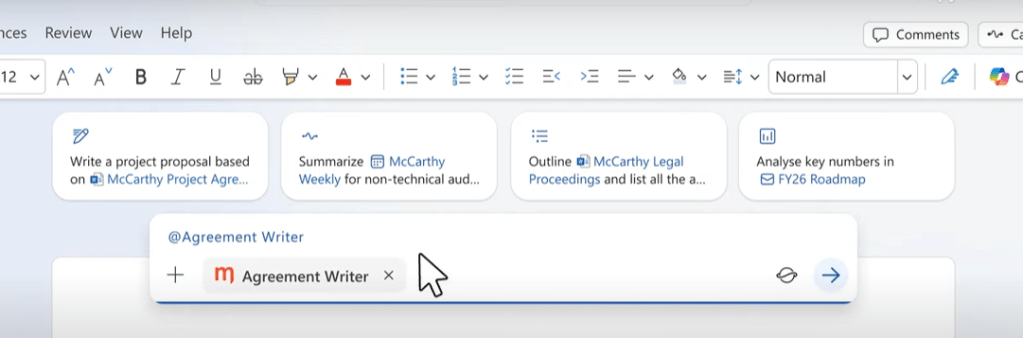
Agents built with Microsoft 365 Copilot’s Agent Builder can take advantage of these tuned models. For example, a legal firm can build an agent that generates documents for legal professionals that incorporate the style, structure and expertise of their prior work.
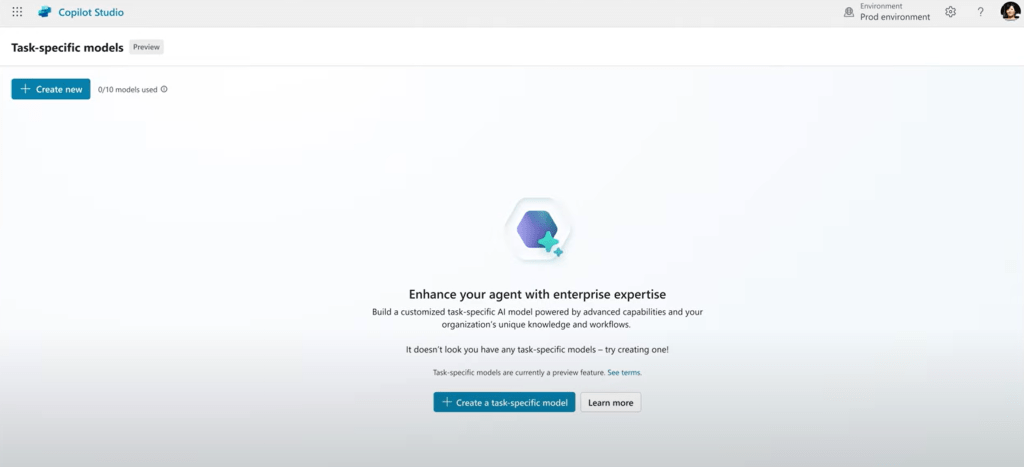
For example, a legal firm could use Copilot Tuning to feed in all their past case briefs, legal templates, and style guides. The result? When their attorneys use Copilot to draft a contract or a court document, the AI will produce text that matches the firm’s style and includes relevant precedents automatically. Microsoft even mentioned this scenario: an agent for legal professionals that “incorporates the style, structure and expertise of their prior work” – that’s exactly what tuning delivers.
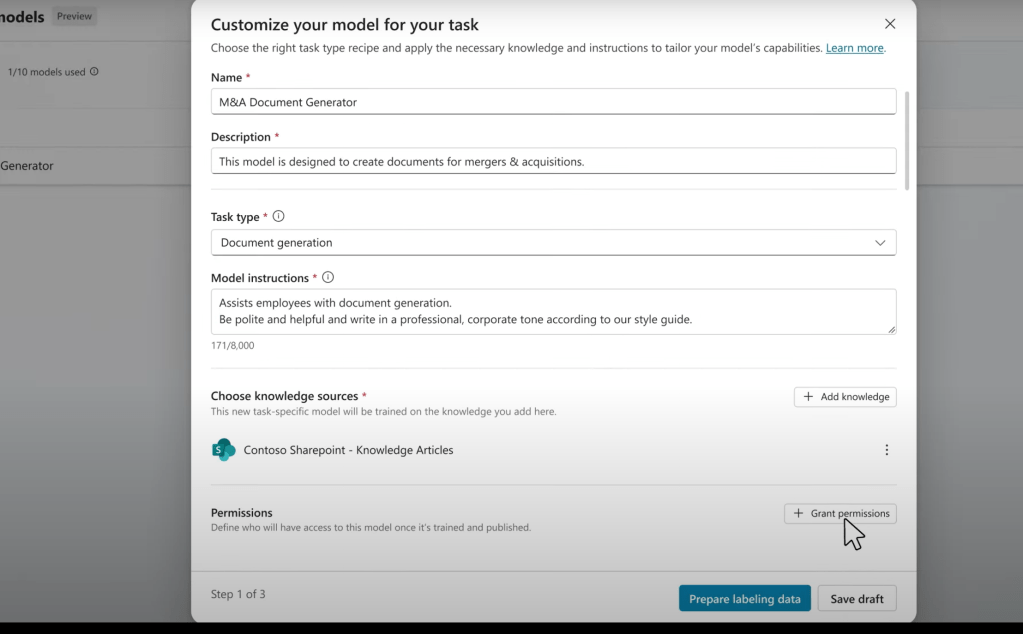
Another scenario: a consulting company in a specialized field (say, aviation). They could tune Copilot on their internal knowledge and technical documents about aviation regulations and then build agents that utilize the tuned Copilot. The company then builds a Q&A agent for their consultants. Now when someone asks, “What are the latest international regulations for drone usage in Europe?” the Copilot agent can answer with confidence and accuracy, citing the internal expert documents. Without tuning, the AI might have given a very generic answer or even a wrong one due to lack of domain knowledge. With tuning, it has been taught by the best resources the company has.
Copilot Tuning is done securely and respects permissions. Only people who have access will get the benefits of the tuned model’s knowledge. It’s not going to leak private info to those who shouldn’t see it.
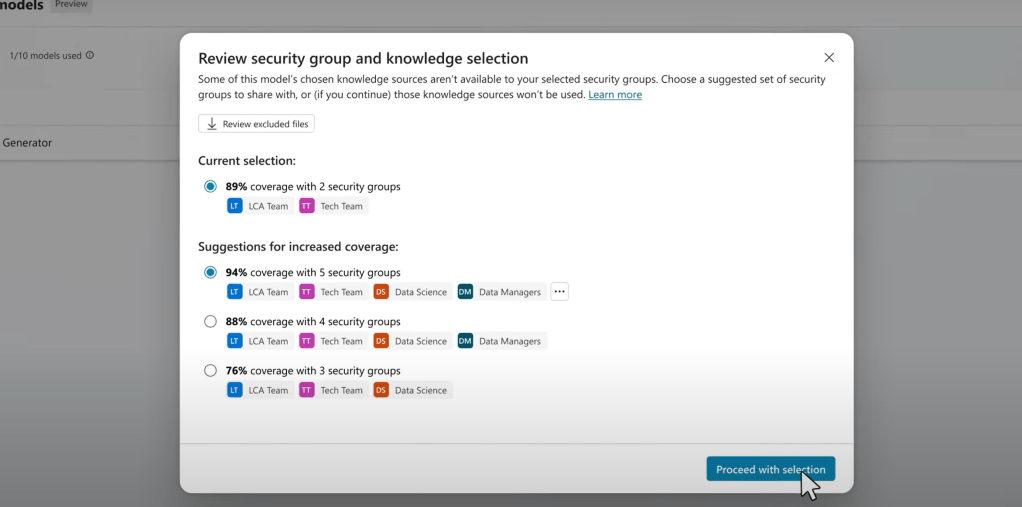
Microsoft will start rolling this out in June as part of a Copilot Tuning Program for customers in EAP. So initially, it’s for large enterprises willing to pioneer the capability. It reminds me a bit of how some early customers got to fine-tune GPT models for their needs, but here it’s all integrated into the Microsoft 365 ecosystem.
For enterprises, Copilot Tuning is huge. It means your AI can speak your language. It will know industry-specific terminology without being explicitly told each time. It will follow policies (imagine a HR Copilot that always enforces the company’s HR handbook guidelines when answering questions). It’s the difference between a one-size-fits-all AI and an AI that’s tailor-made for you. We often say knowledge is power; Copilot Tuning is how you give your AI assistant that knowledge, so it can empower your people even more.

Agents and Multi‑Agent Workflows: AI Colleagues Working Together

We’ve talked mostly about one Copilot so far, but Microsoft is taking things a step further – what if you have multiple AI agents that cooperate with each other and with you? Multi-agent systems was another big focus at Build 2025. It sounds a bit sci-fi, but the pieces are now coming to places to make it real.


Agent-to-Agent communication (A2A):Microsoft has introduced (in preview now) support for something called the Agent2Agent (A2A) protocol to both Azure AI Foundry and to Copilot Studio.

This protocol allows different agents to talk to each other directly in a secure way, without a human in the loop for every step. Why would you want that? Well, often solving a problem involves multiple tasks. Today, you’d ask Copilot to do Task A, then maybe Task B, etc., one by one. In a multi-agent world, you could have one agent specialize in Task A and another in Task B, and they can coordinate. For example, Agent A might be great at pulling data from a database, and Agent B might be great at writing a report. If you say, “produce a weekly sales summary,” Agent A can fetch the numbers, pass it to Agent B, and Agent B writes the summary – all through A2A messaging. This is peer-to-peer collaboration between AI agents or “colleagues”.

You can also start to bring your own models ( BYOM ) to Copilot Studio. Number of possible models to choose from: about 1 900 models today (with 10 k+ in the overall Foundry catalogue).


Microsoft Entra Agent ID assigns a unique identifier to every AI agent in an environment, enabling better management and tracking of AI agents. This feature helps organizations manage AI agent sprawl and ensures secure and efficient communication between agents. Public preview later in CY 2025.


There’s also an Agent Store concept now generally available, where these agents can be listed and shared internally. So an employee might go and search for agents their company has available – like “Travel Request Agent” or “HR Policy Agent” – and start using it.
Copilot Studio now supports publishing agents directly to Copilot, which is generally available. Additionally, two new channels—SharePoint and WhatsApp—have been added to expand publishing options.
Azure AI Foundry Agent Service: On the very high end of complexity and scale, Microsoft announced the general availability of Azure AI Foundry Agent Service. This is a cloud service for organizations that want to deploy agents working together or very sophisticated multi-step AI workflows. Think of it as the command center or “factory” for your AI workforce. It supports those open protocols I mentioned (like A2A for communication, and also Model Context Protocol (MCP) for connecting to other systems). Azure AI Foundry Agent Service and MCP are now generally available.

And what a Build would be without at least one renamed? Graph Connectors are now known as Copilot Connectors.
Azure AI Foundry Observability (preview) introduces built-in observability features that provide metrics for performance, quality, cost, and safety. These features enable developers to monitor and optimize their AI workflows effectively, ensuring high standards of reliability and efficiency.

Why would you use Azure AI Foundry Agent Service? Let’s say you’re a bank building an AI system to automate loan processing:
- One agent collects applicant info (chatting with the customer).
- Another agent pulls credit scores and financial history.
- A third agent applies risk assessment rules and decides approval or not.
- A fourth agent drafts the loan contract document.
You’d want all these agents to coordinate and you need to integrate with secure data sources (bank databases, external credit systems) and comply with regulations. Foundry Agent Service is built for exactly that kind of scenario. It makes sure each agent can talk to the others, that you can orchestrate the sequence of tasks, and importantly that you can monitor and audit everything.

Microsoft is providing the infrastructure for an AI workforce. It starts with a single Copilot chatting with you, and extends all the way to an army of specialized agents automating complex business processes. Enterprises can dip their toe in by maybe building one custom agent in Copilot Studio, or dive deep and re-engineer whole workflows with a fleet of agents in Azure Foundry.

This was perhaps the most forward-looking part of Build: it’s Microsoft laying the groundwork for what they call the “open agentic web”, where just as websites link and interact, agents will be able to link and interact across the internet. We’re not fully there yet, but the vision is taking shape in these features. As an enterprise, it means the future might include having AI colleagues in different departments, and even AI representatives that interface with your partners’ or suppliers’ AI systems – all to get things done more efficiently.

In short, Microsoft is saying: don’t think of Copilot as a solo act; start thinking of assembling your AI team.
Let Copilot Do the Clicking: New “Computer Use” Automation & other Tool Upgrades
One of the coolest updates was something called the “computer use tool” for Copilot Studio. It’s an capability that gives agents the ability to perform tasks through a computer’s user interface, almost like a robotic assistant with eyes and hands to use other software. This is a bit similar to robotic process automation (RPA), but powered by AI vision and intelligence understanding the intent, just like when we prompt Copilot to do something.

Why is this important? Because not everything in our work lives is accessible via an API or a straightforward database query. Sometimes the info you need is trapped in a legacy application or a third-party website that doesn’t integrate nicely. Today, if you wanted to automate that, you’d script an RPA bot or do it manually. With the computer use tool, you can ask Copilot to use the computer like a human would: click buttons, copy-paste information, scroll through pages – across web or desktop apps.

Microsoft describes that with AI vision and understanding, these agents could handle tasks like data transfer between systems, processing forms or documents, doing on-screen research, and so on. They can do it at scale and speed.
Now, this feature is not broadly available yet – it’s currently through the Frontier program and only for very high usage customers (500,000+ Copilot messages, in US region). But this important because it signals a future where the barrier between Copilot and the rest of your software is coming down. Today, if Copilot doesn’t have a connector or plugin for something, it just can’t touch it. Tomorrow, with a “computer vision + control” ability, Copilot can figure out how to use almost any app like a user could. That’s a profound expansion of what AI assistants will be able to do.
In addition to that, Microsoft announced a bunch of tools enhancements for Copilot and agents. These are more behind-the-scenes improvements that nonetheless will make a difference in what practical tasks AI can accomplish:
- Code Interpreter: Built-in ability to write and run Python code in order to solve problems. Why is this cool? Because if you ask Copilot something complex like “analyze this dataset and show me a trendline,” it can generate a little Python script, execute it on the fly, and then produce a chart or answer that’s precisely computed.
- Better connectors and actions: Copilot and custom agents can use connectors (like to third-party services, databases, etc.) and perform actions (like create a task in Planner, send an email, etc.).
- Deep reasoning and agent flows: They’re improving how agents can chain multiple prompts or steps (sometimes called dynamic chaining) to handle more complex tasks. So instead of a one-shot prompt and response, Copilot might do a multi-step interaction under the hood – for instance, ask a clarifying question to itself, fetch some data, then produce a final answer. This will happen automatically as the tooling improves.
And that was just a few of those announcements. If Copilot before was like an intern who maybe knows how to use Office apps and access Wikipedia, now it’s getting power tools: it can potentially operate any software (via the computer vision tool), write and run code to extend its capabilities (code interpreter), and has a Swiss army knife of connectors to interface with other services. For enterprises, that means Copilot can solve a wider range of problems autonomously. Fewer “Sorry, I can’t help with that” moments, more “Here’s exactly what you needed, I’ve taken care of it” moments. We’re not fully there yet, but the trajectory is clear – AI assistants are becoming increasingly functional in the real world of messy software and diverse data.
Microsoft 365 Copilot API: Bringing AI Superpowers to Your Own Apps
Microsoft is also giving developers (and by extension, companies) the tools to embed Copilot’s capabilities wherever they need. The Microsoft 365 Copilot APIs are a new set of enterprise-ready APIs that allow you to tap into Copilot’s AI skills from your own custom applications.

Why does this matter? Imagine you have an internal company portal or a mobile app for your employees. With these APIs, you could integrate Copilot’s “Intelligence on Tap”(=Copilot) into that system. For instance, you might have a custom HR app where an employee can ask, “Hey, what’s the process to enroll in the new benefits program?” and behind the scenes the app calls the Copilot API, which uses Microsoft 365 data (maybe pulling from SharePoint, Copilot Connector (earlier known as Graph Connector) sources, etc.) to generate a helpful answer. You’ve just added a Copilot-style assistant to your own app, without rebuilding AI from scratch.

Retrieval API (in preview) lets your application query Microsoft 365 data (with all the appropriate security, compliance, and context from Copilot). For example, your app could ask Copilot via API: “Find any documents about Project X’s timeline and summarize the milestones.” Copilot would then go through the documents it has access to (maybe on OneDrive, Teams, SharePoint, etc.), do its summarizing magic, and return the answer to your app, which then shows it to the user. All this happens behind the scenes in seconds.
The beauty of the Copilot API approach is that Microsoft 365 Copilot becomes very versatile– it’s not confined to the Microsoft 365 apps or the Copilot chat interface. Enterprises can weave it into their workflows, intranets, and apps.
Azure AI Search Goes Agentic: Smarter Knowledge Retrieval
A lot of what Copilot or any AI agent does is discover information. Microsoft announced a new capability in Azure AI Search: an agentic retrieval engine designed for AI agents.

In simpler terms, Azure’s search service got an upgrade so that it can work more cleverly with AI-driven queries. Normally, a search engine waits for you (or an AI) to provide a query, and then it returns results. With agentic retrieval, the search engine itself can take on a bit of agency. When information is asked, the search can now analyze the request, include the conversation history for context, and then plan out a multi-step strategy to find the answer. It’s not just keyword matching anymore.

From a technical standpoint, this is a feature in Azure AI Search (preview) and part of the whole retrieval-augmented generation (RAG) story. Read more here.
Dynamics 365 Meets Copilot
So far, we’ve focused on Microsoft 365 – documents, emails, Teams chats, etc. But many organizations run their core business on Dynamics 365 apps (like CRM, ERP, finance, operations). Wouldn’t it be great if Copilot could help with those too? Good news: Microsoft is making that happen.
Dynamics 365 is being made “AI-ready” with Model Context Protocol (MCP) servers. That’s a technical way to say: Dynamics 365 apps (Sales, Customer Service, Supply Chain, you name it) will expose their capabilities in a standardized, secure manner so that AI agents can interact with them just like a user would. Essentially, your CRM and ERP can become part of something Copilot agents can utilize.
Concrete example – Using a Dynamics 365 agent from Copilot Studio: Suppose you create a custom agent in Copilot Studio for your sales team. With these new MCP connectors, that agent could do things like the one scenario Microsoft highlighted: end-to-end process orchestration across departments. Think of an order fulfillment process that touches Sales (opportunity -> order), Inventory (check stock), Shipping (arrange delivery), and Finance (invoice). These typically span multiple Dynamics 365 modules. A Copilot agent (or a team of them) could theoretically manage that whole flow: when a sale closes, the agent ensures the order is created, finds an available ship date from supply chain, alerts a human if something needs approval, and later confirms the invoice was sent – interacting with each system using MCP calls as needed. The various D365 apps essentially become collaborators with the agent. All this by issuing commands via the standardized protocol, with appropriate permissions and without breaking the business rules.
The Dynamics 365 MCP servers are private-preview today; sign-up required.
GitHub Copilot: From Assistant to Autonomous Agent
One of the standout announcements was how GitHub Copilot is stepping up its game—from being a helpful in-editor assistant to becoming a fully autonomous, asynchronous coding agent. This new Copilot can now operate directly within GitHub, testing, iterating, and refining code on its own. Think of it as an AI teammate you can delegate tasks to—whether it’s routine refactoring or exploring a new implementation pattern—while you focus on the bigger picture. It’s not just about writing code faster; it’s about having an agent that understands your intent and helps move your project forward, even when you’re not actively coding.

Conclusion: The Frontier of Work – Humans and AI Side by Side
The announcements at Build 2025 paint a clear picture: the era of AI co-workers has truly begun. We have Copilots that can create content, take actions, and collaborate with other AI agents. We can fine-tune these AI to speak our language and integrate them into every corner of our workflows, from Office docs to business apps. It’s a lot to take in, but in practical terms it means we’re going to delegate more drudgery to AI and focus more on high-value work.

Microsoft’s CEO Satya Nadella said earlier this year we’re stepping into an “AI First” era – where “AI is becoming the canvas itself where we work, not just a tool”. Using Copilot lately, especially with the new Copilot app preview, I feel that. You draft a project plan with Copilot doing the first pass, and you refining it. You have an AI join your meeting to take notes and highlight follow-ups, while you focus on the discussion. Work begins to feel less like juggling applications, and more like orchestrating a team where AI is a dependable team member.

Of course, this comes with new responsibilities and learning. We are entering the era where we’re all “AI managers” now– we have to guide our AI, check its work, and provide feedback. It’s not magic; it’s a collaboration. The mundane, repetitive, frustrating tasks are the ones we should happily offload to Copilot and its friends. Our jobs then can evolve to leverage human strengths – creativity, judgment, empathy, strategic thinking – enhanced by the speed, memory, and analytical prowess of AI.

For large enterprises, the key takeaway from Build is customization and control. You will have the ability to craft what AI looks like in your organization: your own trained models, your own fleet of agents, your own rules of engagement and governance. Forward-thinking companies (“Frontier Firms”, as Microsoft calls them are already jumping on these opportunities – they’re piloting multi-agent systems, setting up centers of excellence for Copilot adoption, and reimagining processes with an “AI-first” mindset.
It’s early days, and no doubt we’ll hit some bumps (AI giving a wrong answer or an agent workflow not working perfectly on first try). But just as we embraced PCs, then the internet, then mobile and cloud – this is the next platform to embrace. The difference is this time the technology feels almost like a living collaborator. That’s new, and it’s going to require trust and adaptability from all of us.
My advice: jump in and experiment. Try out Copilot in the areas it’s available to you. If you’re in IT or leadership, start thinking about where an AI assistant or an agent could make a difference – maybe in employee training, customer service, or data analysis. These Build announcements show that the capabilities are rapidly expanding, so it’s wise to begin our learning journey now.
In summary, Microsoft Build 2025 showcased how co-creating with AI is not just a vision but an imminent reality. Copilot is getting more integrated, more personalized, and more powerful. Agents are becoming a concept we need to plan for in our organizations. And the underlying tech – from search to security – is evolving to support an AI-powered workplace. It’s an exciting time to be in the world of “future of work.” I, for one, welcome our new AI colleagues – and I’m eager to put them to work on solving the tough problems and eliminating the boring ones. After all, with the right partnership, human intelligence + artificial intelligence can amplify and empower everyone to levels we’ve never seen before. Let’s co-create that future.


Learn more from Microsoft Blogs and articles
- Microsoft Build 2025 Book of News
- Learn more about Microsoft 365 Copilot news
- Learn more about Microsoft 365 Copilot Tuning here and here
- Learn more about Microsoft Copilot Studio news
- Learn more about Microsoft 365 Copilot Multiagent Orchestration
- Learn more about Computer Use
- Learn more about Microsoft 365 Copilot APIs
- Learn more about Azure AI Foundry Agent Service news
- Learn more about Azure AI Foundry news
- Learn more about Azure AI Search news
- Learn more about Azure AI Foundry Local news
- Learn more about Teams AI Library news
- Learn more about Copilot in Outlook news

PS. Microsoft Discovery demo was really cool, as it shows the power of agents working together.


 Vesa Nopanen - Future Work today